EasyManua.ls Logo

Teac A-7300RX - Wow and Flutter

Teac A-7300RX
65 pages
Print Icon
To Next Page IconTo Next Page
To Previous Page IconTo Previous Page
Loading...
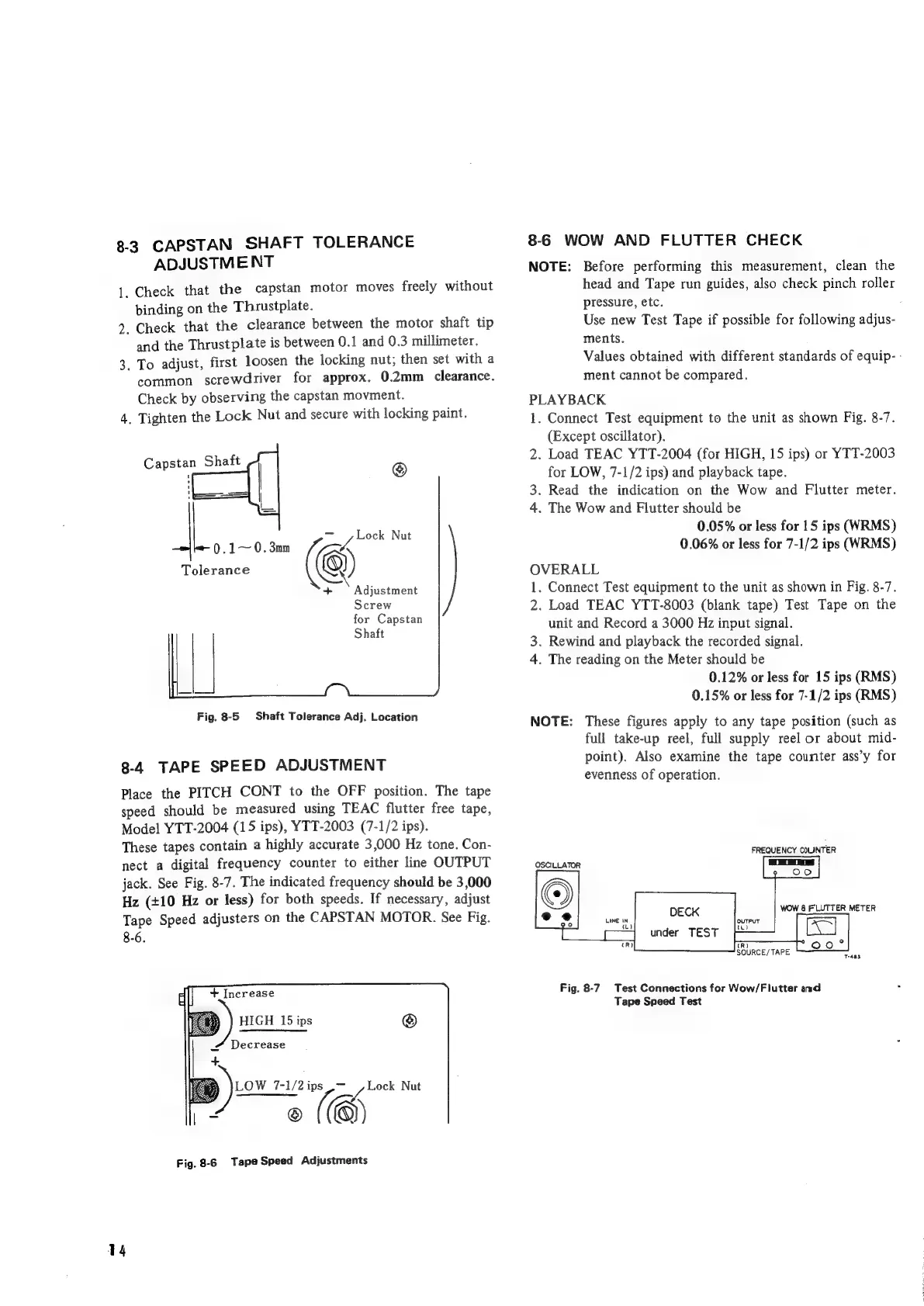
8-3
CAPSTAN
SHAFT
TOLERANCE
ADJUSTMENT
Check
that
the
capstan
motor
moves
freely
without
binding
on
the
Thrustplate.
2.
Check
that
the
clearance
between
the
motor
shaft
tip
and
the
Thrustplate
is
between
0.1
and
0.3
millimeter.
3.
To
adjust,
first
loosen
the
locking
nut;
then
set
with
a
common
screwdriver
for
approx.
0.2mm
clearance.
Check
by
observing
the
capstan
movment.
.
Tighten
the
Lock
Nut
and
secure
with
locking
paint.
a
Shaft
a
a
Tolerance
.1~
0.3mm
Son
Nut
="
@
+
Adjustment
Screw
for
Capstan
Shaft
Fig.
8-5
Shaft
Tolerance
Adj.
Location
8-4
TAPE
SPEED
ADJUSTMENT
Place
the
PITCH
CONT
to
the
OFF
position.
The
tape
speed
should
be
measured
using
TEAC
flutter
free
tape,
Model
YTT-2004
(15
ips),
YTT-2003
(7-1/2
ips).
These
tapes
contain
a
highly
accurate
3,000
Hz
tone.
Con-
nect
a
digital
frequency
counter
to
either
line
OUTPUT
jack.
See
Fig.
8-7.
The
indicated
frequency
should
be
3,000
Hz
(+10
Hz
or
less)
for
both
speeds.
If
necessary,
adjust
Tape
Speed
adjusters
on
the
CAPSTAN
MOTOR.
See
Fig.
8-6.
+
Increase
©
LOW
7-1/2
ips
,~
~
@
(®)
Fig.
8-6
Tape
Speed
Adjustments
Lock
Nut
14
8-6
WOW
AND
FLUTTER
CHECK
NOTE:
Before
performing
this
measurement,
clean
the
head
and
Tape
run
guides,
also
check
pinch
roller
pressure,
etc.
.
Use
new
Test
Tape
if
possible
for
following
adjus-
ments.
Values
obtained
with
different
standards
of
equip-
-
ment
cannot
be
compared.
PLAYBACK
1.
Connect
Test
equipment
to
the
unit
as
shown
Fig.
8-7.
(Except
oscillator).
2.
Load
TEAC
YTT-2004
(for
HIGH,
15
ips)
or
YTT-2003
for
LOW,
7-1/2
ips)
and
playback
tape.
3.
Read
the
indication
on
the
Wow
and
Flutter
meter.
4.
The
Wow
and
Flutter
should
be
0.05%
or
less
for
15
ips
(WRMS)
0.06%
or
less
for
7-1/2
ips
(WRMS)
OVERALL
1.
Connect
Test
equipment
to
the
unit
as
shown
in
Fig.
8-7.
2.
Load
TEAC
YTT-8003
(blank
tape)
Test
Tape
on
the
unit
and
Record
a
3000
Hz
input
signal.
3.
Rewind
and
playback
the
recorded
signal.
4.
The
reading
on
the
Meter
should
be
0.12%
or
less
for
15
ips
(RMS)
0.15%
or
less
for
7-1/2
ips
(RMS)
NOTE:
These
figures
apply
to
any
tape
position
(such
as
full
take-up
reel,
full
supply
reel
or
about
mid-
point).
Also
examine
the
tape
counter
ass’y
for
evenness
of
operation.
FREQUENCY
COUNTER
OSCILLATOR
DECK
wow
8
FLUTTER
METER
under
TEST
LINE
IN
ft)
T-aas
Fig.
8-7
Test
Connections
for
Wow/Flutter
and
Tape
Speed
Test

Related product manuals