EasyManua.ls Logo

Teac A-7300RX - Page 21

Teac A-7300RX
65 pages
Print Icon
To Next Page IconTo Next Page
To Previous Page IconTo Previous Page
Loading...
hhh
RECORD
PERFORMANCE
10-14
BIAS
TRAP
ADJUSTMENT
—_
22
RECORD
MODE
SW...
LEFT
and
RIGHT
(Both
ON)
Select
RECORD
/
PAUSE
mode
MONITOR
SW
.....----
2-2
e
ee ee
eee
TAPE
BIAS
and
EQ
SW
...
6...
cc
ee
eee
1
.
Load
TEAC
YTT-8013
Test
Tape
on
the
unit.
_
Remove
all
input
signals.
.
Connect
a
VIVM
or
oscilloscope
across
the
Bias
Trap
T.P.
(on
REC
AMPL.
UNIT)
and
ground.
See
Fig.
10-10.
.
Adjust
L-503/504
(on
REC
AMPL.
UNIT)
for
mini-
mum
reading
on
scope
or
VIVM.
Use
Plastic
Alignment
Tool.
ON
REC
AMPL.
UNIT
1-622
Fig.
10-10
Bias
Trap
Test
Point
10-15
BIAS
LEAKAGE
CHECK
5.
Adjust
L-251/252
(on
PLAY
LINE
AMPL.
UNIT)
for
minimum
bias
leakage
reading
at
OUTPUT
jack,
with
VTVM
or
oscilloscope
now
connected
to
said
OUT-
PUT
SOURCE/TAPE
jacks.
.
Specified
Level
should
be
—53
dB
(1.73
mV)
or
less.
10-16
RECORD
HEAD
AZIMUTH
ADJ.
Tape
SPEED
SW...
LOW
(7-1/2
ips)
—FINE
ADJUSTMENT—
NOTE:
The
effect
of
turning
the
azimuth
screw
will
not
immediately
register
on
the
VTVM.
A
slight
delay
will
be
noticed.
Therefore,
the
screw
must
be
rotated
slightly
with
a
pause
to
see
the
effect.
7.
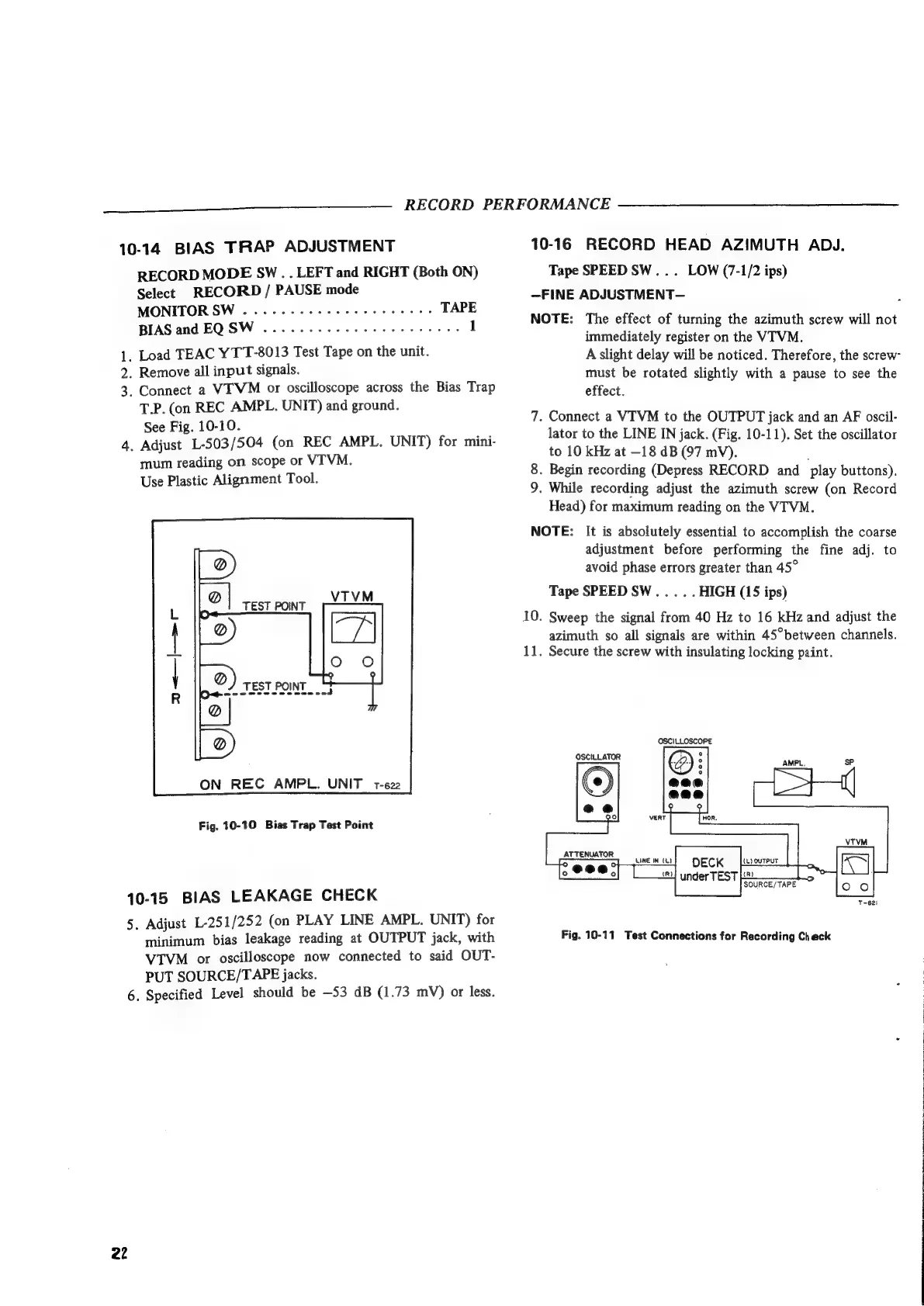
Connect
a
VITVM
to
the
OUTPUT
jack
and
an
AF
oscil-
lator
to
the
LINE
IN
jack.
(Fig.
10-11).
Set
the
oscillator
to
10
kHz
at
-18
dB
(97
mV).
.
Begin
recording
(Depress
RECORD
and
_
play
buttons).
9.
While
recording
adjust
the
azimuth
screw
(on
Record
Head)
for
maximum
reading
on
the
VTVM.
ioe)
NOTE:
It
is
absolutely
essential
to
accomplish
the
coarse
adjustment
before
performing
the
fine
adj.
to
avoid
phase
errors
greater
than
45°
Tape
SPEED
SW...
..
HIGH
(15
ips)
10.
Sweep
the
signal
from
40
Hz
to
16
kHz
and
adjust
the
azimuth
so
all
signals
are
within
45°between
channels.
11.
Secure
the
screw
with
insulating
locking
paint.
T-621
Fig.
10-11
Test
Connections
for
Recording
Check

Related product manuals