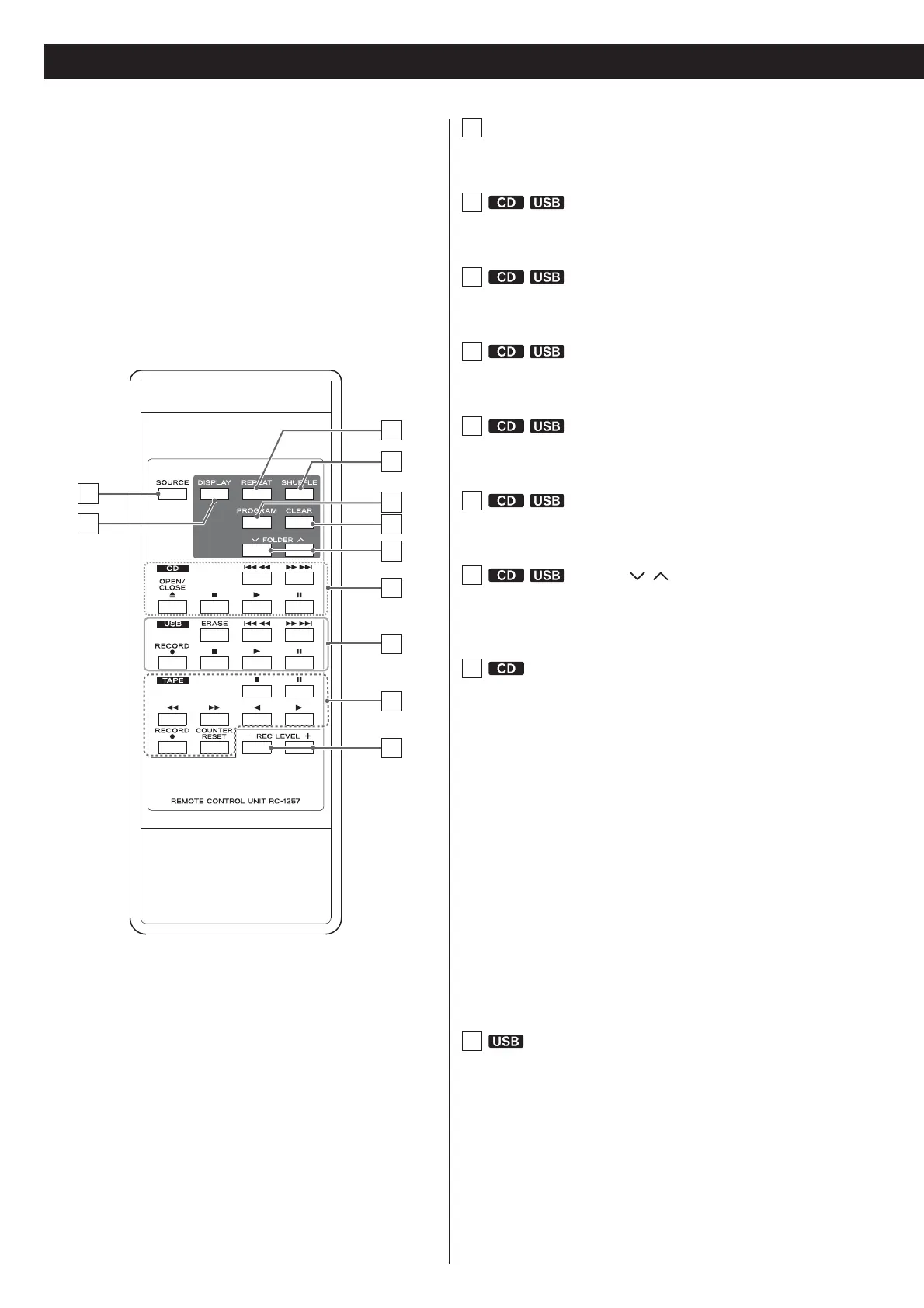
12
A
B
E
D
F
G
K
C
H
I
J
A
SOURCE
Use this button to select a source (page 17).
B
DISPLAY
Press this button to change the display information (page 15).
C
REPEAT
Use this button to set the repeat function (page 20).
D
SHUFFLE
Use this button to start shuffle playback (page 20).
E
PROGRAM
Use this button to program tracks/files (page 21).
F
CLEAR
Use this button to clear programmed tracks/files (page 23).
G
FOLDER (
/ )
Use these buttons to select MP3 folders (pages 19 and 28).
H
Skip (
/
)/Search (
N
/
)
Press these buttons to skip through tracks/files.
Hold down these buttons to search for part of a track/file.
OPEN/CLOSE (-)
Press this button to open and close the disc tray.
Stop (
)
)
Press this button to stop playback.
Play (
U
)
Press this button to start playback.
Pause (
+
)
Press this button to pause playback. To resume playback, press
this button again.
I
ERASE
Use this button to erase files from a USB storage device (page 31).
Skip (
/
)/Search (
N
/
)
Press these buttons to skip through files.
Hold down these buttons to search for a part of a file.
Identifying the Parts (Remote Control Unit)



 To Next Page