EasyManua.ls Logo

Teac AG-V1200 - Page 9

Teac AG-V1200
22 pages
Print Icon
To Next Page IconTo Next Page
To Previous Page IconTo Previous Page
Loading...
Playback
Playback
7
Audio
ice
Source
Component
POO
(Ex.:
CD
Player)
T
|
Video
!
Audio
Signal
!
Signal
!
viDEO2}
IN
1
cD
AG-V1200
CD
Button:
ON
TAPE/DAT
MONITOR:
OFF
—<—
—-——
TV
nontor|
j
Speakers
Recording
with
VIDEO
1
Dubbing
from
VIDEO
2
to
VIDEO
1
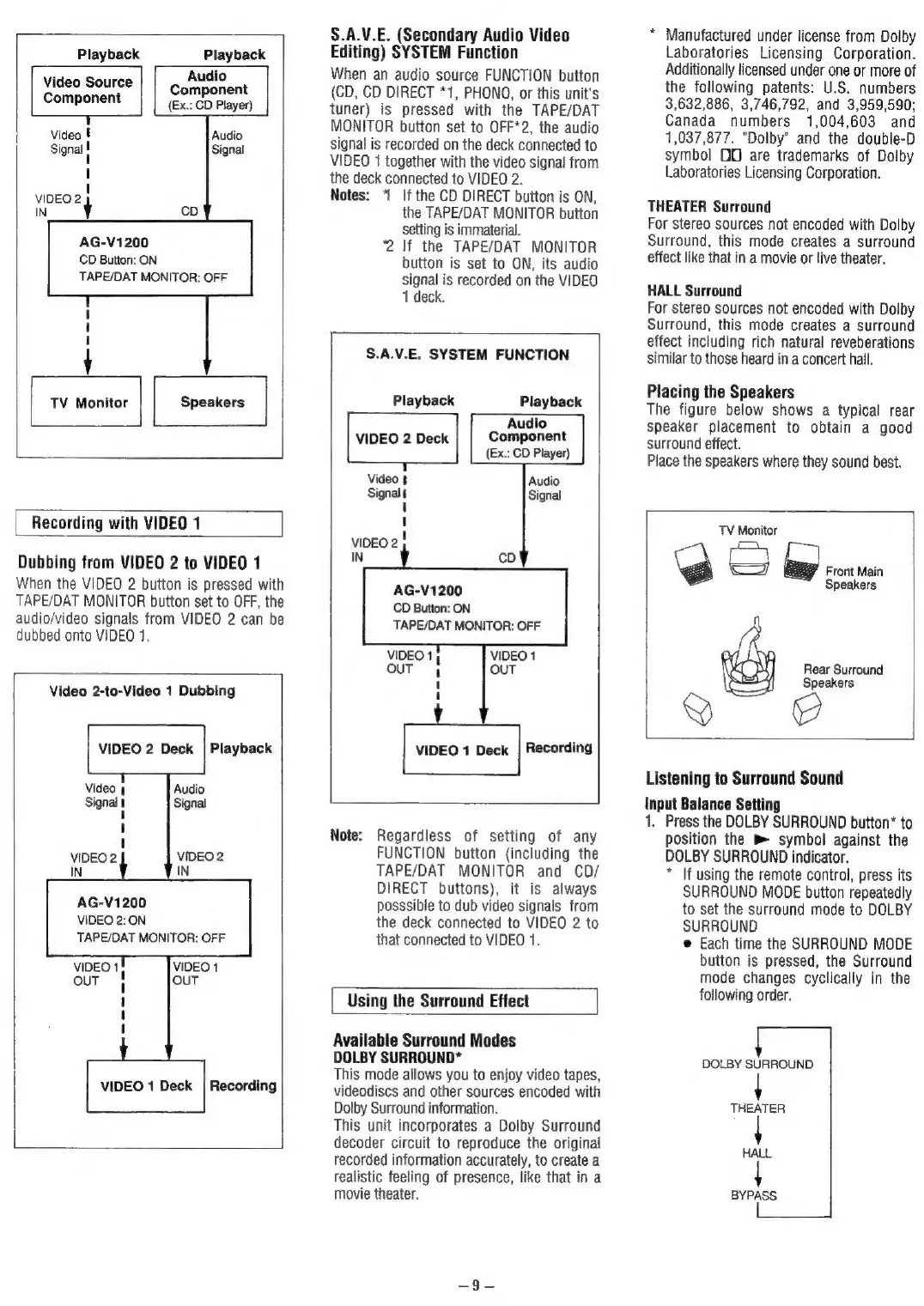
When
the
VIDEO
2
button
is
pressed
with
TAPE/DAT
MONITOR
button
set
to
OFF,
the
audio/video
signals
from
VIDEO
2
can
be
dubbed
onto
VIDEO
1.
i
|
Video
2-to-Video
1
Dubbing
VIDEO
2
Deck
|
Playback
Video
4
Audio
Signal
t
Signal
VIDEO
2
VIDEO
2
IN
AG-V1200
VIDEO
2:
ON
TAPE/DAT
MONITOR:
OFF
VIDEO
1
OUT
OUT
VIDEO
1
Deck
|
Recording
S.A.V.E.
(Secondary
Audio
Video
Editing)
SYSTEM
Function
When
an
audio
source
FUNCTION
button
(CD,
CD
DIRECT
*1,
PHONO,
or
this
unit's
tuner)
is
pressed
with
the
TAPE/DAT
MONITOR
button
set
to
OFF*2,
the
audio
signal
is
recorded
on
the
deck
connected
to
VIDEO
1
together
with
the
video
signal
from
the
deck
connected
to
VIDEO
2.
Notes:
“
If
the
CD
DIRECT
button
is
ON,
the
TAPE/DAT
MONITOR
button
Setting
is
immaterial.
2
If
the
TAPE/DAT
MONITOR
button
is
set
to
ON,
its
audio
signal
is
recorded
on
the
VIDEO
1
deck.
S.A.V.E.
SYSTEM
FUNCTION
Playback
Playback
Audio
VIDEO
2
Deck
Component
(Ex.:
CD
Player)
+
Video
1
Audio
Signal
Signal
'
1
viDeo2
|
IN
AG-V1200
CD
Button:
ON
TAPE/DAT
MONITOR:
OFF
VIDEO
1}
OUT
4
VIDEO
1
OUT
1
1
VIDEO
1
Deck
|
Recording
Note:
Regardless
of
setting
of
any
FUNCTION
button
(including
the
TAPE/DAT
MONITOR
and CD/
DIRECT
buttons),
it
is
always
posssible
to
dub
video
signals
from
the
deck
connected
to
VIDEO
2
to
that
connected
to
VIDEO
1.
Using
the
Surround
Effect
Available
Surround
Modes
DOLBY
SURROUND*
This
mode
allows
you
to
enjoy
video
tapes,
videodiscs
and
other
sources
encoded
with
Dolby
Surround
information.
This
unit
incorporates
a
Dolby
Surround
decoder
circuit
to
reproduce
the
original
recorded
information
accurately,
to
create
a
realistic
feeling
of
presence,
like
that
in
a
movie
theater.
*
Manufactured
under
license
from
Dolby
Laboratories
Licensing
Corporation.
Additionally
licensed
under
one
or
more
of
the
following
patents:
U.S.
numbers
3,632,886,
3,746,792,
and
3,959,590;
Canada
numbers
1,004,603
and
1,037,877.
"Dolby"
and
the
double-D
symbol
DOO
are
trademarks
of
Dolby
Laboratories
Licensing
Corporation.
THEATER
Surround
For
stereo
sources
not
encoded
with
Dolby
Surround,
this
mode
creates
a
surround
effect
like
that
in
a
movie
or
live
theater.
HALL
Surround
For
stereo
sources
not
encoded
with
Dolby
Surround,
this
mode
creates
a
surround
effect
including
rich
natural
reveberations
similar
to
those
heard
in
a
concert
hall.
Placing
the
Speakers
The
figure
below
shows
a
typical
rear
speaker
placement
to
obtain
a
good
surround
effect.
Place
the
speakers
where
they
sound
best.
TV
Monitor
‘a
SS
bap)
cr
nn
Speakers
Rear
Surround
Speakers
Listening
to
Surround
Sound
Input
Balance
Setting
1.
Press
the
DOLBY
SURROUND
button*
to
position
the
B
symbol
against
the
DOLBY
SURROUND
indicator.
*
If
using
the
remote
control,
press
its
SURROUND
MODE
button
repeatedly
to
set
the
surround
mode
to
DOLBY
SURROUND
e
Each
time
the
SURROUND
MODE
button
is
pressed,
the
Surround
mode
changes
cyclically
in
the
following
order.
DOLBY
SURROUND
THEATER
HALL
BYPASS