EasyManua.ls Logo

Teac AI-501DA - Page 23

Teac AI-501DA
29 pages
Print Icon
To Next Page IconTo Next Page
To Previous Page IconTo Previous Page
Loading...
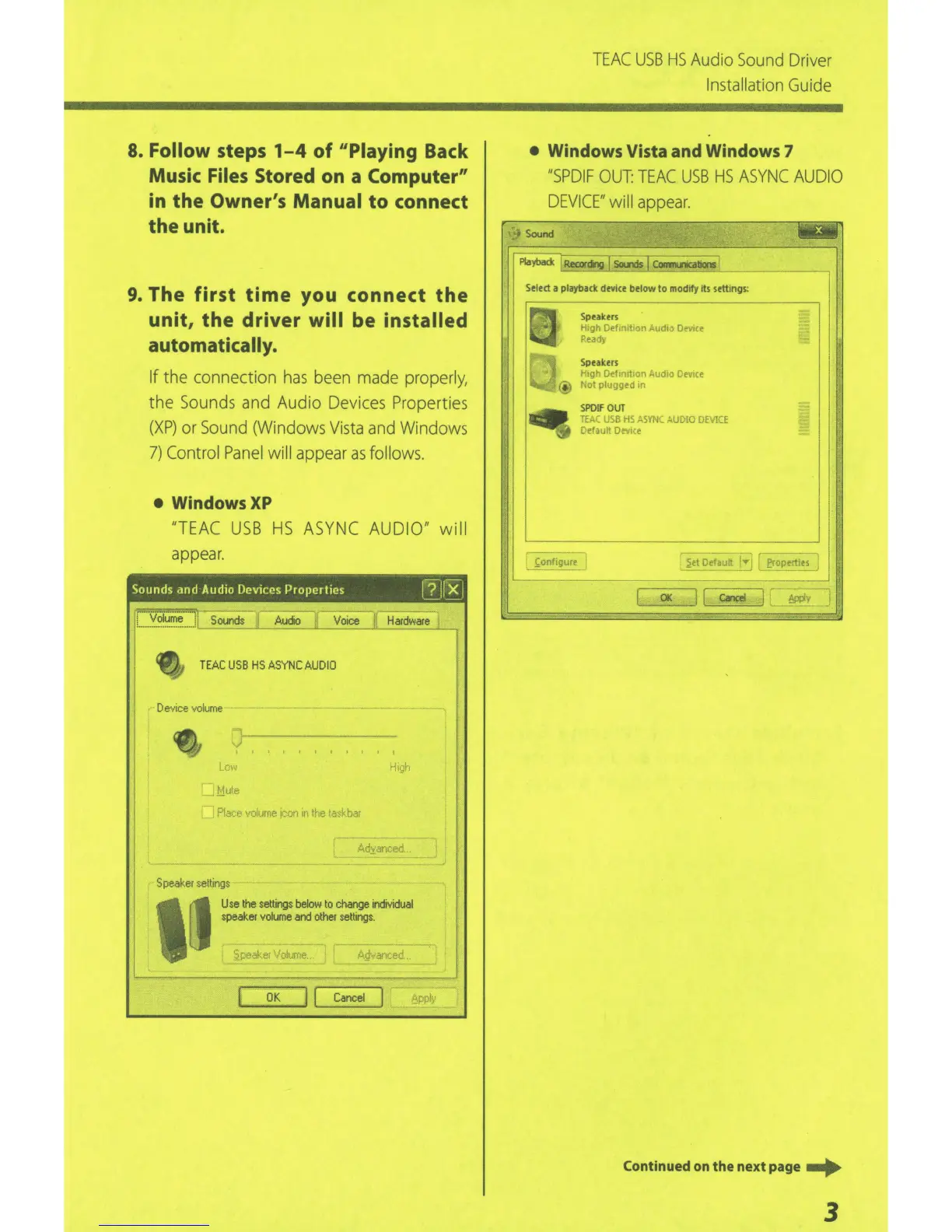
8. Follow steps
1-4
of
11
Piaying
Back
Music
Files
Stored
on
a
Computer"
in the Owner's Manual
to
connect
the unit.
9. The
first
time
you connect
the
unit,
the
driver
will
be
installed
automatically.
If
the connection
has
been
made
properly,
the
Sounds
and Audio
Devices
Properties
(XP)
or
Sound
(Windows
Vista
and
Windows
7)
Control
Panel
will
appear
as
follows.
WindowsXP
"TEAC
USB
HS
ASYNC
AUDIO" will
appear.
Sounds
and
Audio
Devices Properties
I?
Jl'
x
j
··
V'oiume"
·
J
Sounds
II
Audio
1
Voice
~~
Hardware
1/
TEAC
USB
HS
ASYNC
AUDIO
Device
volume
.Mut.e
.4dyar.ced
Speaker
settings
'~
Use
the
settings
below
to
change
individual
speaker
vol
u
me
and
other
settings.
~peaker
Volume
f:.
.
.Q··.··anced
OK
j
[
Cancel
t,ppl•,
TEAC
USB
HS
Audio
Sound
Driver
Installation
Guide
Windows
Vista
and
Windows
7
"SPDIF
OUT:
TEAC
USB
HS
ASYNC
AUDIO
DEVICE"
will
appear.
Select
a
playback device
below
to
modify
its
settings:
l:onfigure
Speakers
Hrgh
Defrn1l10n
:-udro
DeviCe
Ready
Sptakers
H1gt'
Detm1t1on
AudiO
Dev1ce
Not
plugged
in
SPDIF
OUT
TE,.,;_
JSB
Ho
ASYN
~UDIO
DEviCE
Default Devire
_________
__J
OK
Jl
c.lCei
!:iP!Jiv
C
ont
inued
on
th
e ne
xt
page
...
3

Related product manuals