EasyManua.ls Logo

Teac AI-501DA - Page 24

Teac AI-501DA
29 pages
Print Icon
To Next Page IconTo Next Page
To Previous Page IconTo Previous Page
Loading...
TEAC
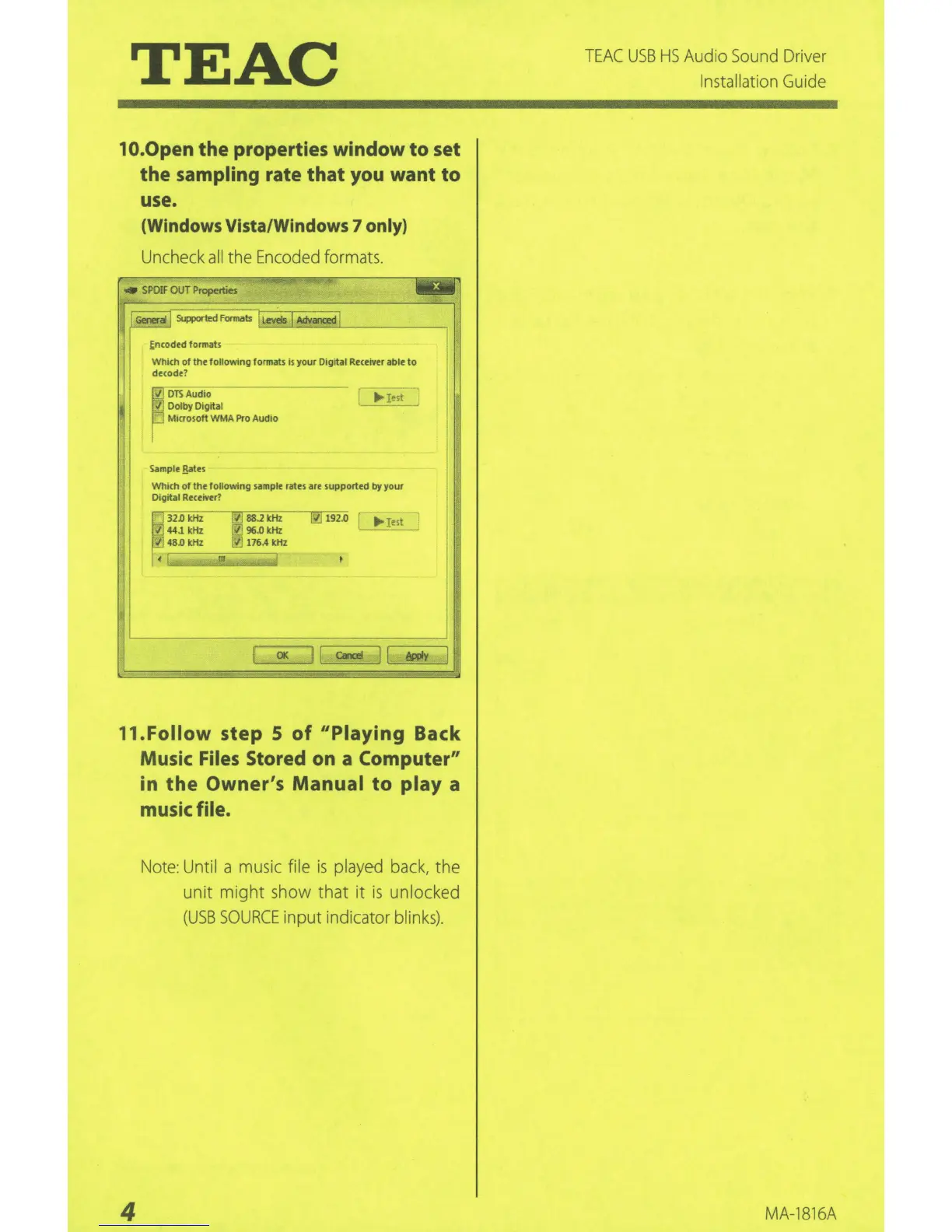
1 O.Open the properties window
to
set
the sampling rate that you want to
use.
(Windows
Vista/Windows 7 only)
Uncheck
all
the
Encoded
formats.
SPOIF
OUT
Properties
r;
--·1-1- 1
~
,,
lli•
,,,_,,
......
,,
...
"''''
.......
"''
••
decode
~
Encoded format<
~
DTSAudio
Dolby Digital
Microsoft WMA
Pro
Audio
Sample
Batts
...
Iest
Which
of
the
following
sample rates
are
supported
by
your
Digital Receiver?
~
32
.0 kHz
G?]
as.1
kHz
44.1 kHz
~
96.0 kHz
~
.
0
kHz
Y.J
176.4 kHz
'"
rtJ
192.0
I
(l(
ll
c..a~
II
~
l
ll
.Follow
step S
of
11
Piaying
Back
Music Files Stored on a Computer"
in
the
Owner's
Manual
to
play
a
music file.
4
Not
e:
Until a
musi
c file
is
played
ba
ck, the
unit might show that it
is
unlocked
(
USB
SOURCE
input i
nd
i
cator
blinks).
TEAC
USB
HS
Audio
So
u
nd
Dri
v
er
Installation
Gu
i
de
MA-
1816A

Related product manuals