EasyManua.ls Logo

Teac AI-501DA - Macintosh Edition: Installation and Playback

Teac AI-501DA
29 pages
Print Icon
To Next Page IconTo Next Page
To Previous Page IconTo Previous Page
Loading...
TEAC
Macintosh
edition
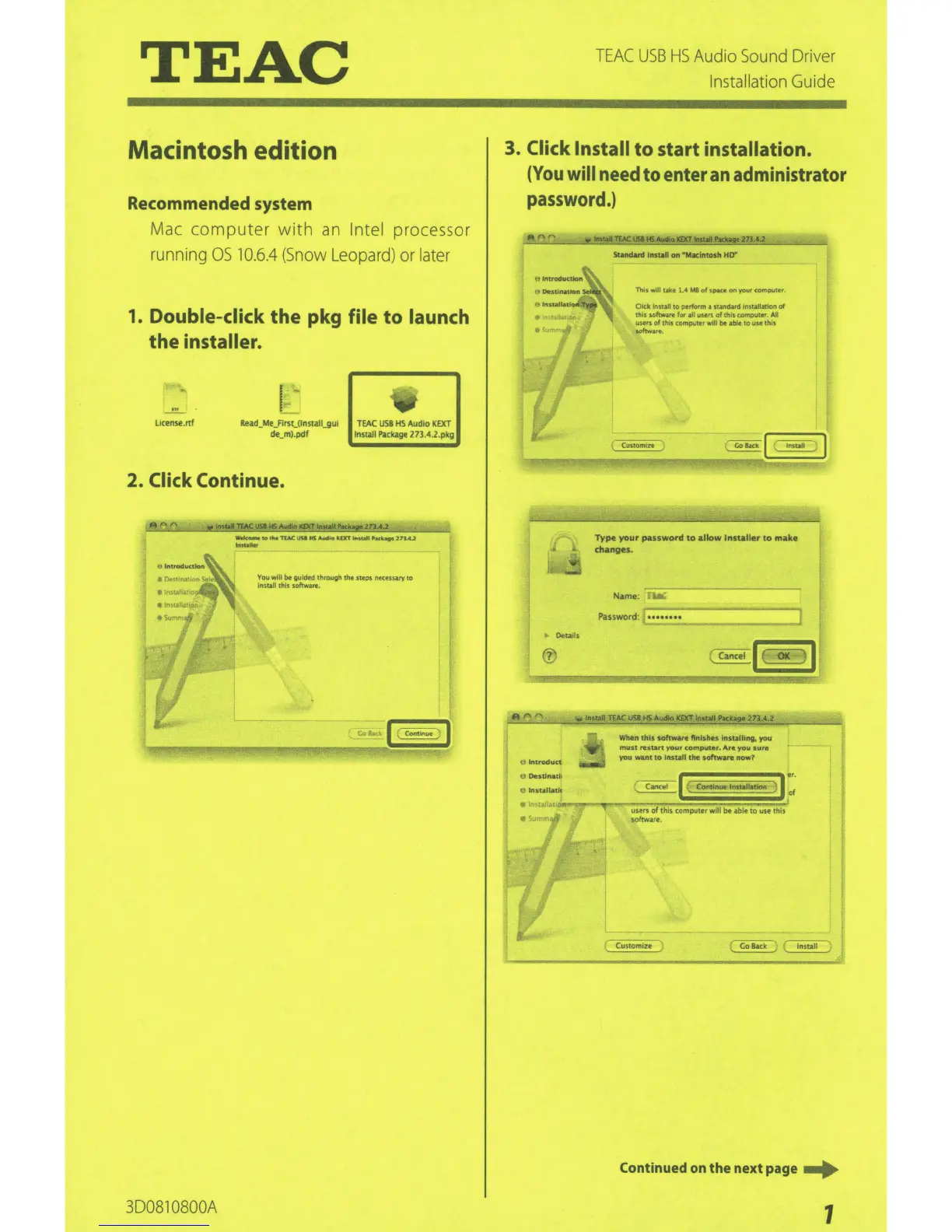
Recommended system
Mac computer
with
an
Intel
processor
running
OS
10.6.4
(Snow
Leopard)
or
later
1.
Double-click
the
pkg
file
to
launch
the
installer.
license.
rtf
Re•d_Me_First_(lnS!all_gUI
TEA(
USB
HS
.O.Udlo
KEXT
de_m).pdf
Install Pilckage
27M.2.pkg
2.
Click
Continue.
3D0810800A
You
will
be
gu•dtd
thrm~;h
the
steps necen.ary
to
Install this
softwart.
TEAC
USB
HS
Audio
Sound
Driver
Installation Guide
3.
Click Install
to
start
installation.
(You
will
need
to
enter an administrator
password.)
StanAnllt11tall
on
-..clntoP
HD"
This
w•ll
take 1.4MB
of
sprKe
on
your
comouter
Okk
lnst.alt
to
Pf!rform
il
sundMd
insWI&tton
of
th•s
softw&nl!
for
aH
us•n
of
this rotnputtt.
All
users
of
th•s
computet
Wtll
be
able
to
uu
th•s
s.oftvrv•.
'
eoo.c•l
,.,,..
I
U
lnt.roduct
Type
your
pauword
to
allow Installer to
mue
changes.
N~mo:
WhM
this
IOhware finishes
lnttalling.
you
must
reswn
rour
com~r.
Are
vou sure
you
want
to
ltt5C.IIthe
sottw•ra
now7
u
Destlnarll
er.
tj
lnstala.t'""......,-....,....,...~~Can<~ol
:l~t~~eom.-~~·-~=~)~~
a(
l
ett
1
1
users
of
this
computtr
will
be
•bit
to
use this
1
so~rt.
Customize
Continued
on
th
e
next
page
...
1

Related product manuals