EasyManua.ls Logo

Teac AI-501DA - Page 26

Teac AI-501DA
29 pages
Print Icon
To Next Page IconTo Next Page
To Previous Page IconTo Previous Page
Loading...
TEAC
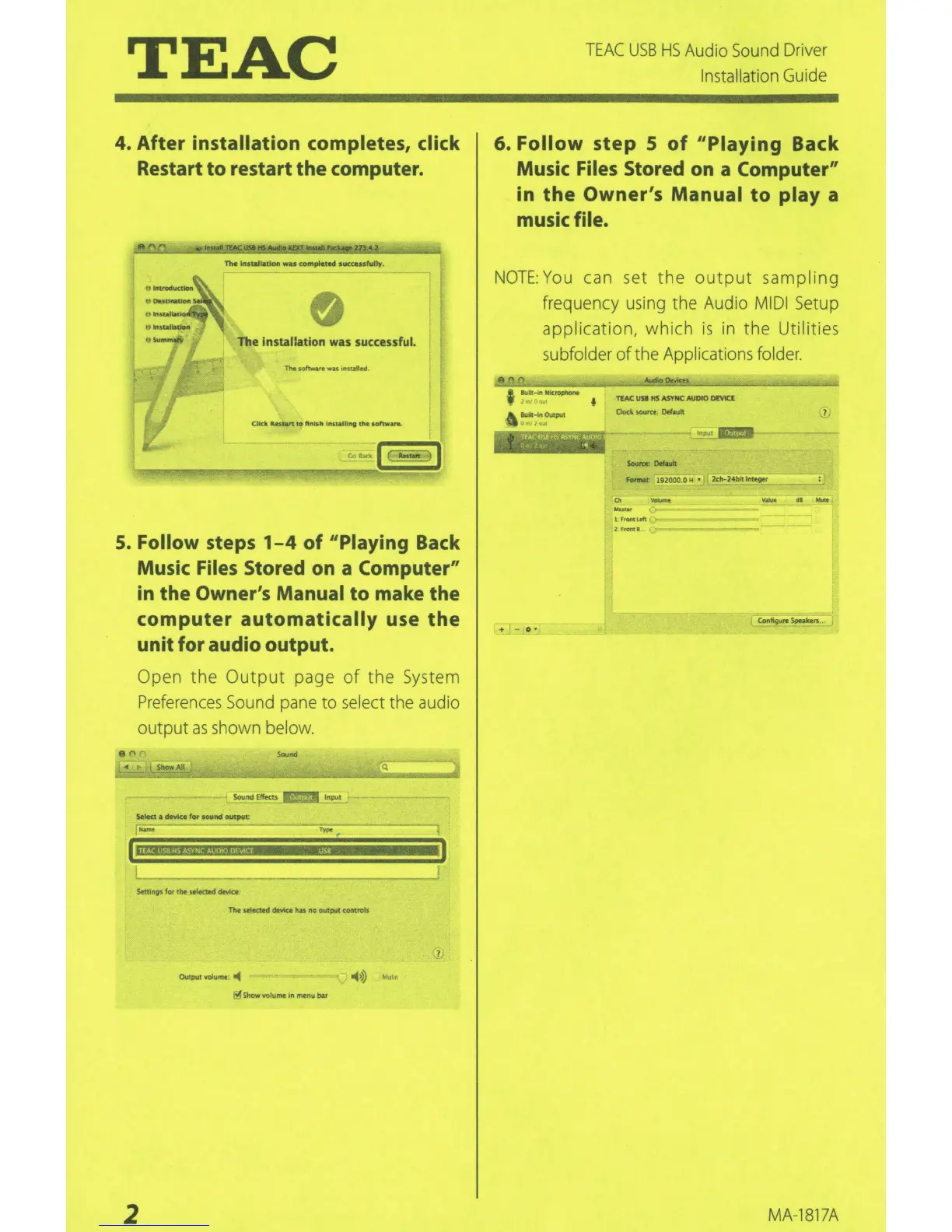
4.
After
installation
completes, click
Restart
to
restart
the
computer.
1"he
lnsuiiAllon
wu
com
pll:ted succusfuUy.
The insta
ll
at
ion was successful.
The
softwt~.re
w.a.s
.nstall~
.
5.
Follow steps
1-4
of
''Playing Back
Music Files Stored on a Computer"
in
the
Owner's Manual
to
make
the
computer
automatically
use
the
unit
for
audio
output.
Open the
Output
page
of
the
System
Preferences
Sound
pane
to
select
the
audio
output
as
shown
be
l
ow.
Sound Effects 'li!!!:l
Input
Tttt
se4ected
~
has
no
output controls
~Show
volume in
menu
ba
r
2
~
I
I
TEAC
USB
HS
Audio
Sound
Dr
iver
Installation
Gu
i
de
6.
Follow
step
5
of
"Playing
Back
Music Files Stored on a Computer"
in
the
Owner's
Manual
to
play
a
music file.
NOTE:
Yo
u can set
the
output
sampling
frequency
using
the Audio
MIDI
Setup
application, whi
ch
is
in
the Utilities
subfolder
of
the Applications
fo
l
der.
0
~
Built-In Mkrophont
TIAC
usa
HS
ASYNC AUDIO
DrVICl
' ' f
Bu.!e-ln 0U1put
Clock
50Ufa.
DtfiiUtt
•'
."
mceY~II!fli<!AIIliO
J,l'
'<:.·
·4!1
ForNt
192000.0 H
2ch
-
2~ntave
~
_
Oo
-
""""
1rrcwocltft
2FrontR
+ -
...
MA
-1
81
7A

Related product manuals