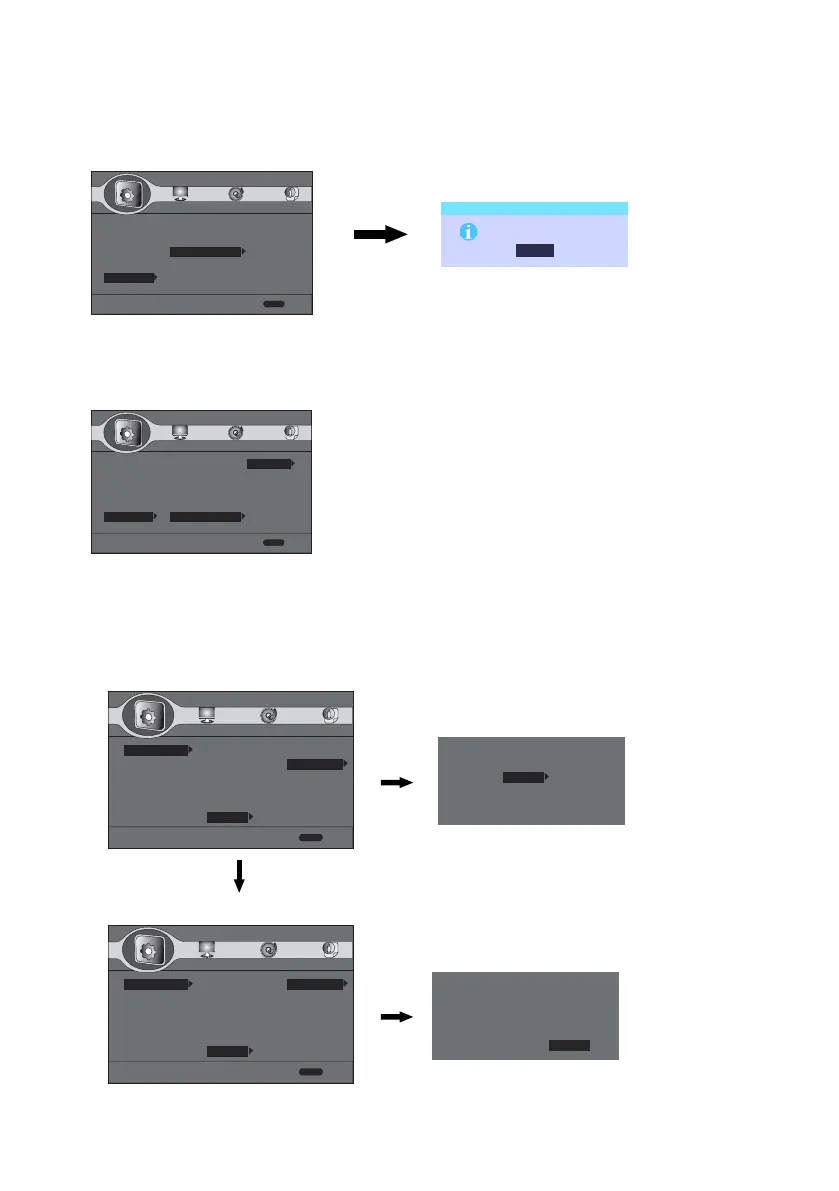
Setup Menu---Network---Connection Test
Connect the Ethermet Cable into the LAN interface, then enter into Network and Connection Test
Setup Menu---Network---BD-Live Connection
1.Permitted 2.Partial Permitted 3.Prohibited
Setup Menu---System---BUDA
1.BUDA Inform 2.BUDA Setup
3. Settling BUDA to External and Formatting it.
Settle it as External(Default is On board)
12
Remark: The storage space of USB or mobile hard disk
drive connected should be more than 1G
2. Settling the BD-LIVE access limited to Permitted
Setup Menu
--- General Setting ---
Exit
Use cusor key to move focus, use
“Enter” key to select
System
Language
Playback
Security
Network
SETUP
Internet Connection
Information
Connection Test
IP Setting
BD-Live Connection
Permitted
Partial Permitted
Prohibited
Setup Menu
--- General Setting ---
Exit
Use cusor key to move focus, use
“Enter” key to select
System
Language
Playback
Security
Network
SETUP
Internet Connection
Information
Connection Test
IP Setting
BD-Live Connection
OK
Connection Test
The network is OK
Setup Menu
--- General Setting ---
System
Language
Playback
Security
Network
Screen Saver
Disc Auto Playback
CEC
Disc Auto Upgrade
Load Default
BUDA
BUDA Inform
BUDS Setup
Exit
Use cusor key to move focus, use “OK”
key to select
SETUP
Please select the BUDA mode:
Exteral
On board
BUDA Information
Choose OK to format the External Equipment.
Remark: It is just format the remaining storage space.
Setup Menu
--- General Setting ---
System
Language
Playback
Security
Network
Screen Saver
Disc Auto Playback
CEC
Disc Auto Upgrade
Load Default
BUDA
BUDA Inform
BUDS Setup
Exit
Use cusor key to move focus, use “OK”
key to select
SETUP
Free size : 85819 MB
Fmt buda
BUDA Information
When Playing Disk with BD-Live
1. Test the Network Connection


 To Next Page