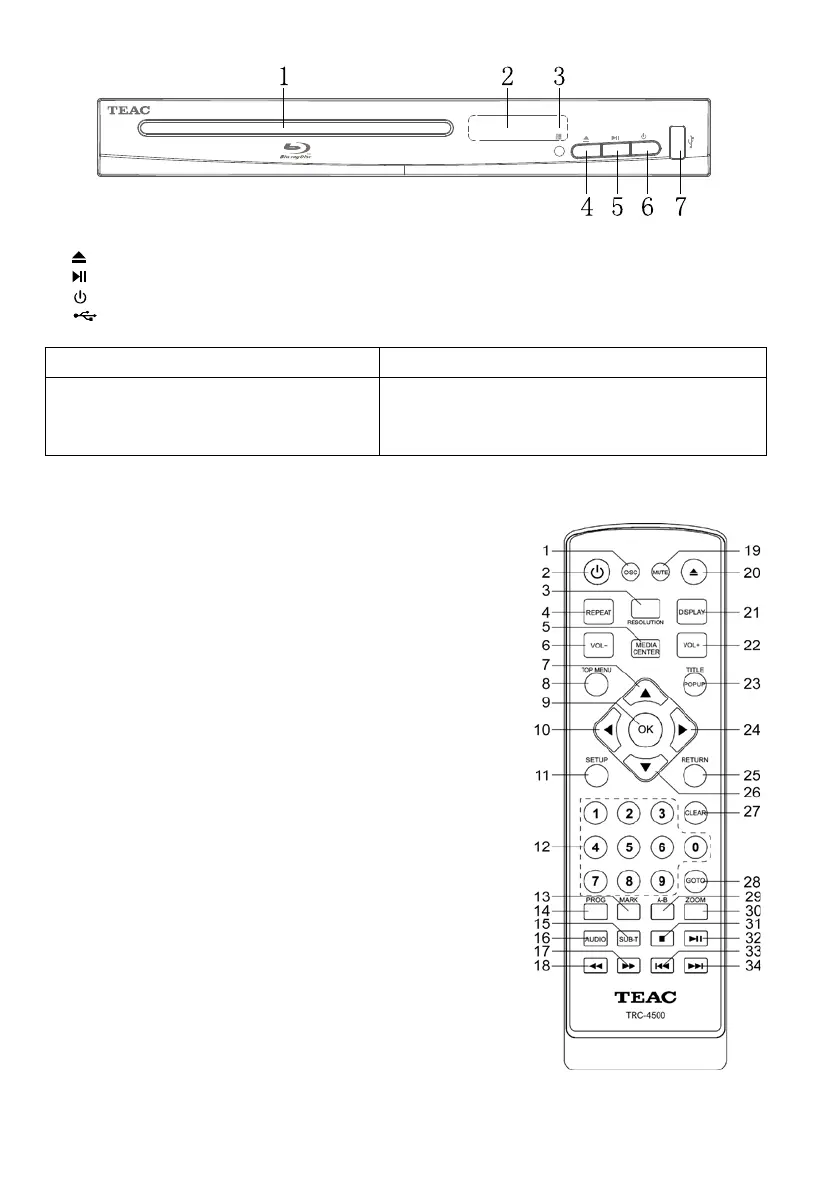
Blu-ray Display
1. D
isc Compartment
2.
Display panel
3. IR
Sensor: Point the remote control at the IR sensor
4. O
pen or close the disc compartment
5.
Start (resume) / pause play.
6.
Turn on / Turn off
7.
USB Display panel
Front Panel Display Description
LOAD
BDMV
SETUP
Loading a disc.
Blu-r
ay disc is recognized.
Setup menu is displayed
Remote Control
(1) OSC: To access On Screen Control Menu.
(2) T
urn on the player or switch it to standby mode.
(3) RE
SOLUTION: Press to change the resolution modeof the
player.
(4) R
EPEAT: The specific repeat mode is different according
disc type.
DVD: RepeatCH>RepeatTT>RepeatAll>Repeat Off.
CD/VCD: Repeat track>Repeat all> Repeat Off.
Playlist: Repeat file>Repeat playlist>Repeat Off.
(5) MEDIA CENTER: To turn on/off Media center.
(6) VOL-:
Decreases volume.
(7) UP
: Navigates through the Menus.
(8) T
OP MENU: To open the Top menu of BD/DVD
vi
deo disc.
(9) O
K: Confirms an entry or selection.
(10) LE
FT: Navigates through the Menus.
(11) S
ETUP: Access the SETUP menu.
(12) N
UMBERS: For direct channel access.
(13) M
ARK: To bookmark at any point during playback.
(14) P
ROG: Edit the program and play.
(15) S
UBTITLE: Select a subtitle language on a disc.
(16) A
UDIO: Select an audio language.
(17) F
AST FORWARD: Search forward.
(18) F
AST REVERSE: Search backward.
(19) MU
TE: To mute the sound and press again to restore.
(20) O
pen or close the disc compartment.
(21) DI
SPLAY the current status or the disc information.
(22) VOL+
: Increases volume.
(23) TI
TLE: To open the Title menu of a disc.
PO
PUP: Shows and hides popup menu.
(24) R
IGHT: Navigates through the Menus.


 To Next Page