EasyManua.ls Logo

Teac CD-P1100 - 2-2 AUDIO CHARACTERISTICS TEST

Teac CD-P1100
14 pages
Print Icon
To Next Page IconTo Next Page
To Previous Page IconTo Previous Page
Loading...
>D-P1100
|
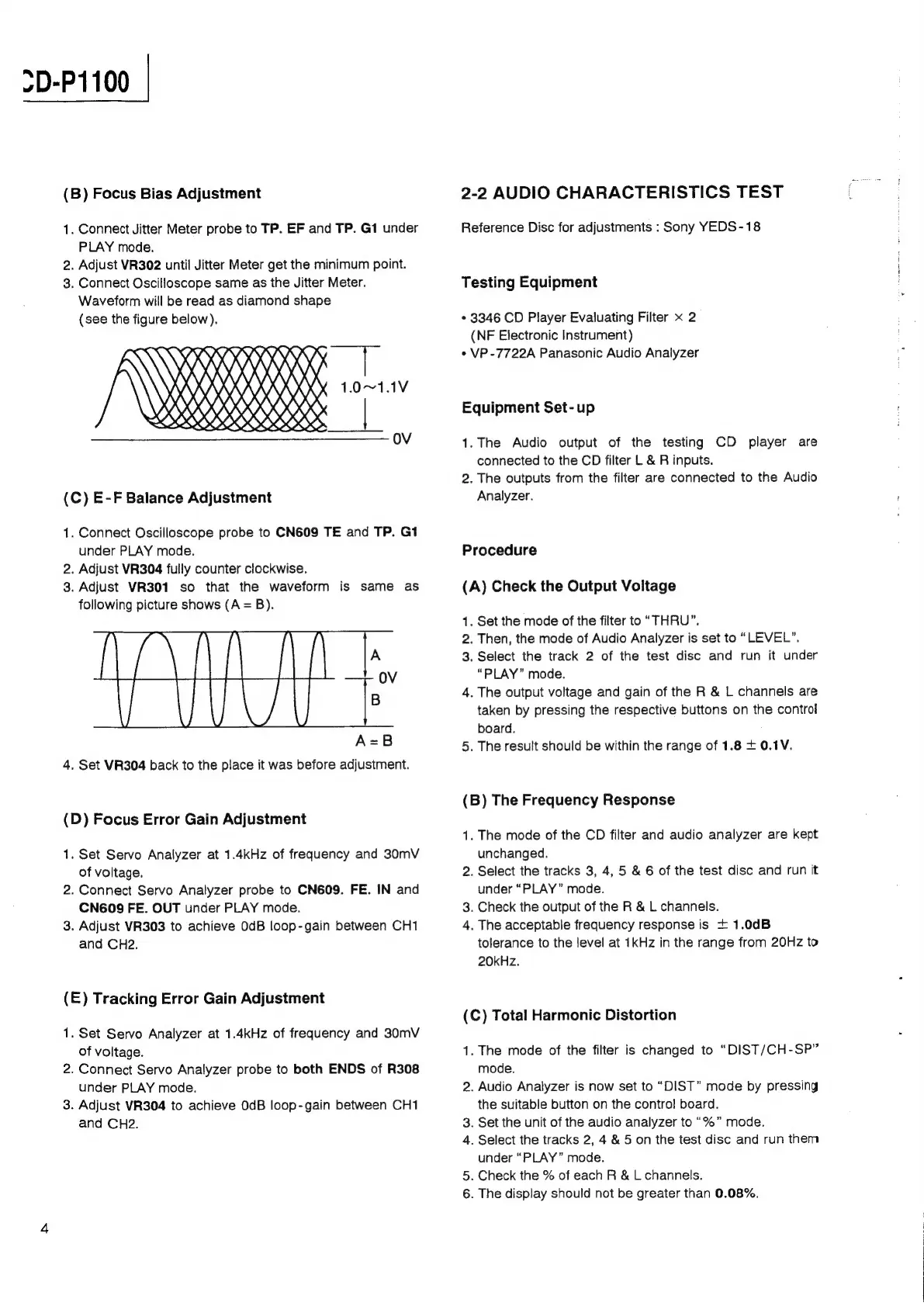
(B)
Focus
Bias
Adjustment
1.
Connect
Jitter
Meter
probe
to
TP.
EF
and
TP.
G1
under
PLAY
mode.
2.
Adjust
VR302
until
Jitter
Meter
get
the
minimum
point.
3.
Connect
Oscilloscope
same
as
the
Jitter
Meter.
Waveform
will
be
read
as
diamond
shape
(see
the
figure
below).
CRRRPRR
Wriiieii
Wi
RY
0,
\\
\
nnn
1.0~1.1V
OO
|
OV
(C)
E-F
Balance
Adjustment
1.
Connect
Oscilloscope
probe
to
CN609
TE
and
TP.
G1
under
PLAY
mode.
2.
Adjust
VR304
fully
counter
clockwise.
3.
Adjust
VR301
so
that
the
waveform
is
same
as
following
picture
shows
(A
=
B).
A
OV
B
A=B
4.
Set
VR304
back
to
the
place
it
was
before
adjustment.
(D)
Focus
Error
Gain
Adjustment
1.
Set
Servo
Analyzer
at
1.4kHz
of
frequency
and
30mV
of
voltage.
2.
Connect
Servo
Analyzer
probe
to
CN609.
FE.
IN
and
CN609
FE.
OUT
under
PLAY
mode.
3.
Adjust
VR303
to
achieve
OdB
loop-gain
between
CH1
and
CH2.
(E)
Tracking
Error
Gain
Adjustment
1.
Set
Servo
Analyzer
at
1.4kHz
of
frequency
and
30mV
of
voltage.
2.
Connect
Servo
Analyzer
probe
to
both
ENDS
of
R308
under
PLAY
mode.
3.
Adjust
VR304
to
achieve
0dB
loop-gain
between
CH1
and
CH2.
2-2
AUDIO
CHARACTERISTICS
TEST
Reference
Disc
for
adjustments
:
Sony
YEDS-18
Testing
Equipment
*
3346
CD
Player
Evaluating
Filter
x
2
(NF
Electronic
Instrument)
*
VP
-7722A
Panasonic
Audio
Analyzer
Equipment
Set-up
1.
The
Audio
output
of
the
testing
CD
player
are
connected
to
the
CD
filter
L
&
R
inputs.
2.
The
outputs
from
the
filter
are
connected
to
the
Audio
Analyzer.
Procedure
(A)
Check
the
Output
Voltage
1.
Set
the
mode
of
the
filter
to
“THRU”.
2.
Then,
the
mode
of
Audio
Analyzer
is
set
to
“LEVEL”.
3.
Select
the
track
2
of
the
test
disc
and
run
it
under
“PLAY”
mode.
4.
The
output
voltage
and
gain
of
the
R
&
L
channels
are
taken
by
pressing
the
respective
buttons
on
the
control
board.
5.
The
result
should
be
within
the
range
of
1.86
+
0.1V.
(B)
The
Frequency
Response
1.
The
mode
of
the
CD
filter
and
audio
analyzer
are
kept
unchanged.
2.
Select
the
tracks
3,
4,
5
&
6
of
the
test
disc
and
run
it
under
“PLAY”
mode.
3.
Check
the
output
of
the
R
&
L
channels.
4.
The
acceptable
frequency
response
is
+
1.0dB
tolerance
to
the
level
at
1kHz
in
the
range
from
20Hz
to
20kHz.
(C)
Total
Harmonic
Distortion
1.
The
mode
of
the
filter
is
changed
to
“DIST/CH-SP”
mode.
2.
Audio
Analyzer
is
now
set
to
“DIST”
mode
by
pressing
the
suitable
button
on
the
contro!
board.
3.
Set
the
unit
of
the
audio
analyzer
to
“%”
mode.
4.
Select
the
tracks
2,
4
&
5
on
the
test
disc
and
run
them
under
“PLAY”
mode.
5.
Check
the
%
of
each
R &
Lchannels.
6.
The
display
should
not
be
greater
than
0.08%.

Related product manuals