EasyManua.ls Logo

Teac CX-210 - Electrical Adjustments and Checks

Teac CX-210
28 pages
Print Icon
To Next Page IconTo Next Page
To Previous Page IconTo Previous Page
Loading...
CX-270/CX-210
5-1
GENERAL
NOTICE
1.
5-2
TEST
EQUIPMENT
NOTE:
When
ordering
test
tapes,
allow
for
the
longer
delivery
time
11.
12.
13.
.
Check
that
the
deck
is
properly
set
for
the
voltage
in
your
lo-
.
In
general,
adjustments
and
checks
are
done
in
the
order
of
L-ch
.
The
AC
voltmeter
used
in
the
procedures
must
have
an
input
.
TEAC
test
tapes
ON
MAR
WL
5
ELECTRICAL
ADJUSTMENTS
AND
CHECKS
Before
performing
adjustments
and
checks,
clean
and
demagne-
tize
the
entire
tape
path.
cality.
then
R-ch.
Double
REF.
Nos.
indicate
L-ch/R-ch.
(Example:
R11/R21)
The
value
of
“dB”
refers
to
OdB
(0.775V).
If
an
AC
voltmeter
calibrated
to
OdB
(1V)
is
to
be
used,
appropriate
compensation
should
be
made.
impedance
of
1
M-ohms
or
more.
required
for
them.
MTT-150:
For
Duolby
tevel
calibration
MTT-316:
For
playback
frequency
response
check
for
EQ
Co
(CrO.)
MTT-216:
For
playback
response
check
for
EQ
-
NORMAL
:
MTT-506
or
similar:
For
record
test
with
BIAS/EQ,
Co
(Cr0,)
Fidt
2
EAC
tom
tapes
MTT-501
or
similar:
For
record
test
with
BIAS/EQ,
NORMAL
.
AF
oscillator:
10Hz
to
100kHz
5-3
PREPARATIONS
.
AC
voltmeter:
0.1mV
to
300V
.
DC
voltmeter
otherwise
in
the
procedures,
1kHz
filter
should
be
bypassed.
|
switch
|
Position
Attenuator:
General
purpose
Distortion
analyzer:
Basic
frequency
400Hz/1kHz
Oscilloscope:
General
purpose
BIAS
Co
(Cr0,)
Band-pass
filter:
1kHz
narrow
band-pass
type
EO
Co
(Cr0,)
Test
load
resistor:
Non
inductive
type
8
ohm/1W
DOLBY
NR
OUT
Plastic
alignment
tool
Head
demagnetizer:
TEAC
E-3
or
equivalent
Cleaner:
TEAC
TZ-261
or
pure
alcohol
Bulk
tape
eraser:
TEAC
E-2
or
equivalent
INPUT
LINE
OSCILLOSCOPE
OSCILLATOR
DISTORTION
ANALYZER
AMP
SPKR
°
@O@O@
OOO,
AC
Voltmeter
IkHz
FILTER
$2
ATTENUATOR
0
T-1772
OUTPUT
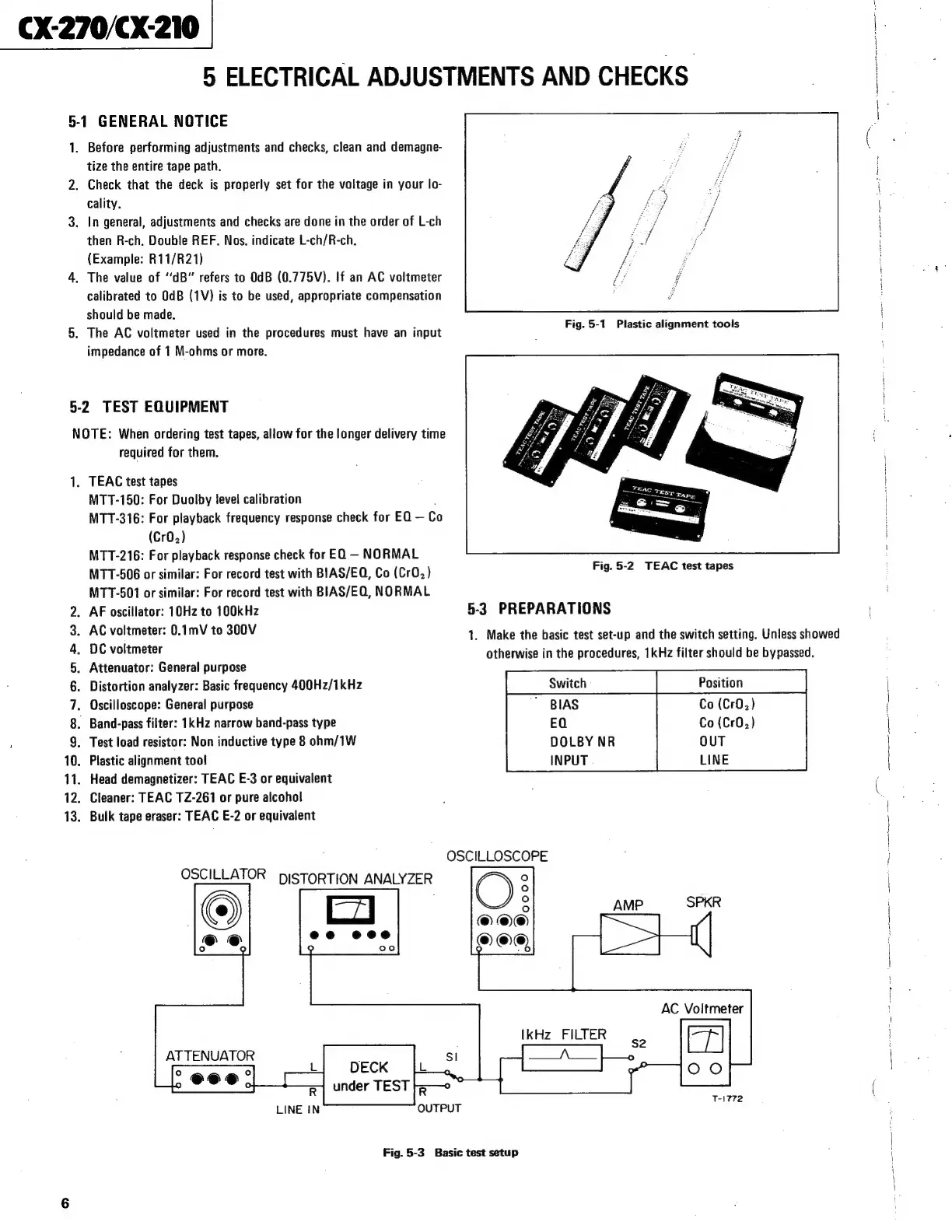
Fig.
5-3
Basic
test
setup
1.
Make
the
basic
test
set-up
and
the
switch
setting.
Unless
showed
ge

Related product manuals