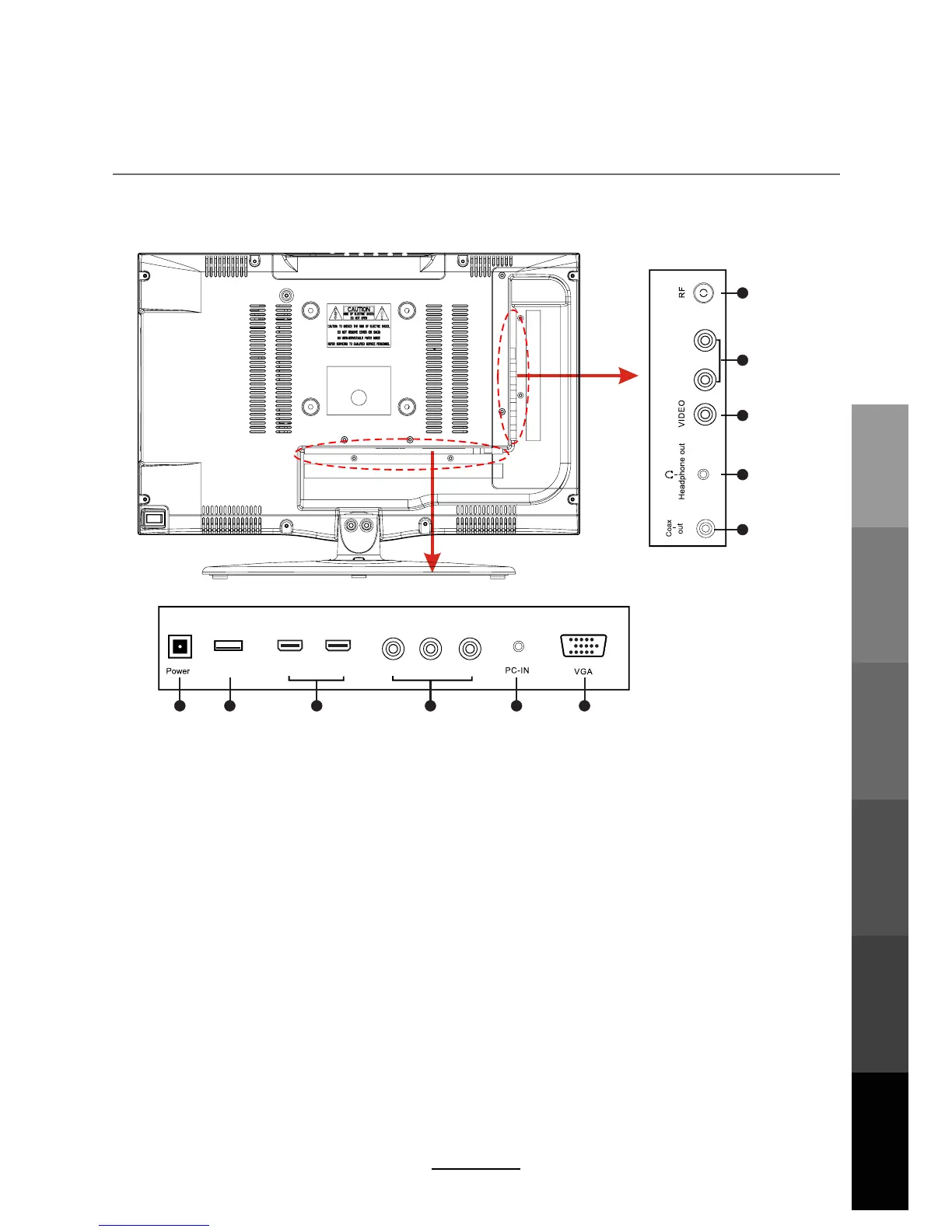
1. POWER: Connect to the AC power adaptor.
2. USB: Connect USB storage devices/hard disk drives
.
3. HDMI1/2: Connect to the HDMI output of external devices like DVD players with a HDMI cable.
4. YPbPr: Connect to the YPbPr video output sockets of external devices.
5. PC-IN: Connect to the audio output terminal on the PC.
6. VGA: For PC video input. Connect to the VGA/RGB plug on the PC.
7. Coax-out: Digital output to AV receiver.
8. Headphone out: Connect to your headphones or other audio equipment.
9. VIDEO: Connect to video output terminal of external devices.
10. R/L in: Connect to the audio output terminal of external devices.(shared with YPbPr)
11. RF: Connect an antenna or a 75 Ohm coaxial cable to receive a TV signal.
Names of each part
Back View
8
Y Pb Pr
1 2 3 4 5 6
7
8 9 10 11
USB HDMI2 HDMI1
L-in R-in
Basic OperationOSD Menu
Multimedia
Operation
Recording
Operation
Maintenance
and Service
User Guidance
Information



 To Next Page