Connections
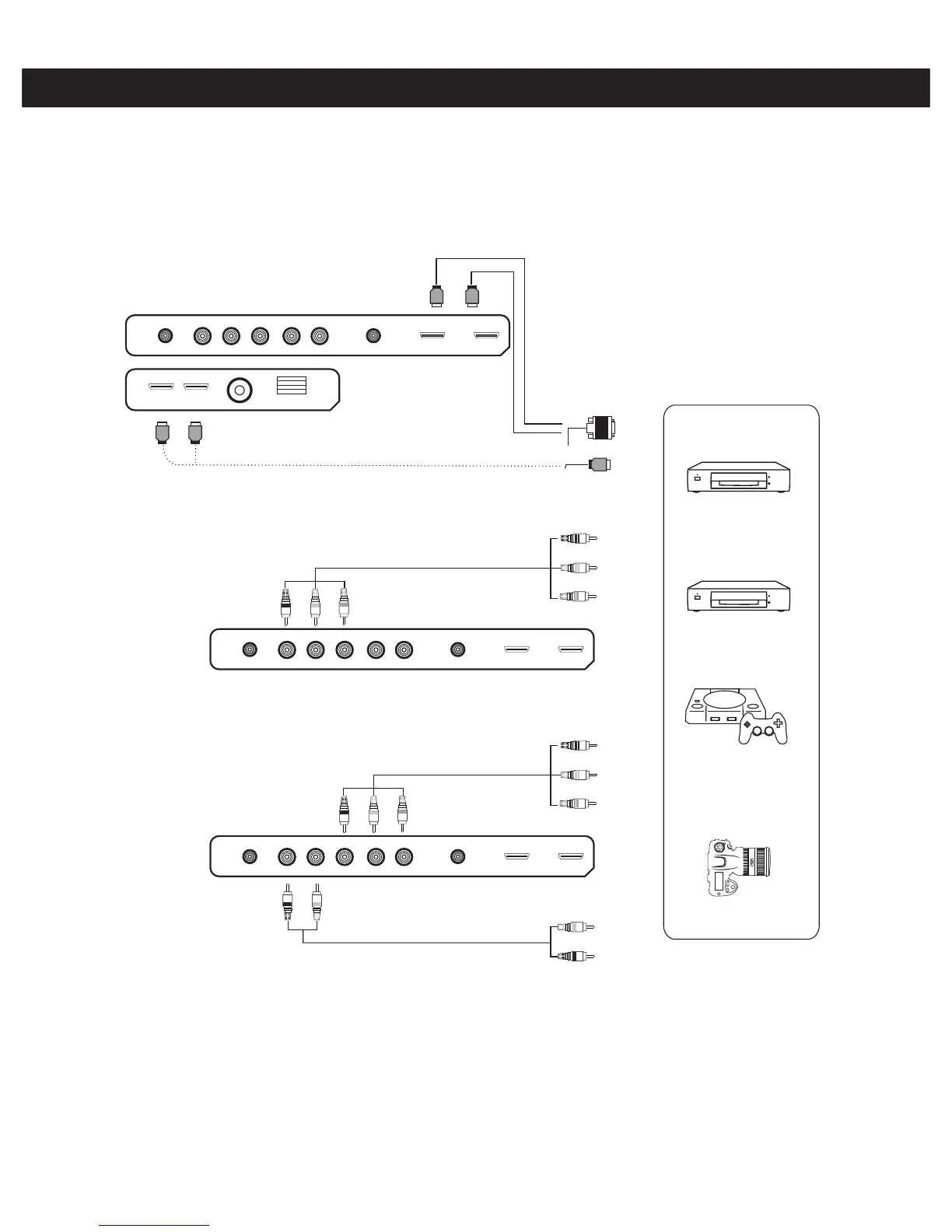
You can connect your DVD player, set-top box, computer, game console or other video equipment to the TV. To view
external source images, press the INPUT button to select the input source.
Connecting AV Equipment with HDMI Connector
L R
VIDEO/ Y
Pb Pr
(DVI)
or
Connecting AV Equipment with Composite Connector
L R
VIDEO/ Y
Pb Pr
Connecting AV Equipment with Composite (YPbPr/YCbCr) Connector
L R
VIDEO/ Y
Pb Pr
■If the external equipment has DVI output, you can connect it to the HDMI terminal using a HDMI-DVI cable.
In case of using the HDMI-DVI cable, connect analog audio signal to RGB/HDMI Analog Audio Input terminal.
■Please refer to the user manual of the external equipment for more information on the connection to the TV.
■Please disconnect all the power supplies to the equipment and TV before connection.
DVD Player
Set-Top Box
Game Console
Camcorder
9



 To Next Page