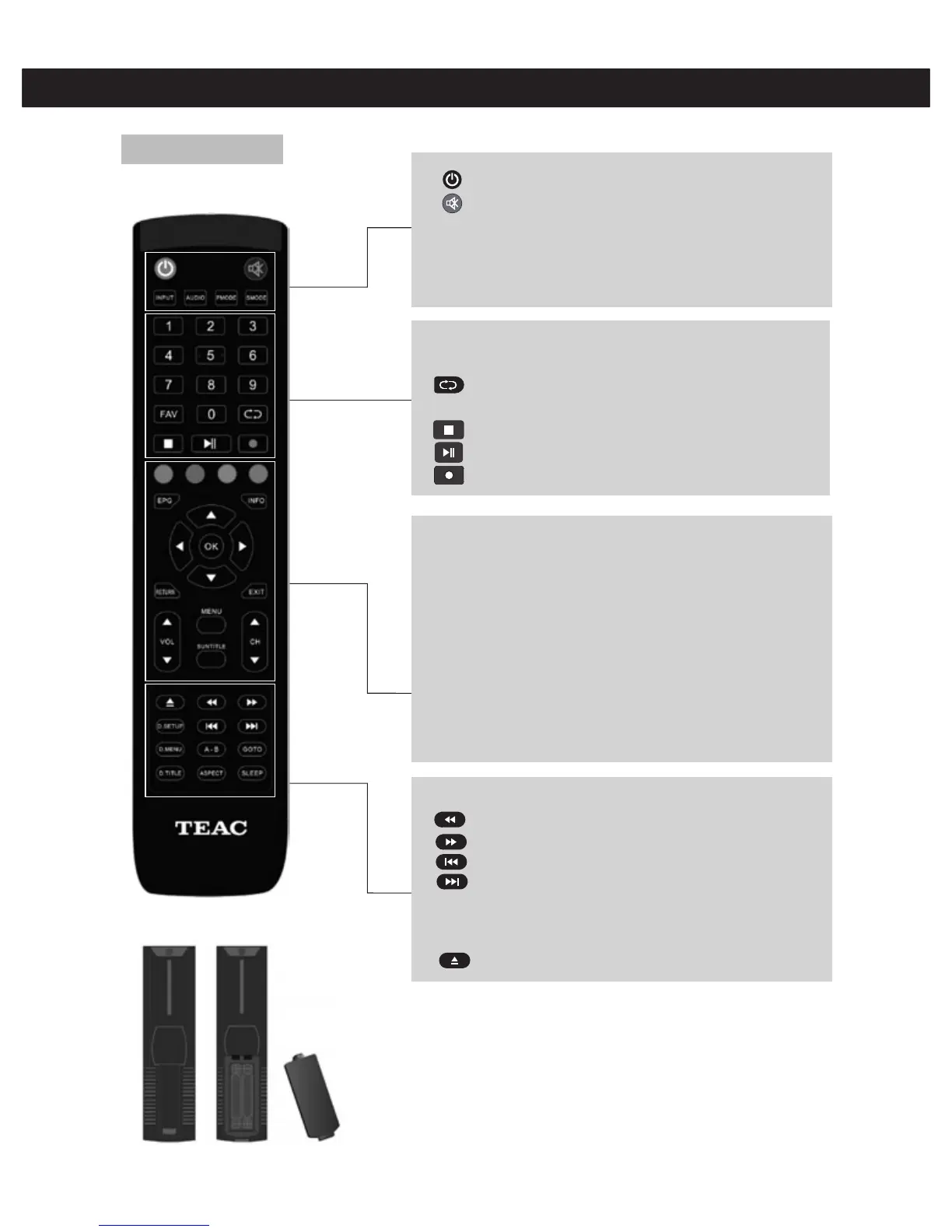
Remote Control
Remote Control
:Press this button to turn the TV on or off.
:Press this button to mute or restore sound.
INPUT: Press to change signal source (DTV, HDMI, USB etc)
AUDIO: Press to select the DTV audio.
PMODE: Select picture mode.
SMODE: Select sound mode.
11
RED,GREEN,YELLOW,BLUE: Dynamic action buttons - follow
the on screen hints to use in DTV mode.
INFO: Press to display the channel information.
OK: Enter the selected option or execute the selected operation.
NOTE: Press this button to display "channel list in DTV mode".
RETURN: Press to return to previous menu.
EXIT: Exit the OSD (On-screen display).
VOL▲/VOL▼: Adjust the volume.
CH▲/CH▼: Change the channel up and down.
MENU: Press this button to enter the main menu for various
optional adjustable settings.
SUBTITLE: Open or close subtitles.
Press to play backward.
Press to play forward.
Skip to previous chapter.
Skip to next chapter.
GOTO: Jump to desired place in the media time line.
ASPECT: Press to adjust picture ratio.
SLEEP: Set the sleep timer.
D.SETUP,D.MENU,D.TITLE,A-B is invalid for this model.
0-9: Select and switch to a channel using 0-9.
FAV: Switch between customer set "Favorite List"
: Switch back and front between the current and
previous channels.
: Stop playing the Media.
: Press to start playing the MEDIA, or to pause playing.
: Start to record.
Playback Control Buttons (for media mode)
1.Open the cover.
2.AAA size batteries, When inserting the batteries, make sure correct polarities as
per "+" and "-" marks on the batteries and within the battery compartment.
3. Replace the battery cover.
To prevent battery leakage which may result in bodily injury or damage to
the remote:
1. Install all batteries correctly, and as marked on the remote control.
2. Do not mix batteries: ( OLD and NEW or CARBON and ALKALINE, etc)
Remove batteries when the remote is not used for a long time.



 To Next Page