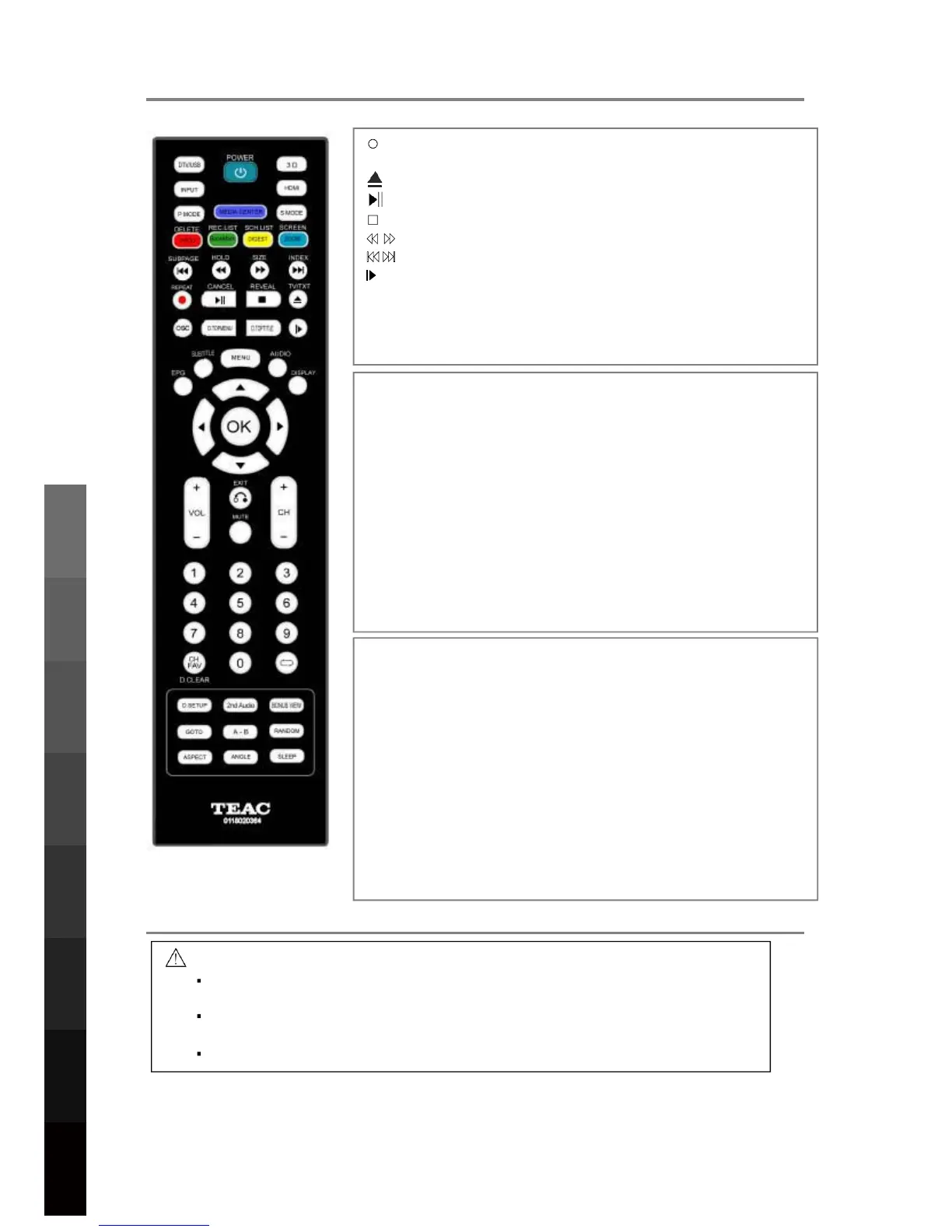
5. REMOTE CONTROL
5.2 Battery Installation
1. To open the battery compartment, press on the battery cover and slide it out.
2. Insert 2 AA batteries, making sure to match +/- polarities as marked in the
compartment.
3. Close the battery cover.
CAUTION
To prevent damage to the remote control, make sure to install batteries
correctly. Do not mix old and new batteries.
Dispose of batteries safely and appropriately. Contact your local authorities
or dealer for advice on battery disposal.
Keep batteries out of reach of children.
(REC): Start recording when in DTV Mode.
REPEAT: Toggle Repeat options in USBDQG%OXUD\ Mode.
: Load/eject DVD disc.
: Play/Pause playback, or toggle DTV Time Shift.
: Stop playback.
: Fast Rewind/Fast Forward up to 16x.
: Previous/next chapter/track.
: PressLQJ this button will WRJJOHVORZPRWLRQSOD\EDFN
at 1/16,1/8,1/4,1/2,normal speedZLWKHDFKSUHVV.
D.MENU: DVD playlist/%'Gisc menu.'HSHQGVRQGLVF
D
OSC:$ccess WKHOnScreen Control menuLQ%OXUD\0RGH.
.TOPTITLE: DVD URRWPHQX%'RQVFUHHQPHQX.
Teletext operation:
Teletext is an information system broadcasted by certain
channels providing news, weather forecasts, puzzles as
well as subtitles. Subject to availabilityIURPWKHEURDGFDVWHU.
SUBPAGE: Toggle subpage.
HOLD: Hold or resume browsing the subpage.
SIZE: Cycle through page zoom-in views.
INDEX: Go to Index.
CANCEL: Cancel the Teletext Display.
REVEAL: Reveal any hidden text.
TV/TXT: Toggle Teletext viewing modes.
Colour buttons: Shortcut keys per on-scre
en hints.
D.SETUP:$FFHVVRUH[LWWKH6HWXS0HQXLQ%OXUD\0RGH
2
nd
AUDIO:3OD\WKH 2nd Audio of 2nd 9ideo (PIP’s sub-
BONUS VIEW: Turn on or off the secondary video in a
GOTO: Jump to a specific point during playback.
A-B: Define Points A and B for looping playback.
RANDOM:7RJJOH Random playback mode2QRU2II.
ASPECT: Cycle through different picture aspect settings.
ANGLE: Choose alternative camera angles if available.
SLEEP: Cycle through and set Timer Sleep settings.
12
3D Video Playback
USB Multimedia
Blu-Ray Disc Player
Playback
Remote Control
On-Screen DisplayTV & Electronic
Programme Guide
Digital Video
Recording (DVR)
(OSD) Menu
Reference
small screen window during play (applicable only to Blu-ray
disc video that supports the BONUSVIEW or Picture-In-
Picture feature)LQ%OXUD\0RGH.
window video)LQ%OXUD\0RGH.



 To Next Page