OSD Menu
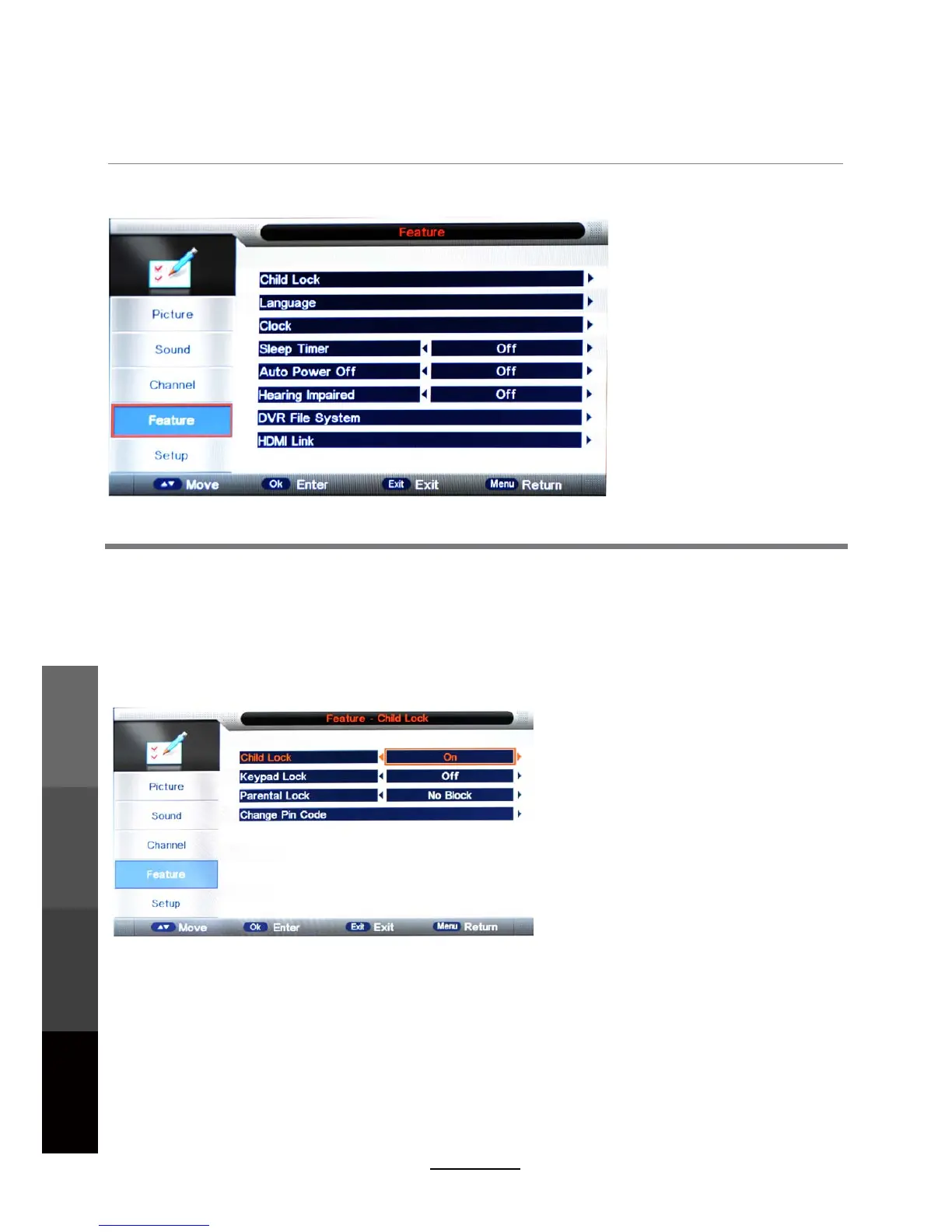
4. Feature menu
Description
Child Lock: This menu allows you to lock certain features of the television so that they can not be
used or viewed. For example, setting a program rating lock for children, locking specific channels,
and preventing unauthorised channel deletion or channel retuning.
Every time you enter the Lock menu you will be asked for a password. The default is 0000. You
are recommended to change the password to your own and keep it in a safe place.
If you have forgotten your current password, the master password is 8899.
- Turn on/off the Lock function.
Parental Guidance
Child Lock
- Adjust Parental Guidance settings or turn it off (No Block).
NOTE: When it is turned on, the Parental Guidance and Change Pin Code settings become
active. Channel Lock/Delete (in Channel Management), Auto Search, DTV Manual Search,
ATV Manual Search (in the Channel menu) will also require password access.
Change Pin Code
Keypad Lock: Lock the buttons on the TV set.
– Press the OK button to start. First enter the current password, then
enter the new password twice to confirm.
Parental Lock: Allows you to select the Program Rating threshold to lock programs by rating.
18
OSD Menu
Multimedia
Operation
Recording
Operation
Maintenance
and Service



 To Next Page