Need help?
Do you have a question about the Teac LPU191 and is the answer not in the manual?
Contact TEAC for warranty support via phone. Have purchase details ready.
Prepare model number, serial number, and proof of purchase for service.
Details Australian Consumer Law rights, exclusions, and warranty periods.
Describes In-Home Service and Authorised Service Centre procedures.
Read all guidelines, unplug before cleaning, avoid water, ensure ventilation.
Do not open cover; refer servicing to qualified personnel. Avoid water contact.
Use FAT12/16/32S USB flash drives (max 16GB), avoid NTFS/HFS+ formats.
Supports max 200 folders and 999 files; files > 2GB not playable.
Details functions like Skip/Search, Play/Pause, Stop, Repeat, Record, Delete.
Install AAA batteries with correct polarity; do not mix types; dispose properly.
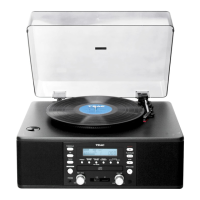
Diagram showing Dust Cover, Band Selector, Speakers, USB Socket, Knobs, etc.
Unpack, check voltage, ensure ventilation, connect power cord, turn on unit.
Tune stations using the knob; use Mono for weak stereo FM reception.
Remove stylus protector, set speed, place record, lift tone arm, adjust volume.
Connect external device via 3.5mm jack, select Phono/Aux, adjust volume.
Connect USB stick/SD card correctly; system plays MP3 files automatically.
Use Play/Pause/Stop, Skip/Search, and +10/-10 buttons for playback control.
Cycle through Repeat Single/All Track and Random modes for playback.
Encode vinyl records or audio devices to MP3 format on USB/SD.
Start new MP3 file during encoding; delete MP3 files from media device.
Connect system to Hi-Fi via Line Out socket (23) using RCA cable.
Details Power Supply, Consumption, Speakers, Turntable Speed, Needle Type, Radio.
Lists User manual, Remote control, and Spindle adapter as included accessories.
 General
| Motor | DC Motor |
|---|---|
| Platter Material | Plastic |
| Speeds | 33 1/3, 45 RPM |
| Tonearm Type | Static Balance |
| Cartridge Type | MM |
| Cartridge | AT3600L |
| Output | RCA |
| Power | AC 100 to 240V, 50/60 Hz |
| Power Supply | AC Adapter |
| Wow and Flutter | 0.25% |
| Type | Belt Drive Turntable |
| Speed | 33 1/3 RPM, 45 RPM |


 To Next Page