16
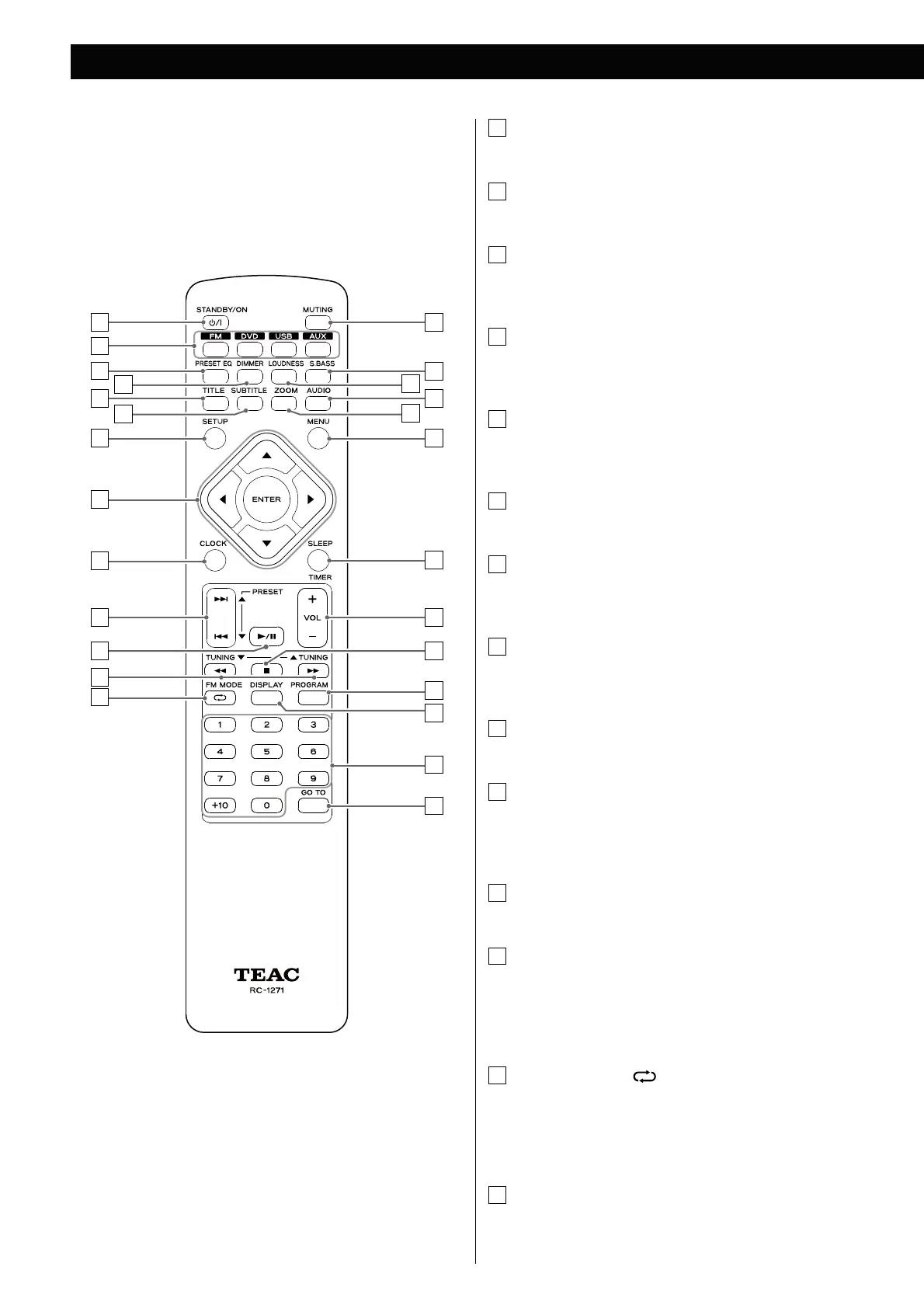
Identifying the Parts (Remote Control Unit)
A
C
G
J
B
I
E
K
M
L
V
U
W
Z
F
H
O
D
R
S
T
X
N
Q
P
Y
A
STANDBY/ON
Use this button to turn the unit on and standby.
B
Source
Use these buttons to select a source.
C
PRESET EQ (Preset Equalizer)
Use this button to select a Preset Equalizer (Classic, Jazz, Rock,
Pop and flat (off) modes).
D
DIMMER
Use this button to change the brightness of the front panel
display.
E
TITLE
During PBC playback of a video CD, use this button to display a
menu.
F
SUBTITLE
Use this button to select the subtitles during DVD playback.
G
SETUP
Use this button to enter the setup menu where you can set up
the parameters of the unit.
H
Cursor (
5
/
b
/
t
/
g
) buttons and ENTER
Use these Cursor buttons for navigation of on-screen menus and
the ENTER button to confirm selections.
I
CLOCK
In the standby mode, use this button to adjust the clock.
J
Skip (
.
/
/
)/PRESET (
g
/
t
)
In FM mode, use these buttons to select a preset channel.
In DISC or USB mode, use these buttons to skip tracks/files.
K
Play/Pause (
G
/
J
)
In DISC or USB mode, use this button to start or pause playback.
L
Search (
m
/
,
)/TUNING (
b
/
5
)
In FM mode, use these buttons to tune in to a station.
In DISC or USB mode, use these buttons to search for a part of a
track/file.
M
FM MODE/Repeat ( )
In FM mode, use this button to select stereo or monaural.
In DISC or USB mode, use this button for Repeat or Shuffle
Playback.
N
MUTING
Use this button to mute the sound.



 To Next Page