EasyManua.ls Logo

Teac MV-6094 - Tuning New Stations; Station Tuning Process

Teac MV-6094
31 pages
Print Icon
To Next Page IconTo Next Page
To Previous Page IconTo Previous Page
Loading...
Tuning
18
TV/VCR
PR
PR
MENU
EJECT
PAL/SEC
A.SEL
AV
SP/LP
INDEX
1
2
3
456
789
0
30
A
OPERATE
REC/
OTR
RC-795 REMOTE CONTROL UNIT
T u n i n g i n
NEW STATIONS
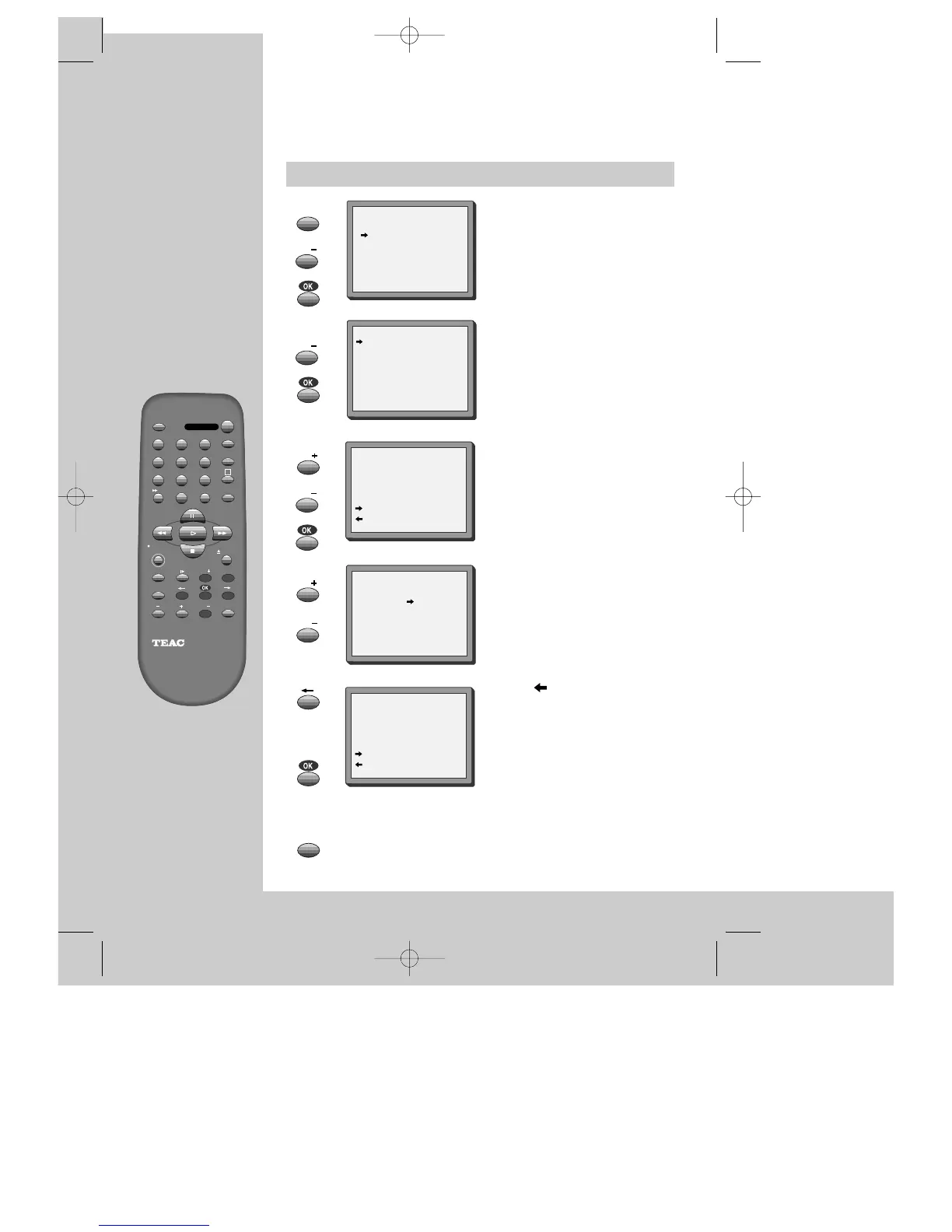
The TV and video recorder are switched on.
To see the picture from your video, press the station button on the TV reserved for
video input or the AV (Audio / Video) button.
"AV" should not be selected with the AV button on the video.
Call the video’s "MAIN MENU",
choose "PR Preset".
Select "Manual Set".
Choose any unused location
number "----" or "P-xx" ...
It's simplest to use the same location
number on both the TV and video.
... and confirm.
Tune in the station you want.
Press button to see the
picture.
If it isn’t the station you want,
or the picture is disturbed,
carry on tuning.
Once you see the station you
want, store it.
Tune in further stations (from
step 3 onwards) or exit tuning
mode.

MENU
MENU
PR
PR
PR
PR
PR
PR
PR PRESET
AUTO SEARCH
MANUAL SET
PR ERASE
PR ALIGN
PR+/-:SELECT
OK:CONFIRM MENU:END
MANUAL SET
PR01 P-01 PR08 P-08
PR02 P-02 PR09 P-09
PR03 P-03 PR10 P-10
PR04 P-04 PR11 P-11
PR05 P-05 PR12 ----
PR06 P-06 PR13 ----
PR07 P-07 PR14 ----
PR+/-:SELECT
OK:CONFIRM MENU:END
MANUAL SET
PR29 P-29
PR+/-:SEARCH UP/DOWN
: NAME CORRECT
: PR VIEW
OK:CONFIRM MENU:END
MANUAL SET
PR+/-:SEARCH UP/DOWN
MENU :END
PR29
V-L ----------- -----
68%
MANUAL SET
PR29 P-29
PR+/-:SEARCH UP/DOWN
: NAME CORRECT
: PR VIEW
OK:CONFIRM MENU:END
DVST7D1D-RB/H(148*210) 01.4.13 3:21 PM ˘`18

Related product manuals