EasyManua.ls Logo

Teac R-9000 - Page 10

Teac R-9000
14 pages
Print Icon
To Next Page IconTo Next Page
To Previous Page IconTo Previous Page
Loading...
eWhen
parts
of
the
program
are
likely
to
be
detected
as
intervals
between
tunes:
Long
low
level
sections
(in
classical
music,
etc.)
Momentary
pauses
in
a
speech
at
a
conference,
etc.
Continuing
low
level
portions
created
by
fading
out,
etc.
ein
the
case
of
tapes
containing
fade-outs,
because
the
length
of
the
blanks
can
differ
depending
on
how
fading
out
was
performed,
some
tune
intervals
may
be
detected
and
others
may
not.
This
problem
can
be
corrected
using
the
REC
MUTE
facility.
Memory
Stop
The
current
position
of
the
tape
is
held
in
memory
when
the
MEMORY
button
is
pressed
there
during
recording
or
playback,
then,
when
the
tape
is
fast
forwarded,
re-
wound
or
played,
the
tape
stops
at
this
position.
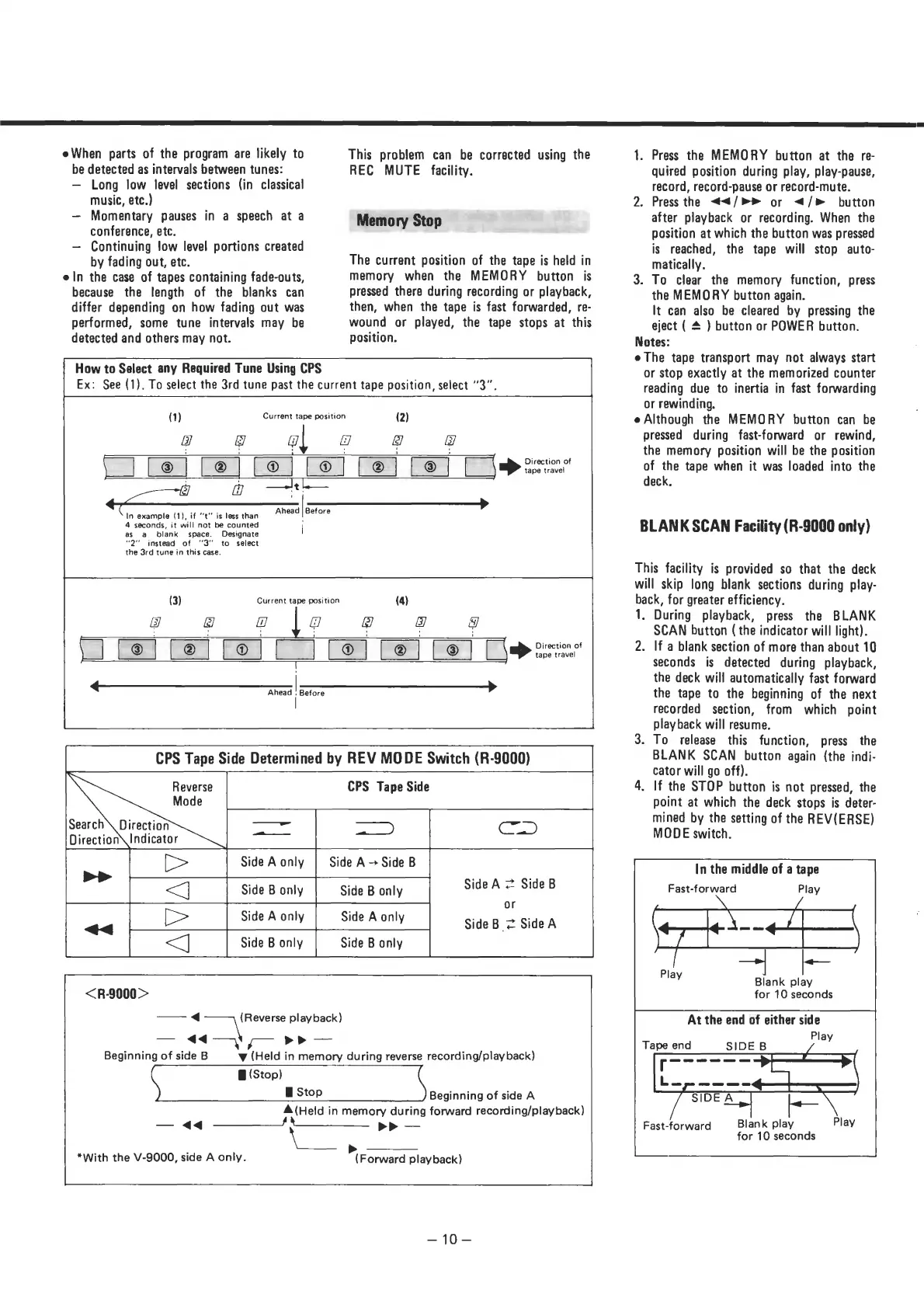
How
to
Select
any
Required
Tune
Using
CPS
Ex:
See
(1).
To
select
the
3rd
tune
past
the
current
tape
position,
select
“3”.
Current
tape
position
a,
9
@
Direction
of
tape
travel
In
example
(1),
if
“t"
is
less
than
:
"go
fegee
t
Ahead
Before
4
seconds,
it
will
not
be
counted
|
as
a
blank
space.
Designate
“2"
instead
of
“3”
to
select
the
3rd
tune
in
this
case.
Current
tape
position
oe
=
tape
travel
t
Ahead
!
Before
CPS
Tape
Side
Determined
by
REV
MODE
Switch
(R-9000)
CPS
Tape
Side
Reverse
Side
A
2
Side
B
or
Side
B
2
SideA
<R-9000
>
<4
(Reverse
playback)
<4
7
Beginning
of
side
B
wv
(Held
in
memory
during
reverse
recording/play
back)
B
(Stop)
H
Stop
Beginning
of
side
A
A
(Held
in
memory
during
forward
recording/playback)
d<
>>
—_
*With
the
V-9000,
side
A
only.
(Forward
playback)
=iO=
SS
SS
SS
SE
>
en
ne
ee
eee
ee
eS
a
ee
ee
1.
Press
the
MEMORY
button
at
the
re-
quired
position
during
play,
play-pause,
record,
record-pause
or
record-mute.
2.
Press
the
«</>
of
</®
button
after
playback
or
recording.
When
the
position
at
which
the
button
was
pressed
is
reached,
the
tape
will
stop
auto-
matically.
3.
To
clear
the
memory
function,
press
the
MEMORY
button
again.
It
can
also
be
cleared
by
pressing
the
eject
(
&
)
button
or
POWER
button.
Notes:
e
The
tape
transport
may
not
always
start
or
stop
exactly
at
the
memorized
counter
reading
due
to
inertia
in
fast
forwarding
or
rewinding.
e
Although
the
MEMORY
button
can
be
pressed
during
fast-forward
or
rewind,
the
memory
position
will
be
the
position
of
the
tape
when
it
was
loaded
into
the
deck.
BLANK
SCAN
Facility
(R-9000
only)
This
facility
is
provided
so
that
the
deck
will
skip
long
blank
sections
during
play-
back,
for
greater
efficiency.
1.
During
playback,
press
the
BLANK
SCAN
button
(
the
indicator
will
light).
2.
If
a
blank
section
of
more
than
about
10
seconds
is
detected
during
playback,
the
deck
will
automatically
fast
forward
the
tape
to
the
beginning
of
the
next
recorded
section,
from
which
point
playback
will
resume.
3.
To
release
this
function,
press
the
BLANK
SCAN
button
again
(the
indi-
cator
will
go
off).
4.
If
the
STOP
button
is
not
pressed,
the
point
at
which
the
deck
stops
is
deter-
mined
by
the
setting
of
the
REV(ERSE)
MODE
switch.
In
the
middle
of
a
tape
Fast-forward
Play
<?—_
Blank
play
for
10
seconds
At
the
end
of
either
side
Play
Tape
end
SIDE
B
Blank
play
Play
for
10
seconds
Fast-forward

Related product manuals