EasyManua.ls Logo

Teac T-H300 - Connections and Rear Panel Overview; LINE OUT and REMOTE CONTROL Jacks; RESET Switch and AC Outlet; AC Power Cord Connection

Teac T-H300
48 pages
Print Icon
To Next Page IconTo Next Page
To Previous Page IconTo Previous Page
Loading...
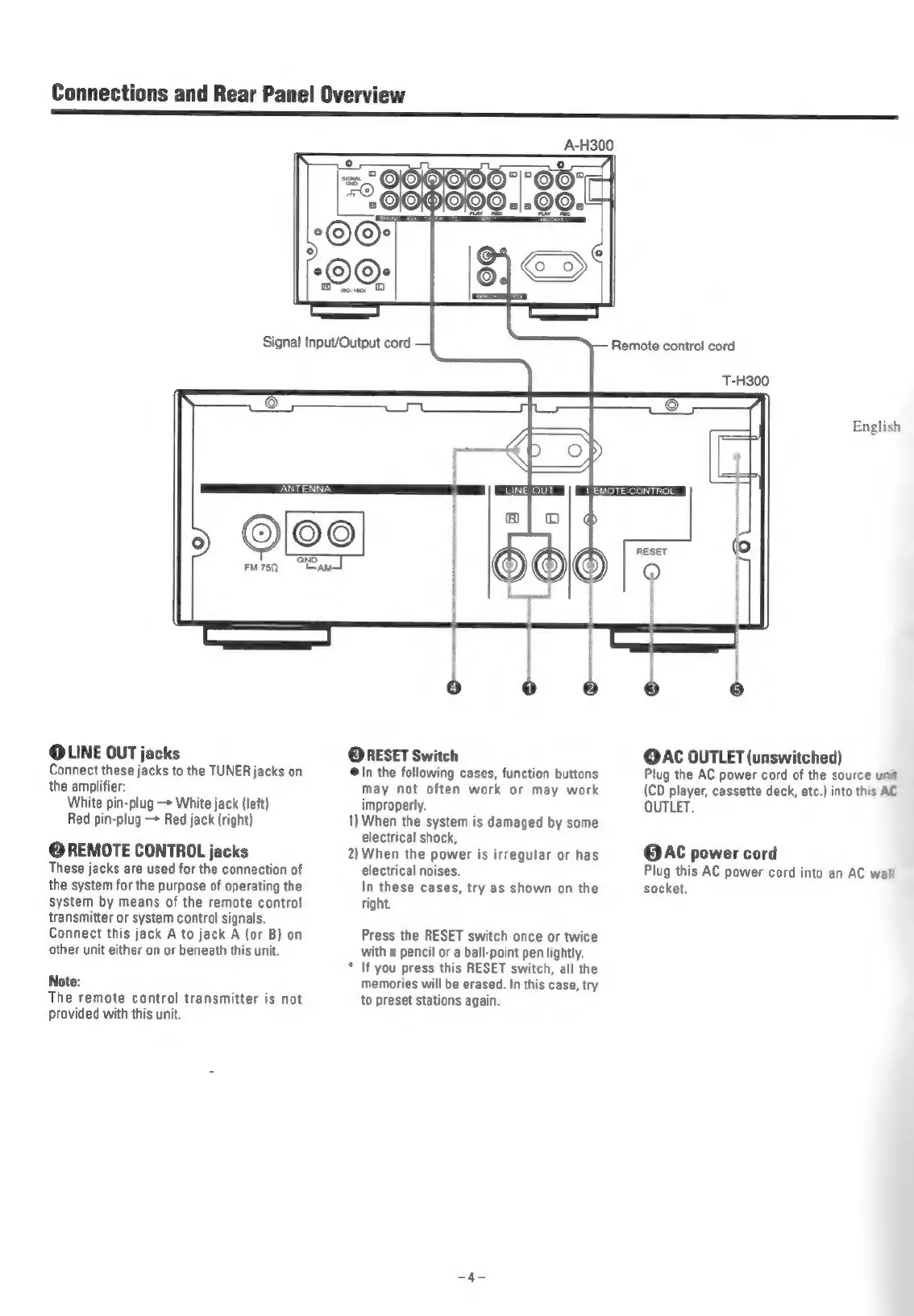
Connections
and
Rear
Panel
Overview
Remote
control
cord
T-H300
@LINE
OUT
jacks
Connect
these
jacks
to
the
TUNER
jacks
on
the
amplifier:
White
pin-plug
—>
White
jack
(left)
Red
pin-plug
—>
Red
jack
(right)
@REMOTE
CONTROL
jacks
These
jacks
are
used
for
the
connection
of
the
system
for
the
purpose
of
operating
the
system
by
means
of
the
remote
control
transmitter
or
system
control
signals.
Connect
this
jack
A
to
jack
A
(or
B)
on
other
unit
either
on
or
beneath
this
unit.
Note:
The
remote
control
transmitter
is
not
provided
with
this
unit.
@RESET
Switch
@In
the
following
cases,
function
buttons
may
not
often
work
or
may
work
improperly.
1)
When
the
system
is
damaged
by
some
electrical
shock,
2)When
the
power
is
irregular
or
has
electrical
noises.
In
these
cases,
try
as
shown
on
the
right.
Press
the
RESET
switch
once
or
twice
with
a
pencil
or
a
ball-point
pen
lightly.
*
If
you
press
this
RESET
switch,
all
the
memories
will
be
erased.
In
this
case,
try
to
preset
stations
again.
English
@AC
OUTLET
(unswitched)
Plug
the
AC
power
cord
of
the
source
unit
(CD
player,
cassette
deck,
etc.)
into this
AC
OUTLET.
@AC
power
cord
Plug
this
AC
power
cord
into
an
AC
wall
socket.

Related product manuals