EasyManua.ls Logo

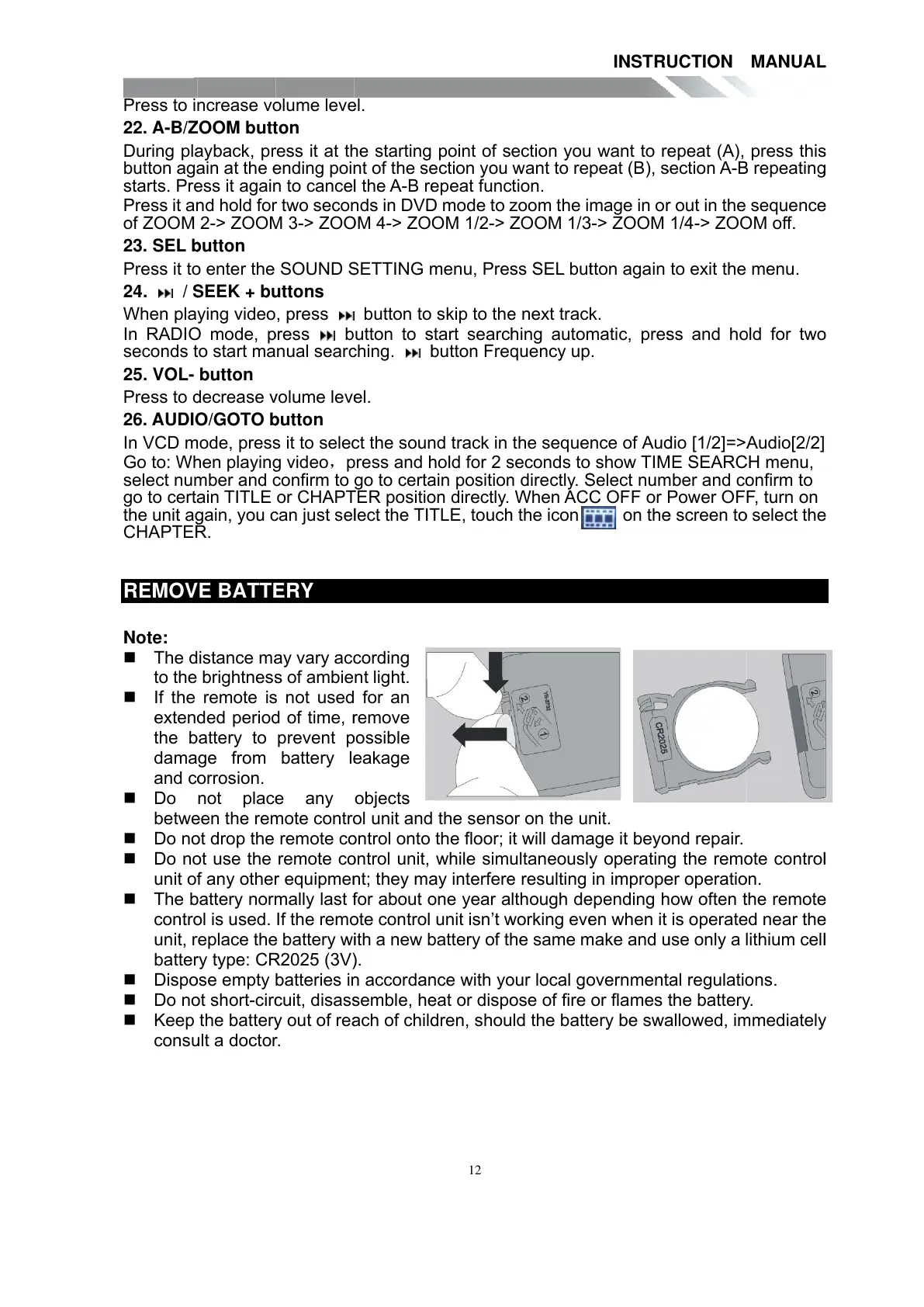
Teac TE-268 - REMOVE BATTERY

Teac TE-268
59 pages
Print Icon
To Next Page IconTo Next Page
To Previous Page IconTo Previous Page
Loading...
Press to i
22. A-B/
Z
During pl
a
button ag
a
starts. Pr
e
Press it a
n
of ZOOM
23. SEL
b
Press it t
o
24. /
S
When pla
In RADI
O
seconds
t
25. VOL-
Press to
d
26. AUDI
O
In VCD
m
Go to: W
h
select nu
m
go to cert
a
the unit a
g
CHAPTE
R
REMO
V
Note:
The d
to the
If the
exten
d
the
b
dama
and c
o
Do
betw
e
Do n
o
Do n
o
unit o
f
The
b
contr
o
unit,
r
batte
r
Disp
o
Do n
o
Keep
cons
u
ncrease v
o
Z
OOM but
t
a
yback, p
r
a
in at the
e
e
ss it agai
n
n
d hold fo
r
2-> ZOO
M
b
utton
o
enter the
S
EEK + b
u
ying video
O
mode,
p
t
o start ma
button
d
ecrease
v
O
/GOTO
b
m
ode, pres
s
h
en playin
g
m
ber and
c
a
in TITLE
g
ain, you
c
R
.
V
E BATT
E
istance m
a
brightnes
s
remote i
s
d
ed perio
d
b
attery to
ge from
o
rrosion.
not plac
e
e
en the re
m
o
t drop the
o
t use the
f
any othe
r
b
attery nor
m
o
l is used.
r
eplace th
e
r
y type: C
R
o
se empty
o
t short-cir
c
the batter
y
u
lt a docto
r
o
lume lev
e
t
on
r
ess it at t
h
e
nding poi
n
n
to cance
l
r
two seco
n
M
3-> ZO
O
SOUND
S
u
ttons
, press
p
ress b
nual sear
c
v
olume lev
e
b
utton
s
it to sele
c
g
video
p
c
onfirm to
or CHAP
T
c
an just se
l
E
RY
a
y vary ac
c
s
of ambie
s
not used
d
of time,
r
prevent
p
battery l
e
e
any
m
ote contr
o
remote c
o
remote c
o
r
equipme
n
m
ally last
f
If the rem
o
e
battery w
i
R
2025 (3V
)
batteries i
n
c
uit, disas
s
y
out of re
a
r
.
e
l.
h
e starting
n
t of the s
e
l
the
A
-B r
e
n
ds in DV
D
O
M 4-> ZO
O
S
ETTING
m
button to
utton to
s
c
hing.
b
e
l.
c
t the sou
n
p
ress and
h
go to cert
a
T
ER positi
o
l
ect the TI
T
c
ording
nt light.
for an
r
emove
p
ossible
e
akage
objects
o
l unit and
o
ntrol onto
o
ntrol unit,
n
t; they m
a
f
or about
o
o
te control
i
th a new
b
)
.
n
accorda
n
s
emble, h
e
a
ch of chil
d
12
point of s
e
ction you
e
peat fun
c
D
mode to
z
O
M 1/2->
Z
m
enu, Pre
s
skip to th
e
s
tart searc
h
b
utton Fre
q
n
d track in
h
old for 2
s
a
in positio
n
o
n directly.
T
LE, touc
h
the sens
o
the floor; i
while sim
u
a
y interfer
e
o
ne year a
unit isn’t
w
b
attery of t
h
n
ce with y
o
e
at or disp
o
d
ren, sho
u
ection yo
u
want to re
c
tion.
z
oom the i
Z
OOM 1/
3
s
s SEL bu
t
e
next trac
h
ing auto
m
q
uency u
p
the seque
s
econds t
o
n
directly.
S
When
A
C
C
h
the icon
o
r on the u
n
t will dam
a
u
ltaneousl
y
e
resulting
lthough d
e
w
orking ev
e
h
e same
m
o
ur local g
o
o
se of fire
u
ld the batt
INSTR
U
u
want to r
e
peat (B),
s
mage in o
r
3
-> ZOOM
t
ton again
k.
m
atic, pre
s
p
.
nce of
A
u
d
o
show TI
M
S
elect nu
m
C
OFF or
P
on th
e
n
it.
a
ge it bey
o
y
operatin
g
in improp
e
e
pending
h
e
n when it
m
ake and
u
o
vernmen
t
or flames
t
ery be sw
a
U
CTION
e
peat (A),
s
ection
A
-
B
r
out in the
1/4-> ZO
O
to exit the
s
s and h
o
d
io [1/2]=>
A
M
E SEAR
C
m
ber and c
o
P
ower OF
e
screen t
o
o
nd repair.
g
the rem
o
e
r operati
o
h
ow often
t
is operat
e
u
se only a
l
t
al regulati
o
t
he batter
y
a
llowed, i
m
MANUA
L
press thi
s
B
repeatin
g
sequenc
e
O
M off.
menu.
o
ld for tw
o
A
udio[2/2]
C
H menu,
o
nfirm to
F
, turn on
o
select th
e
o
te contro
l
o
n.
t
he remot
e
e
d near th
e
l
ithium cel
l
o
ns.
y
.
m
mediatel
y
L
s
g
e
o
e
l
e
e
l
y
All manuals and user guides at all-guides.com

Other manuals for Teac TE-268

Related product manuals