EasyManua.ls Logo

Teac TE-268 - DVD PLAYER

Teac TE-268
59 pages
Print Icon
To Next Page IconTo Next Page
To Previous Page IconTo Previous Page
Loading...
DV
D
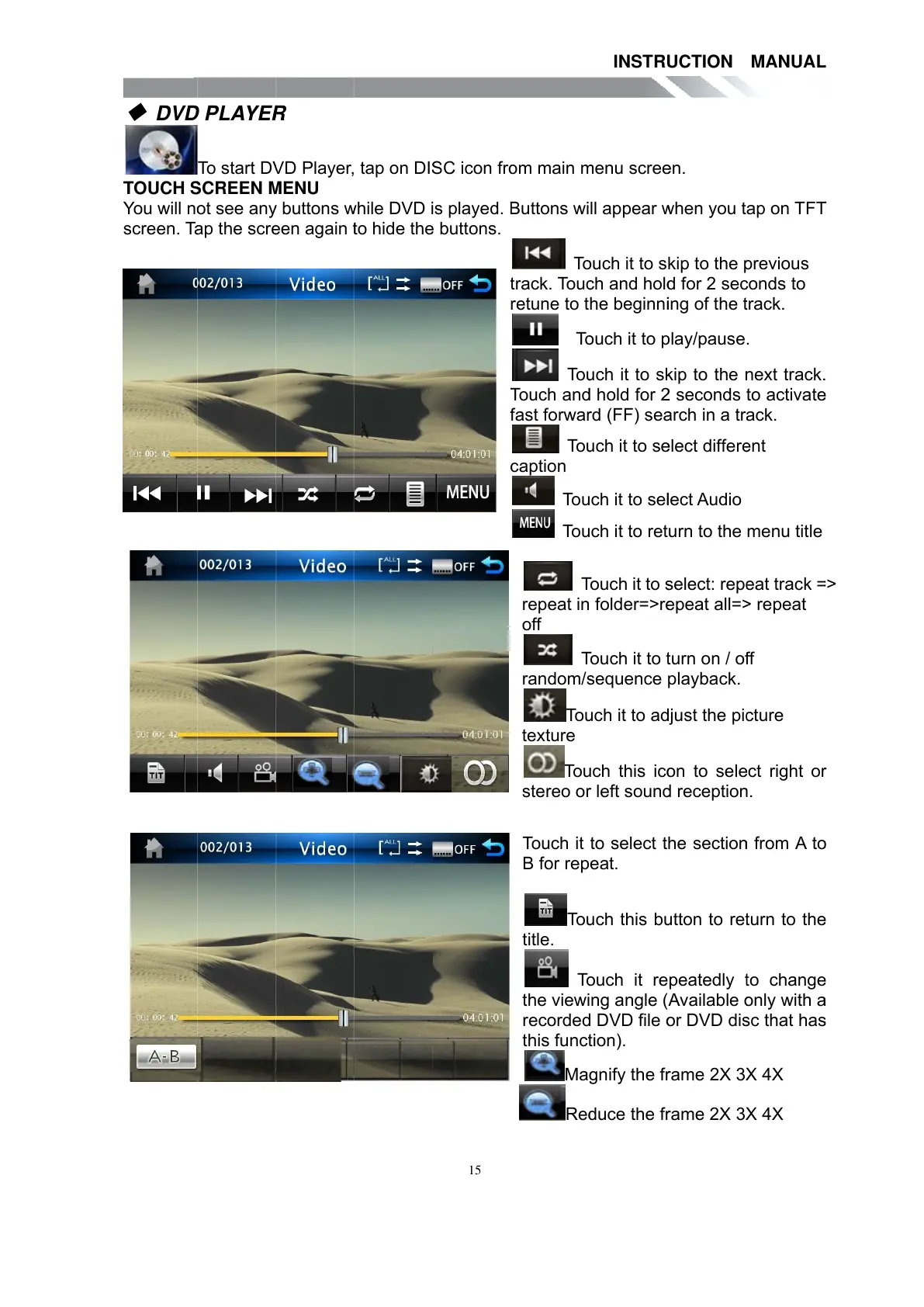
TOUCH
S
You will n
o
screen. T
a
D
PLAYE
R
To star t D
V
S
CREEN
M
o
t see an
y
a
p the scr
e
R
V
D Player,
M
ENU
y
buttons
w
e
en again
t
tap on DI
S
w
hile DVD
i
t
o hide th
e
15
S
C icon fr
o
i
s played.
B
e
buttons.
t
T
f
c
o
m main
m
B
uttons wi
T
o
t
rack. Tou
c
r
etune to t
T
o
To
u
T
ouch an
d
f
ast forwa
r
To
u
c
aption
Tou
Tou
T
repeat in
off
T
random/
s
To
u
texture
To
u
stereo o
r
Touch it
B for rep
To
u
title.
T
o
the viewi
recorde
d
this func
t
Ma
g
Re
d
INSTR
U
m
enu scre
e
ll appear
w
o
uch it to s
c
h and hol
d
he beginn
i
o
uch it to
p
u
ch it to s
k
d
hold for
2
r
d (FF) se
a
u
ch it to s
e
ch it to se
l
ch it to ret
T
ouch it to
s
folder=>r
e
T
ouch it to
t
s
equence
u
ch it to a
d
u
ch this ic
o
r
left soun
d
to select t
eat.
u
ch this b
u
o
uch it re
ng angle (
d
DVD file
o
t
ion).
g
nify the f
r
d
uce the f
r
U
CTION
e
n.
w
hen you t
kip to the
p
d
for 2 se
c
i
ng of the
t
p
lay/pause
k
ip to the
n
2
seconds
a
rch in a tr
e
lect differ
e
l
ect Audio
urn to the
s
elect: rep
e
e
peat all=
>
t
urn on / o
f
playback.
d
just the pi
c
o
n to sel
e
d
receptio
n
he sectio
n
u
tton to re
t
peatedly
t
Available
o
o
r DVD di
s
r
ame 2X 3
X
r
ame 2X 3
X
MANUA
L
ap on TF
T
p
revious
c
onds to
t
rack.
.
n
ext track
.
t
o activat
e
a
ck.
e
nt
menu title
e
at track
=
>
repeat
f
f
c
ture
e
ct right o
r
n
.
n
from A t
o
t
urn to th
e
t
o chang
e
o
nly with
a
s
c that ha
s
X
4X
X
4X
L
T
.
e
=
>
r
o
e
e
a
s
All manuals and user guides at all-guides.com

Other manuals for Teac TE-268

Related product manuals