EasyManua.ls Logo

Teac TE-268 - Page 24

Teac TE-268
59 pages
Print Icon
To Next Page IconTo Next Page
To Previous Page IconTo Previous Page
Loading...
2) Tap t
h
call in its
c
V
oice Tr
a
During a
c
To have
a
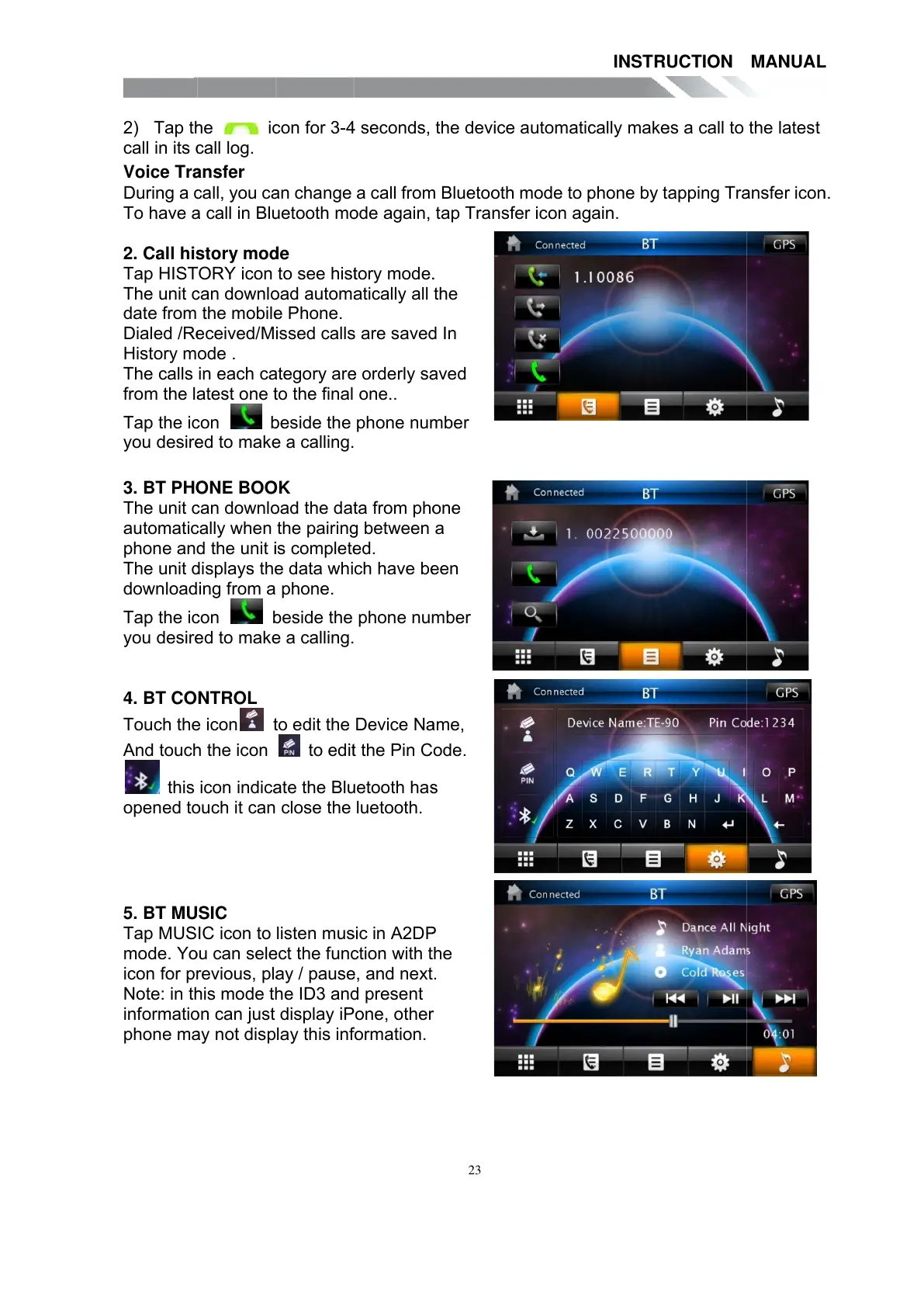
2. Call hi
s
Tap HIS
T
The unit
c
date from
Dialed /R
e
History m
The calls
from the l
a
Tap the i
c
you desir
e
3. BT PH
O
The unit
c
automati
c
phone an
d
The unit
d
download
Tap the i
c
you desir
e
4. BT CO
Touch th
e
And touc
h
this
opened t
o
5. BT MU
Tap MUS
mode. Y
o
icon for p
r
Note: in t
h
informati
o
phone m
a
h
e i
c
c
all log.
a
nsfer
c
all, you c
a
a
call in Bl
u
s
tory mo
d
T
ORY icon
c
an downl
o
the mobil
e
e
ceived/M
ode .
in each c
a
a
test one
t
c
on
b
e
d to mak
e
O
NE BO
O
c
an downl
o
c
ally when
d
the unit
i
d
isplays th
e
ing from a
c
on
b
e
d to mak
e
NTROL
e
icon
t
h
the icon
icon indic
a
o
uch it can
SIC
IC icon to
o
u can sel
e
r
evious, pl
a
h
is mode t
h
o
n can just
a
y not disp
c
on for 3-
4
a
n change
u
etooth m
o
d
e
to see his
t
o
ad autom
a
e
Phone.
issed call
s
a
tegory ar
e
t
o the final
b
eside the
e
a calling.
O
K
o
ad the da
t
the pairin
g
i
s complet
e
e
data whi
phone.
b
eside the
e
a calling.
t
o edit the
to edi
t
a
te the Bl
u
close the
listen mu
s
e
ct the fun
c
a
y / paus
e
h
e ID3 an
d
display iP
lay this in
f
4
seconds,
a call fro
m
o
de again,
t
ory mode
.
a
tically all
s
are save
d
e
orderly s
a
one..
phone nu
m
t
a from ph
o
g
between
e
d.
ch have b
e
phone nu
m
Device N
a
t
the Pin C
u
etooth ha
s
luetooth.
s
ic in
A
2D
P
c
tion with
t
e
, and next
d
present
one, othe
r
f
ormation.
23
the devic
e
m
Bluetoot
h
tap Trans
f
.
the
d
In
a
ved
m
ber
o
ne
a
e
en
m
ber
a
me,
ode.
s
P
t
he
.
r
e
automati
c
h
mode to
p
f
er icon a
g
INSTR
U
c
ally mak
e
p
hone by t
g
ain.
U
CTION
e
s a call to
apping Tr
a
MANUA
L
the latest
a
nsfer ico
n
L
n
.
All manuals and user guides at all-guides.com

Other manuals for Teac TE-268

Related product manuals