8
Balancing the tone arm and adjusting
the stylus pressure
A
N
T
I
–
S
K
A
T
I
N
G
3
0
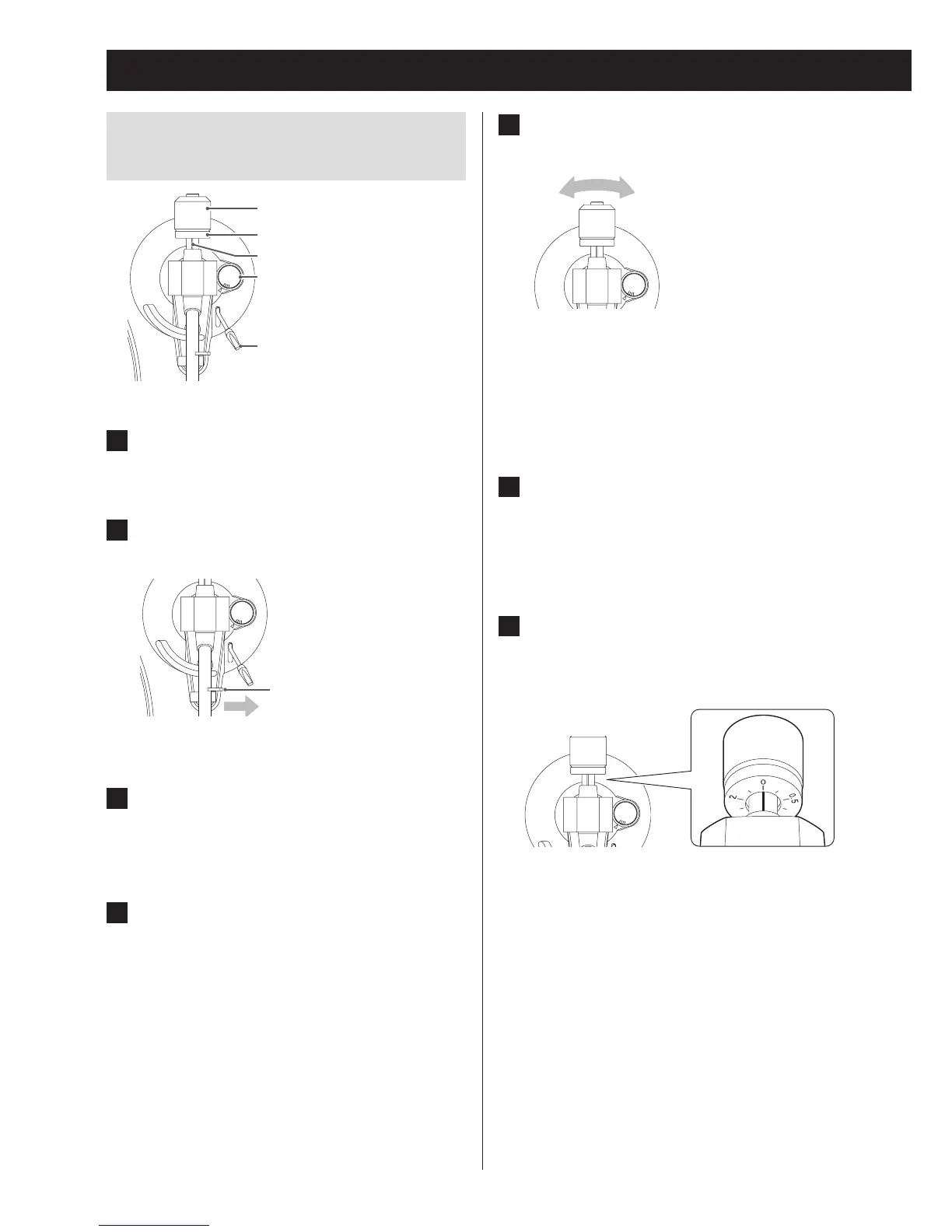
Anti-skating
Cue lever
Counterweight
Stylus pressure adjustment ring
Center line
1 Set the anti-skating dial to zero.
2 Move the tone arm clasp to the right to
release the tone arm.
Clasp
A
N
T
I
–
S
K
A
T
I
N
G
3
0
3 Lift the cue lever and shift the tone arm
to the left slightly.
4 Lower the cue lever.
5 Turn the counterweight and adjust so
that the tone arm is level.
A
N
T
I
–
S
K
A
T
I
N
G
3
0
o Remove the cartridge stylus protection cover
before making adjustments.
o Be careful not to let the cartridge stylus touch
the unit.
6 Return the tone arm to its original posi-
tion, and move the tone arm clasp to
the left to lock it in place.
7 Turn the stylus pressure adjustment
ring so that the center line aligns with 0
on the scale.
A
N
T
I
–
S
K
A
T
I
N
G
3
0
o Be careful not to let the counterweight turn.
Preparing the record player (continued)



 To Next Page