!J
Place
the felt mat on the turntable
(platter).
Place
the
included felt
mat
on
the
turntable (pla
tter
)
before
us
ing i
t.
~~
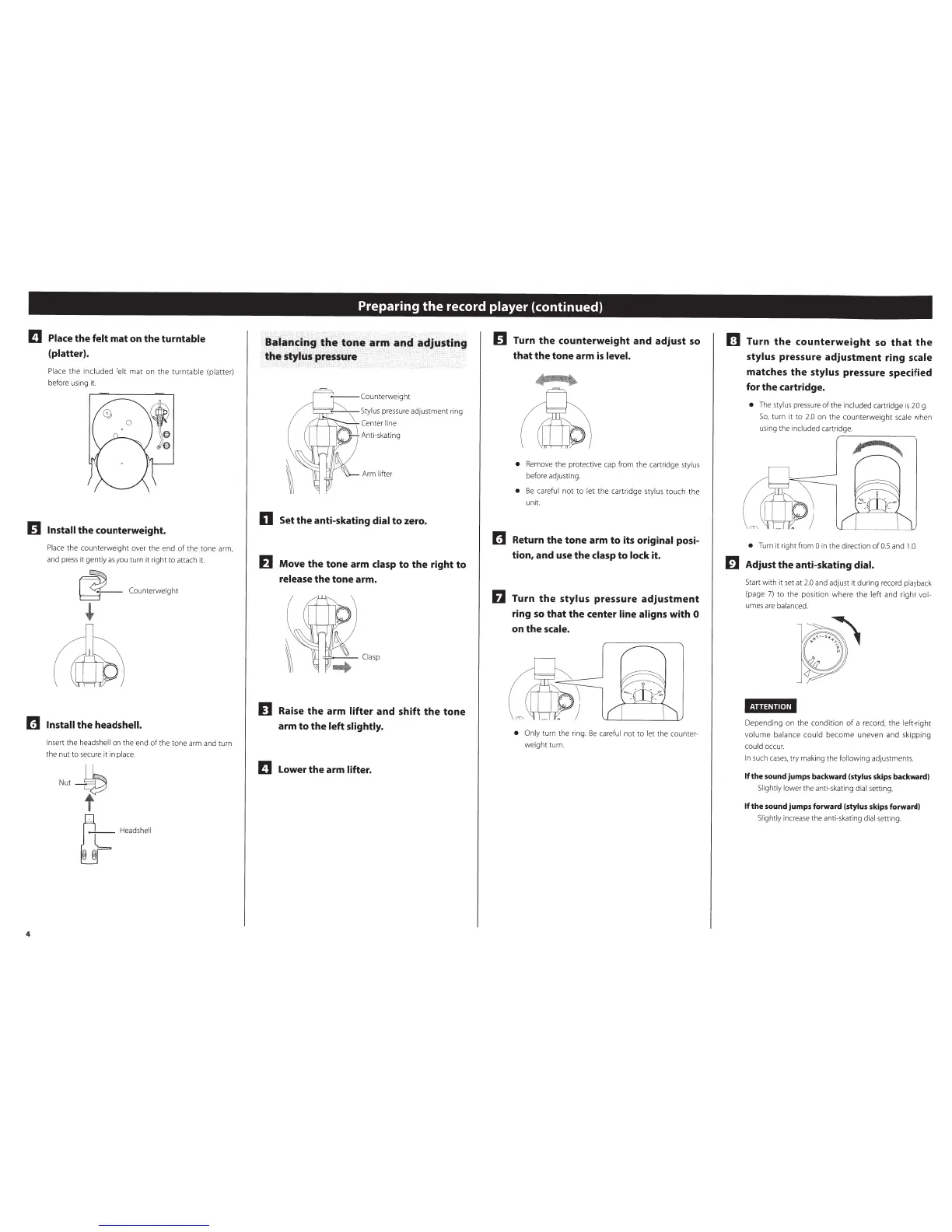
Install
the counterweight.
Pla
ce
the counterwei
ght
over the end
of
the tone arm,
and
press
it
gently
as
you turn
it
right to attach it.
Coun
terw
eig
ht
fiJ
Install
the head
shell.
4
Insert
th
e
headshell
on
the end
of
the
ton
e arm and turn
the
nut
to
secure
it
in
place.
Preparing
the
record player
(continued)
n Set the anti-skating dial
to
zero.
~~
Move the tone arm clasp
to
the right
to
release
the tone arm.
n
Raise
the
arm lifter
and shift the tone
arm
to
the
left slightly.
!J
Lower the arm
lifter.
~~
Turn the counterweight and adjust
so
that the tone arm
is
level.
•
Remove the protective cap f
ro
m the cartridge
styl
us
before adjusting.
•
Be
ca
reful
n
ot
to
let
the
ca
rtri
dge
stylus
touch the
unit
fiJ
Return the tone arm to its original posi-
tion, and
use
the
clasp
to
lock it.
Turn
the
stylus pressure
adjustment
ring
so
that the center line aligns
with 0
on
the
scale.
• Only
tu
rn
the rin
g.
Be
ca
reful
not
to
l
et
the counter-
wei
gh
t turn
[I
Turn
the
counterweight
so
that
the
stylus pressure adjustment ring
sca
le
matches
the
stylus pressure specified
for the cartridge.
•
Th
e
sty
l
us
pr
essure
of
the
included
ca
rtrid
ge
is
2
.0
g.
So
, turn it to
2.0
on the coun
te
rwei
gh
t
sca
le
wh
en
us
ing t
he
included
ca
rtridge.
~
---
--...._
•
Tu
rn
it
right from
0
in the
direction
ofO.S
and
1.0
.
m Adjust the anti-skating dial.
Start with it set at
2.
0
and adjust it during reco
rd
pla
yb
ack
(page
7)
to
th
e posi
ti
on where
th
e left and right
vol-
umes
are
ba
lanced.
MUiMi[.!ll
Depending on
th
e conditi
on
of
a record,
the
left-right
vo
l
ume
ba
lance could
become
uneven a
nd
sk
i
pp
ing
could
occur.
In
su
ch
cases
, try m
ak
ing the
following
ad
ju
stments.
If
the sound jumps
backward
{stylus skips
backward
)
Sl
ightly lower
the
anti-sk
at
ing
dial
setting.
If
the sound jumps forward
(stylus
skips forward)
Slightly
incr
ea
se
th
e anti-skating
dial
setti
ng
.



 To Next Page