EasyManua.ls Logo

Teac V-600 - Page 6

Teac V-600
29 pages
Print Icon
To Next Page IconTo Next Page
To Previous Page IconTo Previous Page
Loading...
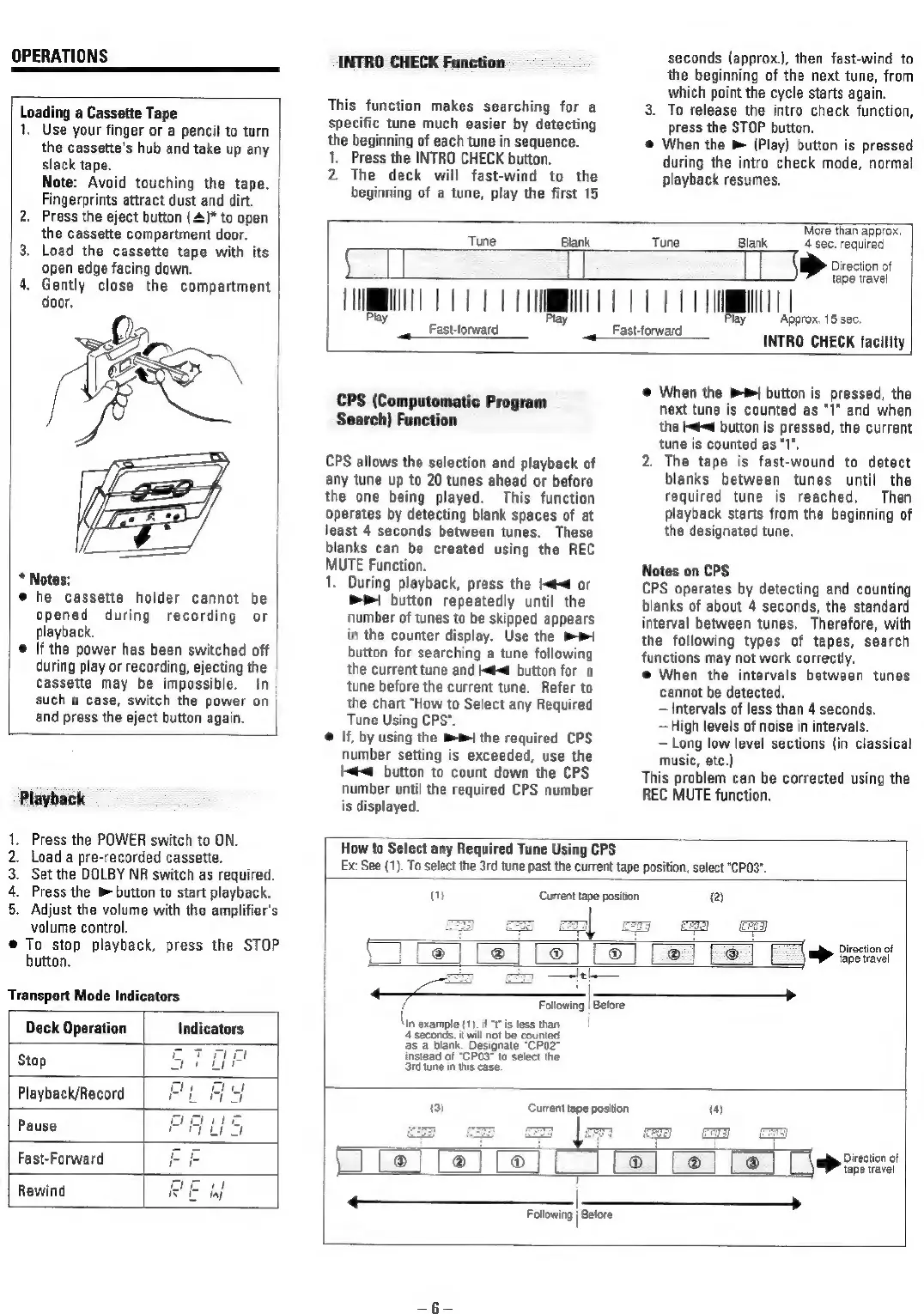
OPERATIONS
Loading
a
Cassette
Tape
1,
Use
your
finger
or
a
pencil
to
turn
the
cassette's
hub
and
take
up
any
|
slack
tape.
|
Note:
Avoid
touching
the
tape.
Fingerprints
attract
dust
and
dirt.
2.
Press
the
eject
button
{4)*
to
open
the
cassette
compartment
door.
3.
Load
the
cassette
tape
with
its
open
edge
facing
down.
4.
Gently
close
the
compartment
door,
*
Notes:
@
he
cassette
holder
cannot
be
opened
during
recording
or
playback.
|
@
If
the
power
has
been
switched
off
during
play
or
recording,
ejecting
the
Cassette
may
be
impossible.
In
such
a
case,
switch
the
power
on
and
press
the
eject
button
again.
Playback
1.
Press
the
POWER
switch
to
ON.
2.
Load
a
pre-recorded
cassette.
3.
Set
the
DOLBY
NR
switch
as
required.
4.
Press
the
®
button
to
start
playback.
5.
Adjust
the
volume
with
the
amplifier's
volume
control.
@
To
stop
playback,
press
the
STOP
button.
Transport
Mode
Indicators
INTRO
CHECK
Function
This
function
makes
searching
for
a
specific
tune
much
easier
by
detecting
the
beginning
of
each
tune
in
sequence.
1.
Press
the
INTRO
CHECK
button.
2.
The
deck
will
fast-wind
to
the
beginning
of
a
tune,
play
the
first
15
seconds
(approx.},
then
fast-wind
to
the
beginning
of
the
next
tune,
from
which
point
the
cycle
starts
again.
3.
To
release
the
intro
check
function,
press
the
STOP
button.
@
When
the
(Play)
button
is
pressed
during
the
intro
check
mode,
normal
playback
resumes.
More
than
approx.
Fasttorward
Tune
Blank
Tune
Blank
4
sec.
required
if
[
|
Direction
of
tape
travel
TT
Fast-torward
Approx,
15
sec.
~
INTRO
CHECK
facility
CPS
(Computomatic
Program
Search)
Function
CPS
allows
the
selection
and
playback
of
any
tune
up
to
20
tunes
ahead
or
before
the
one
being
played.
This
function
Operates
by
detecting
blank
spaces
of
at
least
4
seconds
between
tunes.
These
blanks
can
be
created
using
the
REC
MUTE
Function.
1.
During
playback,
press
the
I<
or
Pr!
button
repeatedly
until
the
number
of
tunes
to
be
skipped
appears
in
the
counter
display.
Use
the
mp
button
for
searching
a
tune
following
the
current
tune
and
|@
button
for a
tune
before
the
current
tune.
Refer
to
the
chart
"How
to
Select
any
Required
Tune
Using
CPS".
@
If,
by
using
the
m1
the
required
CPS
number
setting
is
exceeded,
use
the
l<#<@
button
to
count
down
the
CPS
number
until
the
required
CPS
number
is
displayed.
@
When
the
mt
button
is
pressed,
the
next
tune
is
counted
as
"I"
and
when
the
Id
button
is
pressed,
the
current
tune
is
counted
as
“I,
2.
The
tape
is
fast-wound
to
detect
blanks
between
tunes
until
the
required
tune
is
reached.
Then
playback
starts
from
the
beginning
of
the
designated
tune.
Notes
on
CPS
CPS
operates
by
detecting
and
counting
blanks
of
about
4
seconds,
the
standard
interval
between
tunes.
Therefore,
with
the
following
types
of
tapes,
search
functions
may
not
work
correctly.
@
When
the
intervals
between
tunes
cannot
be
detected.
Intervals
of
less
than
4
seconds.
—High
levels
of
noise
in
intervals.
Long
low
level
sections
(in
classical
music,
etc.)
This
problem
can
be
corrected
using
the
REC
MUTE
function.
How
to
Select
any
Required
Tune
Using
CPS
Ex:
See
(1).
To
select
the
3rd
tune
past
the
current
tape
position,
select
"CPO3".
a
Current
tape
position
(2)
{
Diraction
of
tape
travel
Following
|
Before
\in
example
(1),
if
“fis
less
than
!
———————
Deck
Operation
Indicators
4'seconds,
t
wil
not
be
counted
as
a
blank.
Designate
“CPO”
e7vrnaea
instead
of
“CP03*
to
select
the
Stop
ar
ip
3rd
tune
in
this
case.
Che
he
=
Playback/Record
Oe
ay
Current
tape
position
(4)
Pause
PLS
7
ED
we
rj
Direction
of
Fast-Forward
br
[
®
®
®
tape
travel
Rewind
BE
if
|
>
Following
|
Before

Related product manuals