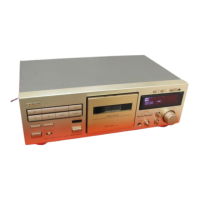
The TEAC V-3000 is a Stereo Cassette Deck designed for high-quality audio recording and playback. This owner's manual provides comprehensive instructions for its operation, maintenance, and various features, ensuring users can achieve optimal performance from the unit.
Function Description
The V-3000 functions as a stereo cassette deck, capable of both playing back pre-recorded cassette tapes and recording audio onto blank cassettes. It features a 3-head system (1 erase, 1 record, and 1 playback head) for superior recording and monitoring capabilities. The deck supports standard C-60 and C-90 Philips type cassette tapes.
Key functions include:
- Power On/Off: A dedicated POWER switch turns the deck on, illuminating the display window, and off. A brief waiting period of at least 2 seconds is recommended between power cycles.
- Tape Transport Controls: Standard controls for tape movement include Rewind (◄), Fast-Forward (►), Stop (■), Play (►), and Pause (‖). These allow users to navigate tapes, initiate playback, and temporarily halt tape travel during recording or playback.
- Recording: The RECORD button initiates the record-pause mode, preparing the deck for recording. Both the REC and PAUSE indicators light up. Recording begins by pressing either the PLAY or PAUSE button. For remote control recording, both RECORD buttons must be pressed simultaneously.
- Record Mute: The REC MUTE button allows users to insert blank sections (approximately 4 seconds) between tunes during recording. Pressing it during recording or record-pause mode causes the tape to run, record a blank space, and then automatically switch to record-pause mode. Holding the button down creates longer blank periods.
- Eject: The EJECT button opens the cassette holder when the deck is in stop mode, allowing for tape loading and unloading. It should not be pressed during recording or playback.
- Display Control: A DISPLAY button toggles the illumination of the display window on and off.
- Multi-Counter Function: The deck features a multi-counter with two modes: Tape Counter Mode (conventional 4-digit counter) and TRT (Tape-Run-Time) Counter Mode (measures tape travel in minutes and seconds up to 99M59S). The MODE button switches between these. The CLEAR button resets the currently displayed counter to "0000" or "00M00S". Both counters are reset when power is switched off.
- Return To Zero (RTZ): The RTZ button automatically fast-forwards or rewinds the tape until the counter reaches "0000", then stops the deck. This is useful for quickly locating the beginning of a tune. If pressed while the tape is running after RTZ, pressing PLAY will temporarily stop the tape at "0000" and then start playback. Pressing STOP, REWIND, or FAST-FORWARD during an RTZ operation releases the function. The RTZ function is not available in record mode or near the "0000" counter reading.
- Timer-Controlled Operations: The V-3000 can be integrated with an audio timer for unattended recording or playback. By setting the TIMER switch to REC or PLAY, the deck will automatically start recording or playing when power is supplied by the timer.
Usage Features
The V-3000 incorporates several features to enhance the user experience and recording quality:
- Automatic Tape Type Detection: The deck automatically detects the type of tape loaded (Normal, Chrome, or Metal) via tape identification holes, and corresponding indicators (NORMAL, CrO₂, METAL) light up.
- Dolby Noise Reduction (NR): The DOLBY NR switch allows selection of OFF, Dolby B, or Dolby C noise reduction systems to minimize tape hiss during recording and playback.
- MPX Filter: The MPX FILTER switch, when activated, eliminates the 19 kHz pilot tone and 38 kHz sub-carrier tone from FM broadcasts. This prevents interference with the Dolby NR system during FM radio recording.
- Auto Monitor: The AUTO MONITOR button allows selection of the signal source for monitoring (TAPE or SOURCE). In record-pause mode, it automatically switches to SOURCE to monitor the input signal. When recording starts, it switches to TAPE to monitor the recorded signal. This feature enables direct comparison between the source and recorded sound.
- Recording Level Controls: The REC LEVEL control adjusts the overall input signal level, while the BALANCE control fine-tunes the balance between the left and right channels. These are crucial for setting optimal recording levels to avoid noise (too low) or distortion (too high). The PEAK LEVEL METER visually indicates the input or playback signal levels.
- Bias Fine Tuning: The BIAS FINE tuning control allows for subtle adjustments to the bias current during recording. The center "click" position provides a standard bias. Turning it towards "+" increases bias, decreasing high-frequency response, while turning it towards "-" decreases bias, increasing high-frequency response. This feature helps optimize recording quality for different tape formulations and program material.
- Headphone Output: A PHONES jack allows connection of 8-ohm stereo headphones for private listening or monitoring. The PHONES LEVEL control adjusts the headphone volume independently of the main output.
- Dolby HX Pro: This advanced "active bias" technique improves the quality of audio tape recordings, particularly high frequencies, by monitoring the program material's high-frequency content and adjusting the bias oscillator to maintain a constant total bias level. This reduces distortion and improves headroom, resulting in more accurate recordings that sound better on any machine, even without decoding.
Maintenance Features
Proper maintenance is essential for the longevity and optimal performance of the V-3000:
- Head and Tape Path Cleaning: The manual emphasizes the importance of periodically cleaning the heads and tape path. This involves using special cotton swabs or a soft cloth with head cleaning fluid to gently rub the heads, capstans, and all metal parts in the tape path. The pinch rollers should be cleaned with rubber cleaning fluid.
- Demagnetizing Heads: Regular demagnetization of the heads is recommended to prevent magnetic buildup, which can degrade sound quality. Users are instructed to turn off the power before demagnetizing and to use a TEAC E-3 demagnetizer or equivalent, following its instructions.
- Battery Replacement (Remote Control Unit): The RC-393 remote control unit requires two "AA" type dry batteries. Users are instructed to insert them correctly, observing polarity. Batteries typically last about six months, but should be replaced if the operating distance of the remote control unit decreases. Precautions include not mixing old and new batteries, using batteries of the same type, removing batteries during long periods of disuse, and proper disposal (not heating, disassembling, or throwing into fire).
- Environmental Precautions: To ensure reliable operation, the deck should not be used in environments with high temperatures (direct sunlight, heaters), extremely low temperatures, excessive humidity, or dusty atmospheres. Voltage fluctuations should also be avoided, and a voltage regulator may be advisable if severe fluctuations occur.
- C-120 Cassette Tapes: The manual advises caution when using C-120 tapes due to their thinness, which makes them prone to stretching and magnetic layer issues, potentially causing wow & flutter or tape wrapping around the pinch roller/capstan if dirty. It is recommended to avoid using C-120 tapes for these reasons.
- Tape Handling: Tapes should not be stored near heat sources (heaters, direct sunlight), strong magnetic fields (speakers, TV sets, amplifiers), or in high-humidity/dusty areas. Dropping cassettes or subjecting them to excessive shock should also be avoided.

 Need help?
 Track System
 Power
Power Weight and Dimensions

 To Next Page