EasyManua.ls Logo

Teac V-3000 - Maintenance and Troubleshooting Guide; Tape Path Cleaning and Demagnetization; Troubleshooting Common Operational Issues

Teac V-3000
10 pages
Print Icon
To Next Page IconTo Next Page
To Previous Page IconTo Previous Page
Loading...
Note
Even
if
the
remote
control
unit
is
operated
within
the
effective
range,
remote
control
operation
may
be
impossible
if
there
is
any
obstruction
between
the
V-3000
and
the
remote
control
unit.
elf
the
deck
is
operated
in
the
vicinity
of
other
appliances generating
infrared
rays,
or
if
other
remote
control devices
using
infrared
rays
are
used
near
the
V-3000,
the
deck
may
operate
incorrectly.
Con-
versely,
if
the
V-3000's
remote
control
unit
is
operated
in
the
vicinity
of
other
appliances
which
use
an
infrared
re-
mote
control
device,
the
other
appliance
may
operate
incorrectly,
When
the
unit
will
not
be
used
for
a
long
period
of
time
(more
than
one
month),
remove
the
batteries
to
prevent
them
from
leaking.
If
they
do
leak,
wipe
off
the
liquid
inside
the
battery
compartment
and
replace
the
batteries
with
new
ones.
Do
not
place
books
or
other
objects
on
the
remote
control
unit
as
they
could
press
the
buttons
and
discharge
the
batteries,
Maintenance
(Fig.
7)
The
heads
and
tape
path
should
be
cleaned
and
damagnetized
periodically.
Cleaning
Tape
Path
eApply
head
cleaning
fluid*
to
special
cotton
swabs
or
a
soft
cloth,
and
lightly
rub
the
heads,
capstans
and
all
metal
parts
in
the
tape
path,
Also
clean
the
pinch
rollers
using
rubber
cleaning
fluid*.
*Both
are
available
in
TEAC
HC-1
and
RC-1
in
the
U.S.A.
or
TEAC
12-261
Tape
Recorder
Cleaning
Kit
in
other
areas,
Demagnetizing
Heads
Be
sure
that
the
power
is
off,
then
demag-
netize
the
heads
using
a
TEAC
E-3
demay-
netizer
or
equivalent.
For
details
of
its
use,
read
its
instructions,
Troubleshooting
a
Basic
troubleshooting
of
a
cassette
tape
deck
is
similar
to
troubleshooting
any
other
electrical
or
electronic
equipment.
Always
check
the
most
obvious
possible
causes
first.
To
give
you
a
few
ideas
of
what
to
look
for,
check
the
following:
‘©
No
power:
Is
the
power
cord
connected?
Tape
begins
running
when
power
is
turned
on:
Is
the
TIMER
function
on?
DOLBY
HX
PRO
Dolby
HX
Pro
is
an
“active
bias"
technique
that
can
improve
the
quality
of
audio
tape
recordings.
High-level
high
frequencies
can
be
recorded
more
accurately,
without
sacrificing
signal-to-noise
ratio,
while
such
side
effects
of
tape
saturation
as
distortion
are
reduced,
What
Is
Bias?
Bias
is
a
very
high-frequency
signal
generat-
ed
within
a
tape
deck
and
recorded
on
the
tape
simultaneously
with
the
program
material.
This
inaudible
signal
allows
a
low
noise,
low
distortion
recording
and
flat
frequency
response.
Different
magnetic
tape
formulations
require
different
amounts
of
bias
for
optimum
performance.
If
the
bias
level
is
too
high,
high-frequency
Maximum
Output
Level
(MOL)
decreases.
The
Problem
of
Self-Bias
Unfortunately,
bias
level
is
often
influenced
by
the
signal
being
recorded.
The
high
fre-
quencies
contained
in
some
music
act
as
bias.
This
unpredictable
source
of
bias
is
added
to
the
existing
bias,
resulting
in
a loss
of
high-frequency
response.
As
the
high-
frequency
content
of
the
signal
increases,
eNo
audio
output.
Are
all
connections
properly
made?
Degraded
sound
quality:
Are
the
heads
dirty
or
magnetized?
Are
you
using
good
quality
tape?
Is
the
proper
NR
System
select
switch
on?
eUnable
to
select
record
mode:
Are
the
record
protection
tabs
on
the
tape
in
place?
the
ability
of
the
recorder
to
record
high
frequencies
(MOL)
decreases.
This
pheno-
menon
is
called
self-biasing.
How
Dolby
HX
Pro
Solution
The
Dolby
HX
Pro
monitors
the
high-
frequency
content
of
the
program
material
and
adjusts
the
recorder
bias
oscillator
to
maintain
a
constant
total
bias
level.
The
result
is
improved
high-frequency
response
and
lower
distortion.
Depending
on
the
type
of
tape,
the
improvement
in
headroom
can
be
6
dB
or
more.
The
Benefits
With
Dolby
HX
Pro,
it
is
easier
to
make
More
accurate
recordings
of
the
kind
of
music
which
contains
high-level
high
fre-
quencies.
The
improvement
is
similar
to
that
of
high-performance
tape
over
conven-
tional
tape,
so
regardless
of
the
type
of
tape
used,
the
results
will
sound
better.
Most
important
of
all,
Dolby
HX
Pro
requires
no
decoding
process.
Once
the
tape
is
recorded
with
it,
the
improvements
will
be
realized
when
playing
the
tape
back
on
any
machine.
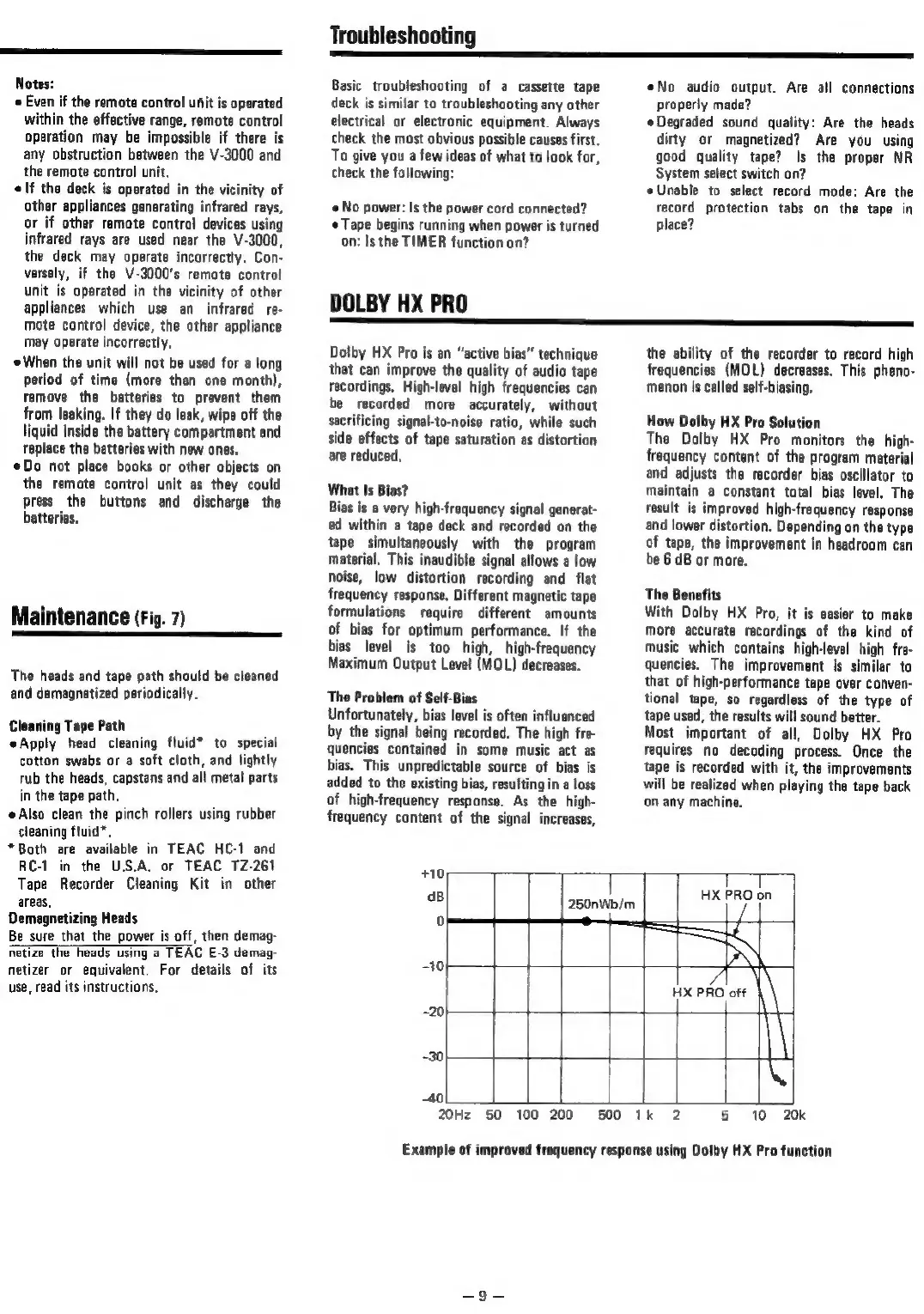
+10,
a8
250nWb/m
T
HX
PRO
on
HX
PRO
off
-30
~
40)
20Hz
50
100
200
500
1k
2
5
10
20k
Example
of
improved
frequency
response
using
Dolby
HX
Pro
function

Related product manuals