EasyManua.ls Logo

Teac V-770 - Page 7

Teac V-770
32 pages
Print Icon
To Next Page IconTo Next Page
To Previous Page IconTo Previous Page
Loading...
from
left
to
right,
and
downwards
during
rewind
as
the
tape
moves
from
right
to
left.
The
indicated
numerals
are
not
related
to
time
lapse
and
are
not
compatible
with
the
counter
readings
of
other
cassette
decks.
A
typical
example
of
using
this
display
in
the
conventional
tape
counter
mode
is
to
first
load
a
cassette
and,
before
recording,
press
the
CLEAR
button
resetting
the
counter
to
“0000".
Then
note
the
counter
reading
at
the
beginning
of
each
piece
of
music
to
facilitate
locating
a
particular
selection
when
you
wish
to
play
it
back.
Using
as
a
Tape-run-time
Counter
Using
the
COUNTER
MODE
button,
call
up
the
tape-run-time
mode;
a
dot
appears
between
the
2nd
and
3rd
digit.
In
this
mode,
tape
travel
is
measured
in
increasing
minutes
and
seconds
while
the
tape
is
running
at
normal
speed
during
recording
(including
record
muting)
and
playback.
Counting
stops
during
rewind
and
fast-
forward,
This
function
can
be
used
to
measure
the
approximate
length
of
a
re-
corded
song
or
to
make
a
calculated
estima-
tion
of
how
much
tape
is
left.
“Visible”
and
“Invisible”
Counters
Both
counter
modes
are
switchable
at
any
time,
with
the
one
selected
appearing
on
the
display
and
the
other
functioning
in
mem-
ory.
For
example,
when
the
conventional
tape
counter
is
selected
with
the
COUNTER
MODE
button,
counting
of
the
tape-run-
time
also
takes
place
and
its
reading
can
be
called
up
at
any
time
by
pressing
the
COUNTER
MODE
button.
Pressing
the
CLEAR
button
resets
only
the
counter
whitch
is
visible.
Both
counters,
“visible”
and
“invisible”
are
reset
when
power
is
switched
off.
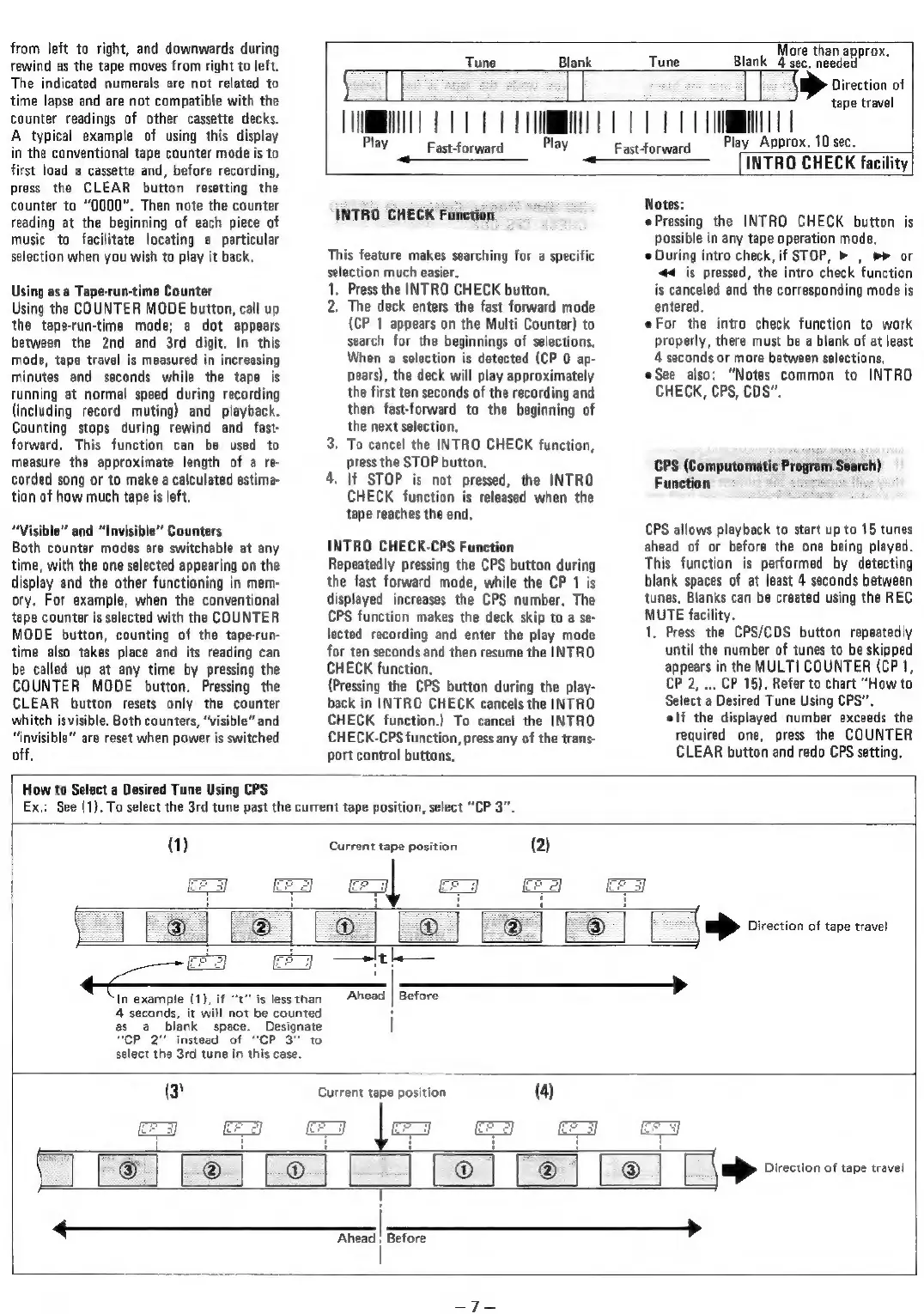
Tune
Blank
More
than
approx,
Tune
Blank_4
sec,
needed
|
BD
Direction
of
Fastforward
Play
{NMI
ORR
e
UU
Fastforward
Play
tape
travel
Approx,
10
sec.
INTRO
CHECK
facility
INTRO
CHECK
Function
This
feature
makes
searching
for
a
specific
selection
much
easier.
1.
Press
the
INTRO
CHECK
button.
2.
The
deck
enters
the
fast
forward
mode
(CP
1
appears
on
the
Multi
Counter)
to
search
for
the
beginnings
of
selections,
When
a
selection
is
detected
(CP
0
ap-
pears),
the
deck
will
play
approximately
the
first
ten
seconds
of
the
recording
and
then
fast-forward
to
the
beginning
of
the
next
selection,
To
cancel
the
INTRO
CHECK
function,
press
the
STOP
button.
4.
If
STOP
is
not
pressed,
the
INTRO
CHECK
function
is
released
when
the
tape
reaches
the
end,
oe
INTRO
CHECK-CPS
Function
Repeatedly
pressing
the
CPS
button
during
the
fast
forward
made,
while
the
CP
1
is
displayed
increases
the
CPS
number.
The
CPS
function
makes
the
deck
skip
to
a
se-
lected
recording
and
enter
the
play
mode
for
ten
seconds
and
then
resume
the
INTRO
CHECK
function,
(Pressing
the
CPS
button
during
the
play-
back
in
INTRO
CHECK
cancels
the
INTRO
CHECK
function.)
To
cancel
the
INTRO
CHECK-CPS
function,
press
any
of
the
trans-
port
control
buttons,
Notes:
Pressing
the
INTRO
CHECK
button
is
possible
in
any
tape
operation
mode,
During
intro
check,
if
STOP,
»
,
»»
or
#<_is
pressed,
the
intro
check
function
is
canceled
and
the
corresponding
mode
is
entered.
eFor
the
intro
check
function
to
work
properly,
there
must
be
a
blank
of
at
least
4
seconds
or
more
between
selections,
See
also:
“Notes
common
to
INTRO
CHECK,
CPS,
COS”,
CPS
(Computomatic
Program
Search)
Function
CPS
allows
playback
to
start
up
to
15
tunes
ahead
of
or
before
the
one
being
played.
This
function
is
performed
by
detecting
blank
spaces
of
at
least
4
seconds
between
tunes,
Blanks
can
be
created
using
the
REC
MUTE
facility.
1,
Press
the
CPS/CDS
button
repeatedly
until
the
number
of
tunes
to
be
skipped
appears
in
the
MULTI
COUNTER
(CP
1,
CP
2,
...
CP
15),
Refer
to
chart
“How
to
Select
a
Desired
Tune
Using
CPS”.
elf the
displayed
number
exceeds
the
required
one,
press
the
COUNTER
CLEAR
button
and
redo
CPS
setting,
How
to
Select
a
Desired
Tune
Using
CPS
Ex.
See
(1),
To
select
the
3rd
tune
past
the
current
tape
position,
select
“CP
3”.
(1)
Current
tape
position
(2)
In
example
(1),
if
“t’'
is
lessthan
Ahead
|
Before
4
seconds,
it
will
not
be
counted
H
as
a
blank
space.
Designate
|
“CP
2"
instead
of
“CP
3”
t
select
the
3rd
tune
in
this
case.
(3
Current
tape
position
(4)
eS
CFS}
&
T
pees
|
Before

Related product manuals