EasyManua.ls Logo

Teac V-770 - Page 8

Teac V-770
32 pages
Print Icon
To Next Page IconTo Next Page
To Previous Page IconTo Previous Page
Loading...
2.
Press
the
<4
or
»®
button
depending
on
the
search
direction,
3.
As
the
tape
is
fast
wound
and
the
blank
spaces
between
tunes
are
detected,
the
displayed
number
will
decrease
until
it
reaches
CP
0,
at
which
point
playback
will
start,
Notes:
©
CPS
setting
is
possible
in
any
tape
opera-
tion
mode
except
rewind
and
fast-
forward.
To
cancel
the
CPS
function
after
search
run
has
started,
press
the
44,
>>
|
>
or
STOP
button,
The
corresponding
mode
will
be
entered
and
the
display
will
return
to
the
previously-engaged
counter
made,
«To
cancel
the
CPS
function
before
press-
ing
the
#4
or
button,
press
the
COUNTER
CLEAR
or
COUNTER
MODE
button,
The
display
will
return
to
the
previously-engaged
counter
mode
and
the
current
tape
operation
mode
will
continue,
\f
the
STOP
or
»
button
is
pressed,
they
will
supersede
the
current
mode.
@See
also:
“Notes
Common
to
INTRO
CHECK,
CPS,
CDS”,
CDS
(Computomatic
Direct
Selection)
Function
CDS
system
allows
direct
access
to
any
one
of
tunes
recorded
by
presetting
the
tune
number
(up
to
15)
counted
from
the
be-
ginning
or
end
of
the
tape.
The
tune
number
can
be
preset
by
pushing
the
<4
or
p>
button
depending
on
the
search
direction
and
then
CPS/CDS
button.
“PL
will
appear
on
the
MULTI
COUN-
TER
as
the
CPS/CDS
button
is
pushed
first,
the
PL
number
will
increase
by
one
each
time
the
CPS/CDS
button
is
pushed
repeatedly.
Thus
“PL
5”
will
appear
if
the
button
is
pushed
5
times,
For
example,
if
you
wish
to
search
the
3rd
tune
from
the
beginning
of
tape,
push
the
44°
button
to
rewind
the
tape
at
its
begin-
ning,
then
the
CPS/CDS
button
3
times
to
set
the
counter
to
“PL
3”,
In
the
same
way
if
you
wish
to
search
the
4th
tune
from
the
end
of
tape,
push
the
pp
button
and
CPS/CDS
button
4
times
to
set
the
counter
to
“PL
4".
After
reaching
the
beginning
of
the
desired
tune,
the
tape
is
automatically
played
back
until
the
play
mode
is
cancelled,
To
exit
from
the
CDS
mode:
Press
the
COUNTER
CLEAR
or
MODE
button
while
the
tape
is
being
rewound
{or
fast
forwarded),
before
reaching
the
beginning
(or
end)
of
tape.
elf
the
tape
has
already
reached
the
begin-
ning
(or
end)
and
is
being
fast
forwarded
(or
rewound)
to
search
for
a
tune,
press
the
€4
(or
b>),
»
or
STOP
button.
eSee
also:
“Notes
Common
to
INTRO
CHECK,
CPS,
CDS.”
Notes
Common
to
INTRO
CHECK,
CPS,
cos
:
Various
search
functions
INTRO
CHECK,
CPS,
CDS
are
performed
by
detecting
and
counting
blanks
of
about
4
seconds,
such
as
intervals
between
tunes,
Therefore,
with
the
following
types
of
tapes,
search
functions
may
not
work
correctly.
When
the
intervals
between
tunes
cannot
be
detected.
Intervals
of
less
than
4
seconds,
High
levels
of
noise
in
intervals
(due
to
recording
old
scratched
records,
poor
FM
or
AM
reception,
etc.).
When
parts
of
the
program
are
likely
to
be
detected
as
intervals
between
tunes:
Long
low
level
sections
in
classical
music,
etc.
Momentary
pause
in
a
speech
at
a
conference,
etc.
Continuing
low
level
portions
created
by
fading
out,
ete,
ln
the
case
of
tapes
containing
fade-outs,
because
the
length
of
the
blanks
can
differ
depending
on
how
the
fade-out
was
performed,
some
tune
intervals
may
be
detected
and
others
may
not.
This
problem
can
be
corrected
using
the
REC
MUTE
facility.
Tape
Memory
Functions
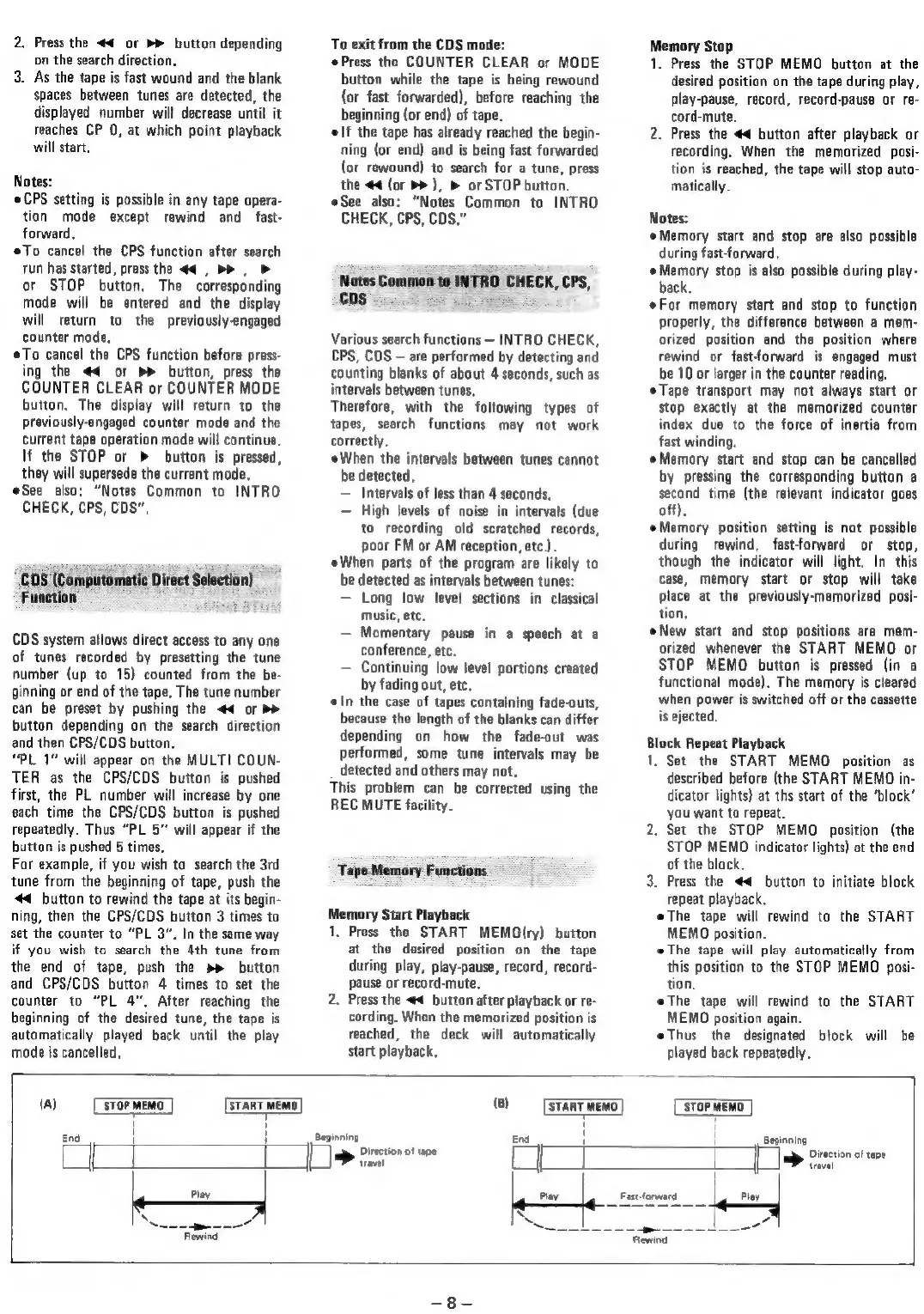
Memory
Start
Playback
1,
Press
the
START
MEMO(ry)
button
at
the
desired
position
on
the
tape
during
play,
play-pause,
record,
record-
pause
or
record-mute.
2.
Press
the
4
button
after
playback
or
re-
cording.
When
the
memorized
position
is
reached,
the
deck
will
automatically
start
playback,
Memory
Stop
1.
Press
the
STOP
MEMO
button
at
the
desired
position
on
the
tape
during
play,
play-pause,
record,
record-pause
or
re-
cord-mute.
2.
Press
the
#4
button
after
playback
or
recording,
When
the
memorized
pasi-
tion
is
reached,
the
tape
will
stop
auto-
matically.
Notes:
Memory
start
and
stop
are
also
possible
during
fast-forward.
Memory
stop
is
also
possible
during
play-
back.
For
memory
start
and
stop
to
function
properly,
the
difference
between
a
mem-
orized
position
and
the
position
where
rewind
or
fast-forward
is
engaged
must
be
10
or
larger
in
the
counter
reading,
Tape
transport
may
not
always
start
or
stop
exactly
at
the
memorized
counter
index
due
to
the
force
of
inertia
from
fast
winding,
Memory
start
and
stop
can
be
cancelled
by
pressing
the
corresponding
button
a
second
time
(the
relevant
indicator
goes
off).
Memory
position
setting
is
not
possible
during
rewind,
fast-forward
or
stop,
though
the
indicator
will
light.
In
this
case,
memory
start
or
stop
will
take
place
at
the
previously-memorized
posi-
tion,
New
start
and
stop
positions
are
mem-
orized
whenever
the
START
MEMO
or
STOP
MEMO
button
is
pressed
(in
a
functional
mode).
The
memory
is
cleared
when
power
is
switched
off
or
the
cassette
is
ejected.
Block
Repeat
Playback
1.
Set
the
START
MEMO
position
as
described
before
(the
START
MEMO
in-
dicator
lights)
at
ths
start
of
the
‘block’
you
want
to
repeat.
2.
Set
the
STOP
MEMO
position
(the
STOP
MEMO
indicator
lights)
at
the
end
of
the
black.
3.
Press
the
<4
button
to
initiate
block
repeat
playback.
eThe
tape
will
rewind
to
the
START
MEMO
position.
The
tape
will
play
automatically
from
this
position
to
the
STOP
MEMO
pasi-
tion.
eThe
tape
will
rewind
to
the
START
MEMO
position
again.
eThus
the
designated
block
will
be
played
back
repeatedly.
(a)
STOP
MEMO
START
MEMO
(8)
START
MEMO
}
‘STOP
MEMO
T
End
H
“Beginning
Sia
!
T
|
Hl
Beginning
Direction
of
tape
travel
Play
a
Rewind
>
Diection
of
ape
travel
2
Fastforward
Play
~

Related product manuals