EasyManua.ls Logo

Teac V-909RX - Page 12

Teac V-909RX
69 pages
Print Icon
To Next Page IconTo Next Page
To Previous Page IconTo Previous Page
Loading...
12
V-909RX/V-707RX/V-707R-
48
TAPE
PATH
CHECK
1.
Load
and
play
a
TEAC
MTT-902
mirror
tape
(C-90)
and
check
for
any
noticeable
tape
curling
on
the
sides
of
the
record-playback
head
guide.
2.
Adjust
the
height
of
the
REC/PLAY
head
when
curling
is
evident.
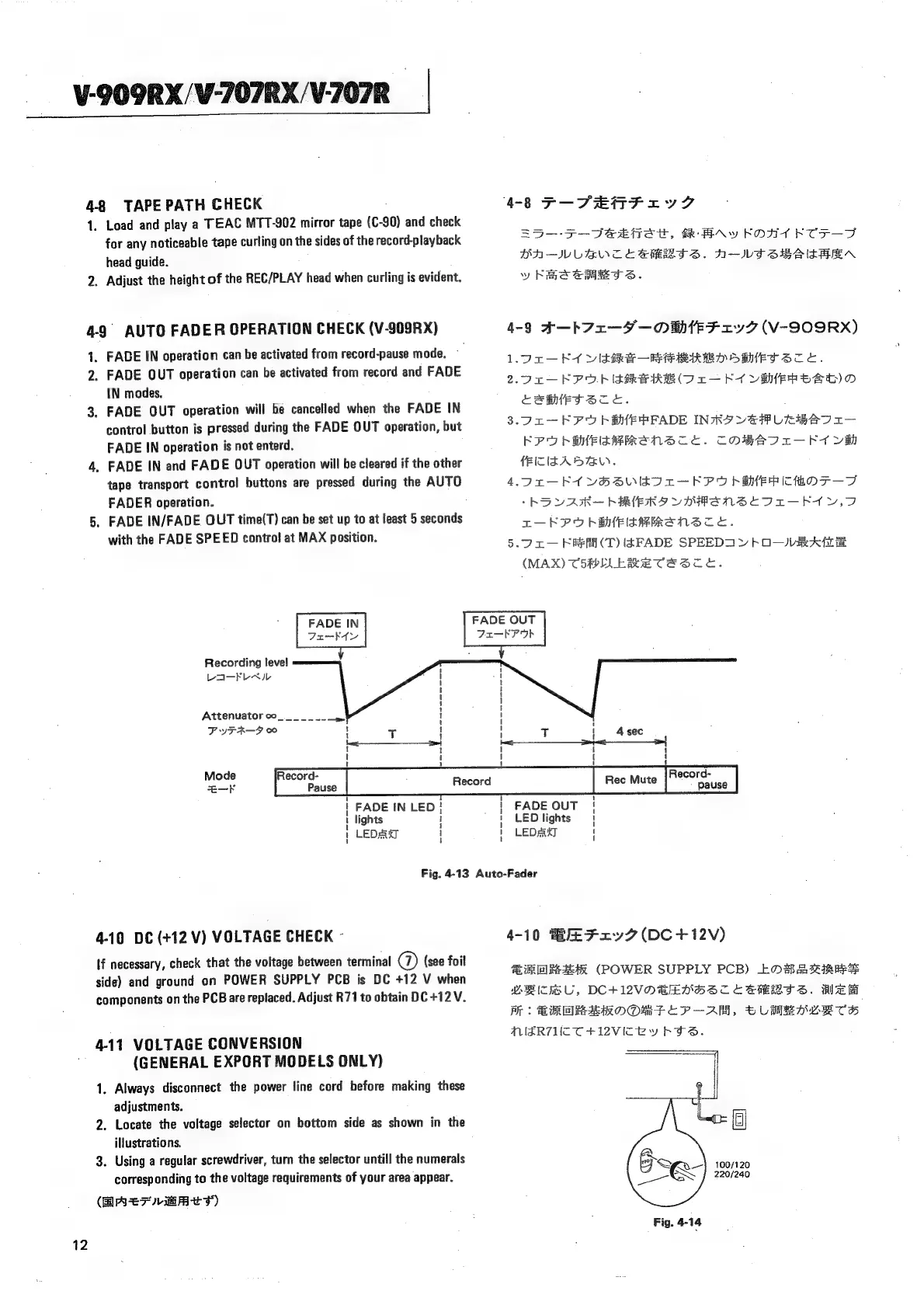
4-9
AUTO
FADER
OPERATION
CHECK
(V-909RX)
1,
FADE
IN
operation
can
be
activated
from
record-pause
mode.
~
2.
FADE
OUT
operation
can
be
activated
from
record
and
FADE
IN
modes.
3.
FADE
QUT
operation
will
be
cancelled
when
the
FADE
IN
control
button
is
pressed
during
the
FADE
OUT
operation,
but
FADE
IN
operation
is
not
enterd.
4,
FADE
IN
and
FADE
OUT
operation
will
be
cleared
if
the
other
tape
transport
control
buttons
are
pressed
during
the
AUTO
FADER
operation.
5.
FADE
IN/FADE
OUT
time(T)
can
be
set
up
to
at
least
5
seconds
with
the
FADE
SPEED
contro!
at
MAX
position.
:
FADE
IN
Tu~-kKt{y
Recording
level
LI-FLAIL
Attenuator
oo
PIFA—-F
$e
a
1
!
1
t
#
1
'
!
1
1
1
1
1
1
4-8
F—PEDFrVZ
S5-—-F-DeeitSt,
BR
HAY
FORT
FTF
TF
DA-—IWLEWCE
SHERI
S.
N-IVI
SHAAN
y
hme
em
S.
4-9
A-—b
Az
—F—OEF
27
(V-SO9RX)
LOT
Ef
VUIsSshe
PRED
OBHET
STE.
2.902
KPO
IARI
(Or
RT
VEEP
OSD)
O
ceaerece.
;
3.05
—-KPURSMEPFADE
INRA
VATLERATI
I
KPUSMEISHHReENS
CL.
COBAIT—FAVH
fEITIZA
DAY.
4.0n—-K1
VoHSUILIT—
KPO
EMER
ITHOFT—T
-hOVAR—
hERERD
UO
ANSEDI-FIY.D
r—KPUbSHEIAHRANS
ce.
5.7
2c—
KReAA(T)
IAFADE
SPEEDI
Y
KOVR
ATE
(MAX)
C5RELLERE
TESTE.
FADE
OUT
Fxu—kKP
Ob
Mode
Record-
Record-
FADE
IN
LED}
lights
LED#axy
1
t
1
i
FADE
OUT
!
LED
lights
|
LED
sak]
|
Fig.
4-13
Auto-Fader
4-10
DC
(+12
V)
VOLTAGE
CHECK
-
If
necessary,
check
that
the
voltage
between
terminal
®
(see
foil
side)
and
ground
on
POWER
SUPPLY
PCB
is
DC
+12
V
when
components
on
the
PCB
are
replaced.
Adjust
R71
to
obtain
DC
+1
2V.
4-11
VOLTAGE
CONVERSION
(GENERAL
EXPORT
MODELS
ONLY)
1.
Always
disconnect
the
power
line
cord
before
making
these
adjustments,
2.
Locate
the
voltage
selector
on
bottom
side
as
shown
in
the
illustrations,
3.
Using
a
regular
screwdriver,
turn
the
selector
untill
the
numerals
corresponding
to
the
voltage
requirements
of
your
area
appear.
(BASF
EBts)
4-10
BEFxry7
(DC+12V)
SVE
(POWER
SUPPLY
PCB)
EL
#8dch3etaneS$
VBC
U,
DC+WVOBEMHSCE
SHRI
S.
HER
MW:
BRR
AROOmMPTEP—-AM.
bLUMBADETH
MERTUTTHIZVIZEY
KTS.

Related product manuals