EasyManua.ls Logo

Teac W-415 - Name of each Control

Teac W-415
15 pages
Print Icon
To Next Page IconTo Next Page
To Previous Page IconTo Previous Page
Loading...
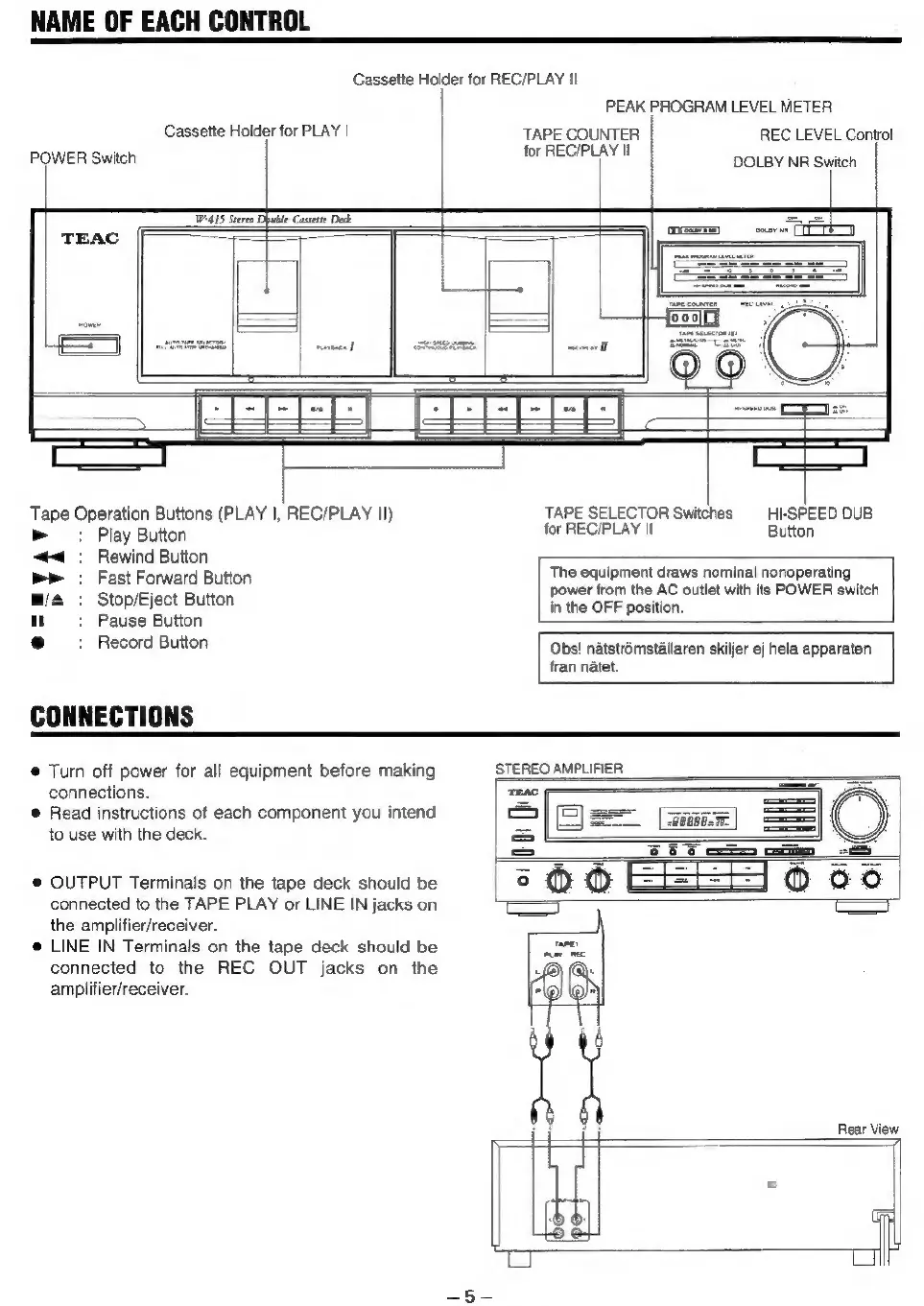
NAME
OF
EACH
CONTROL
Cassette
Holder
for
REC/PLAY
II
Cassette
Holder
for
PLAY
|
POWER
Switch
W415
Stereo
Dpuble
Cassette
Deck
|
Tape
Operation
Buttons
(PLAY
|,
REC/PLAY
II)
»
=:
Play
Button
“4:
Rewind
Button
mr
.
Fast
Forward
Button
@/4
:
Stop/Eject
Button
PEAK
PROGRAM
LEVEL
METER
TAPE
COUNTER
REC
LEVEL
Control
PLAY
I
mrReGrTS
DOLBY
NR
Switch
TAPE
SELECTOR
Switches
HI-SPEED
DUB
for
REC/PLAY
II
Button
The
equipment
draws
nominal
nonoperating
power
from
the
AC
outlet
with
its
POWER
switch
in
the
OFF
position.
1}
:
Pause
Button
®
+
Record
Button
Obs!
natstromstallaren
skiljer
ej
hela
apparaten
fran
natet.
®
Turn
off
power
for
all
equipment
before
making
STEREO
AMPLIFIER
connections.
©
Read
instructions
of
each
component
you
intend
to
use
with
the
deck.
®
OUTPUT
Terminals
on
the
tape
deck
should
be
connected
to
the
TAPE
PLAY
or
LINE
IN
jacks
on
the
amplifier/receiver.
@
LINE
IN
Terminals
on
the
tape
deck
should
be
connected
to
the
REC
OUT
jacks
on
the
amplifier/receiver.
Rear View
1
a
Hh

Related product manuals