EasyManua.ls Logo

Teac W-415 - Continuous Playback

Teac W-415
15 pages
Print Icon
To Next Page IconTo Next Page
To Previous Page IconTo Previous Page
Loading...
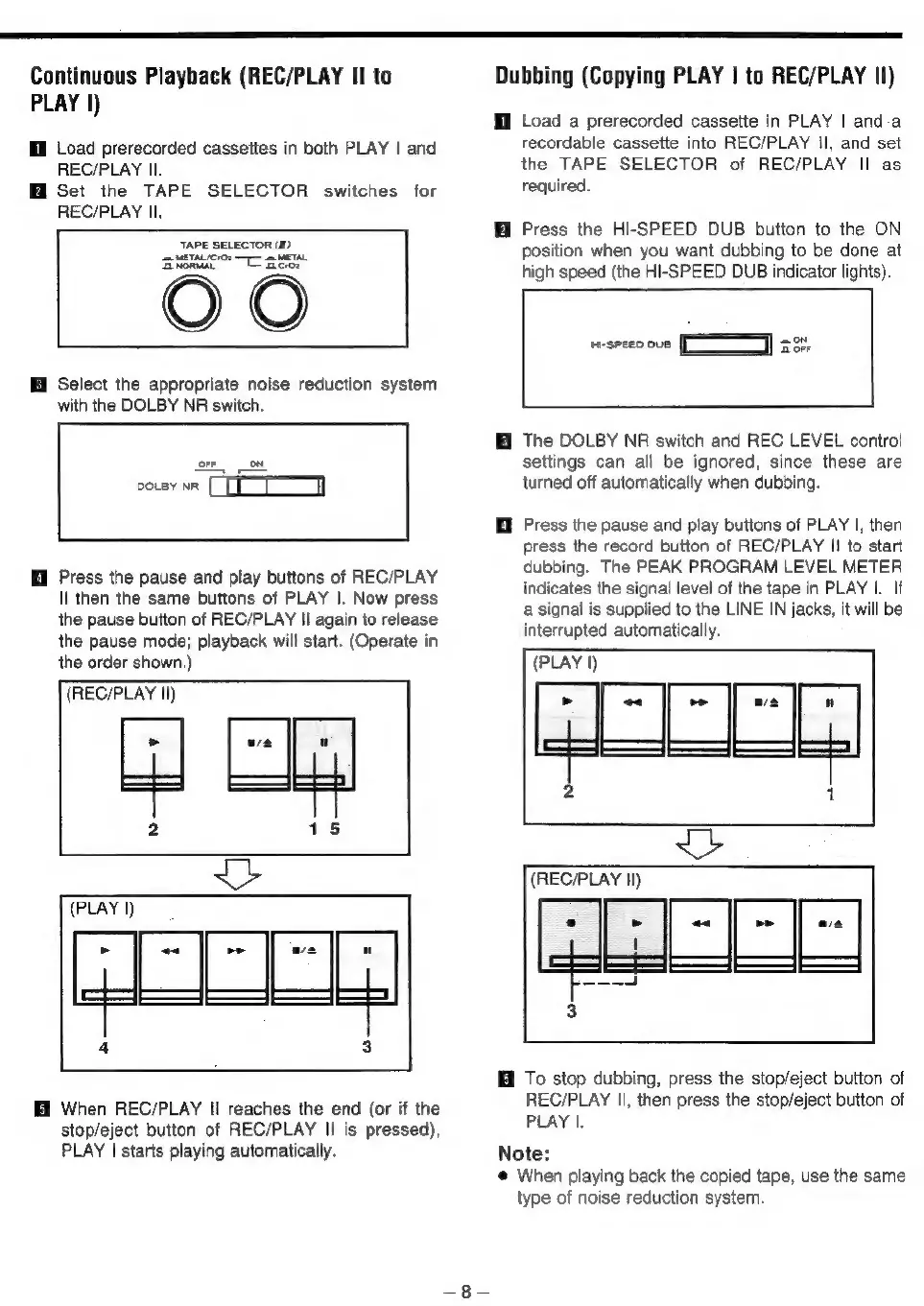
Continuous
Playback
(REC/PLAY
II
to
PLAY
I)
Il
Load
prerecorded
cassettes
in
both
PLAY
|
and
REC/PLAY
Il.
Set
the
TAPE
SELECTOR
switches
for
REC/PLAY
Il.
TAPE
SELECTOR
(1D)
Senco
ase
OO
Select
the
appropriate
noise
reduction
system
with
the
DOLBY
NR
switch.
DOLBY
NR
Ml
Press
the
pause
and
play
buttons
of
REC/PLAY
Il
then
the
same
buttons
of
PLAY
|.
Now
press
the
pause
button
of
REC/PLAY
Il
again
to
release
the
pause
mode;
playback
will
start.
(Operate
in
the
order
shown.)
(REC/PLAY
Il)
+
When
REC/PLAY
II
reaches
the
end
(or
if
the
stop/eject
button
of
REC/PLAY
Il
is
pressed),
PLAY
|
starts
playing
automatically.
Dubbing
(Copying
PLAY
|
to
REC/PLAY
Il)
Hl
Load
a
prerecorded
cassette
in
PLAY
|
anda
recordable
cassette
into
REC/PLAY
Il,
and
set
the
TAPE
SELECTOR
of
REC/PLAY
II
as
required.
i
Press
the
HI-SPEED
DUB
button
to
the
ON
position
when
you
want
dubbing
to
be
done
at
high
speed
(the
HI-SPEED
DUB
indicator
lights).
weseen
oun
J
a
The
DOLBY
NR
switch
and
REC
LEVEL
control
settings
can
all
be
ignored,
since
these
are
turned
off
automatically
when
dubbing.
@
Press
the
pause
and
play
buttons
of
PLAY
|,
then
press
the
record
button
of
REC/PLAY
|!
to
start
dubbing.
The
PEAK
PROGRAM
LEVEL
METER
indicates
the
signal
level
of
the
tape
in
PLAY
I.
If
a
signal
is
supplied
to
the
LINE
IN
jacks,
it
will
be
interrupted
automatically.
(PLAY
|)
GCOoE
(REC/PLAY
Il)
ET
——-J
To
stop
dubbing,
press
the
stop/eject
button
of
REC/PLAY
Il,
then
press
the
stop/eject
button
of
PLAY
|.
Note:
@
When
playing
back
the
copied
tape,
use
the
same
type
of
noise
reduction
system.

Related product manuals