EasyManua.ls Logo

Teac W-415 - Page 7

Teac W-415
15 pages
Print Icon
To Next Page IconTo Next Page
To Previous Page IconTo Previous Page
Loading...
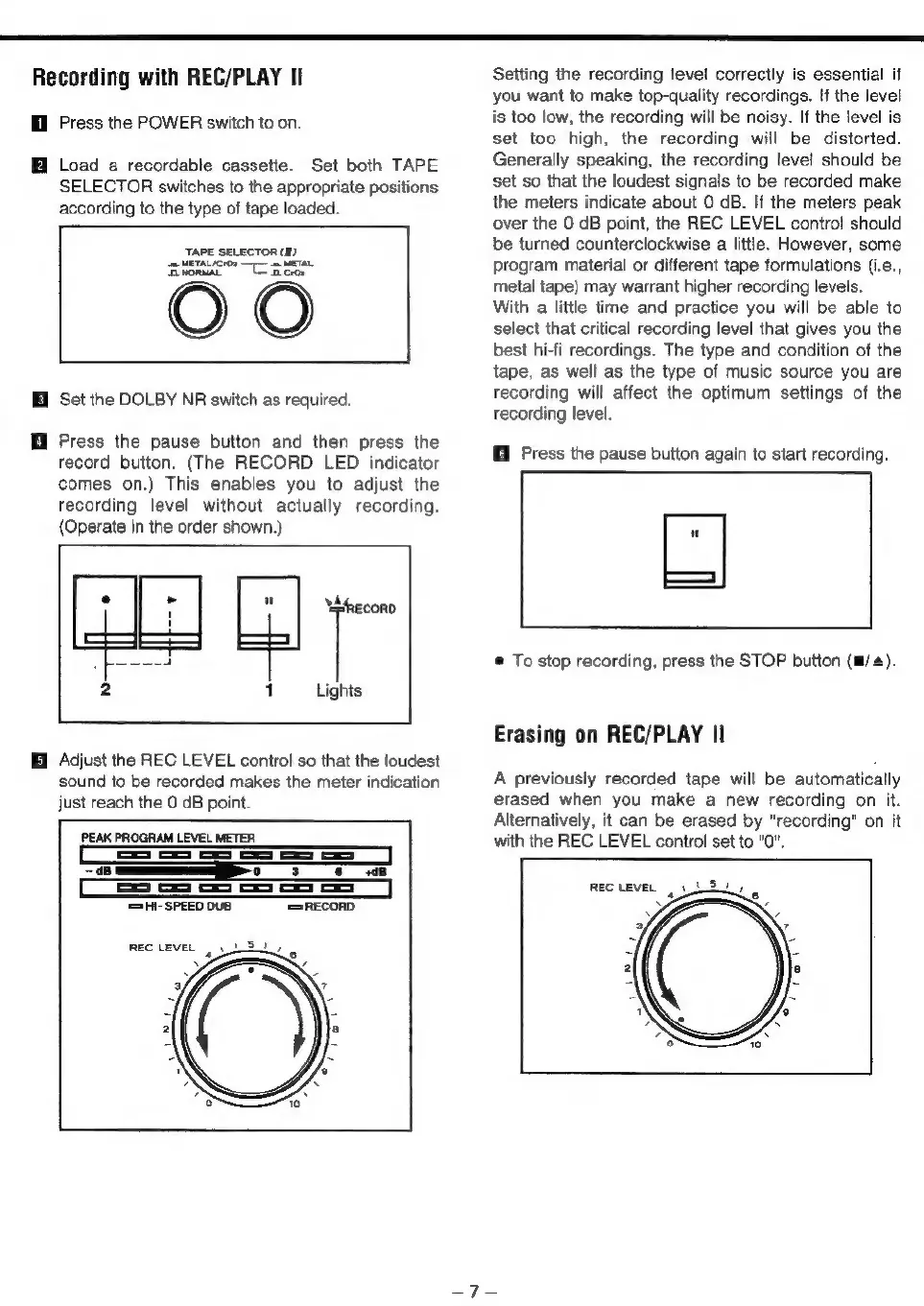
Recording
with
REC/PLAY
Il
Hl
Press
the
POWER
switch
to
on.
ff
Load
a
recordable
cassette.
Set
both
TAPE
SELECTOR
switches
to
the
appropriate
positions
according
to
the
type
of
tape
loaded.
TAPE
SELECTOR
(I)
SE
METAL/CrO>
—[—
=
METAL
OO
i
Set
the
DOLBY
NR
switch
as
required.
i
Press
the
pause
button
and
then
press
the
record
button.
(The
RECORD
LED
indicator
comes
on.)
This
enables
you
to
adjust
the
recording
level
without
actually
recording.
(Operate
in
the
order
shown.)
an
A
ae
2
1
Lights
Adjust
the
REC
LEVEL
control
so
that
the
loudest
sound
to
be
recorded
makes
the
meter
indication
just
reach
the
0
dB
point.
PEAK
PROGRAM
LEVEL
METER
SS
oS
es
os
a
oe
oS
78
'SHI-SPEED
DUB
‘[=RECORD
REC
LEVEL
|
St,
Setting
the
recording
level
correctly
is
essential
if
you
want
to
make
top-quality
recordings.
If
the
level
is
too
low,
the
recording
will
be
noisy.
If
the
level
is
set
too
high,
the
recording
will
be
distorted.
Generally
speaking,
the
recording
level
should
be
set
so
that
the
loudest
signals
to
be
recorded
make
the
meters
indicate
about
0
dB.
If
the
meters
peak
over
the
0
dB
point,
the
REC
LEVEL
control
should
be
turned
counterclockwise
a
little.
However,
some
program
material
or
different
tape
formulations
(i.e.,
metal
tape)
may
warrant
higher
recording
levels.
With
a
little
time
and
practice
you
will
be
able
to
select
that
critical
recording
level
that
gives
you
the
best
hi-fi
recordings.
The
type
and
condition
of
the
tape,
as
well
as
the
type
of
music
source
you
are
recording
will
affect
the
optimum
settings
of
the
recording
level.
Press
the
pause
button
again
to
start
recording.
®
To
stop
recording,
press
the
STOP
button
(im,
Erasing
on
REC/PLAY
II
A
previously
recorded
tape
will
be
automatically
erased
when
you
make
a
new
recording
on
it.
Alternatively,
it
can
be
erased
by
"recording"
on
it
with
the
REC
LEVEL
control
set
to
"0".

Related product manuals