EasyManua.ls Logo

Teac W-4200 - Page 6

Teac W-4200
11 pages
Print Icon
To Next Page IconTo Next Page
To Previous Page IconTo Previous Page
Loading...
OPERATIONS
Loading
a
Cassette
Tape
We
recommend
that
you
load
the
cassette
tape
in
the
PLAY
|
compartment
when
playing
a
single
tape,
so
that
you
can
use
the
pause
feature
and
tape
counter.
Mi
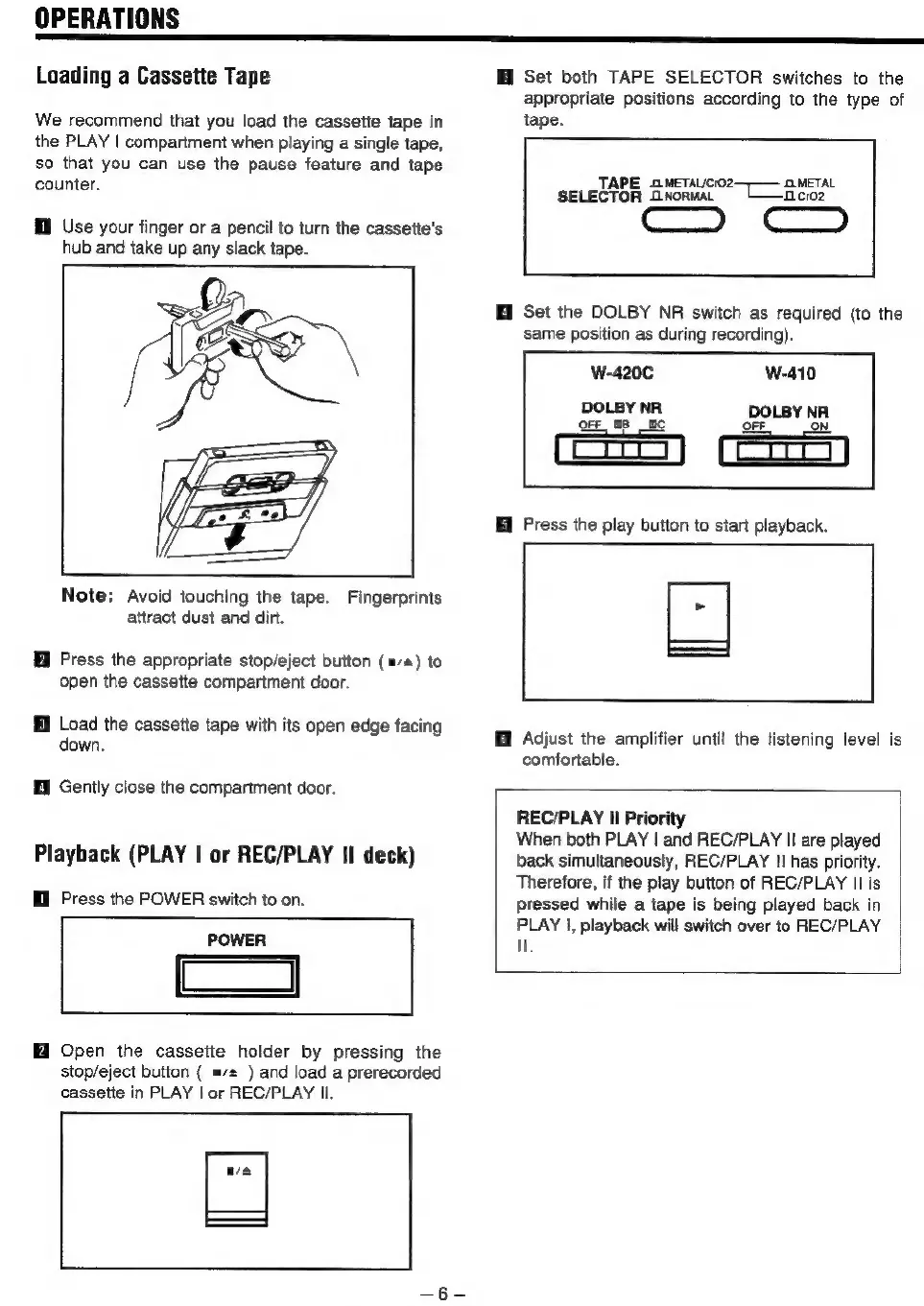
Use
your
finger
or
a
pencil
to
turn
the
cassette's
hub and
take
up
any
slack
tape.
Note:
Avoid
touching
the
tape.
Fingerprints
attract
dust
and
dirt.
Press
the
appropriate
stop/eject
button
(m/s)
to
open
the
cassette
compartment
door.
Load
the
cassette
tape
with
its
open
edge
facing
down.
fl
Gently
close
the
compartment
door.
Playback
(PLAY
|
or
REC/PLAY
II
deck)
Ml
Press
the
POWER
switch
to
on.
POWER
=
HI
Open
the
cassette
holder
by
pressing
the
stop/eject
button
(
=/+
)
and
load
a
prerecorded
cassette
in
PLAY
|
or
REC/PLAY
Il.
i
Set
both
TAPE
SELECTOR
switches
to
the
appropriate
positions
according
to
the
type
of
tape.
TAPE
aMetaucroz:
METAL
SELECTOR
ONorwal
CL
—icroz
Cc
i
Set
the
DOLBY
NR
switch
as
required
(to
the
same
position
as
during
recording).
W-420C
W-410
DOLBY
NR
DOLBY
NR
FF
IN
OFF
OB
=
of
=
i
Press
the
play
button
to
start
playback.
Adjust
the
amplifier
until
the
listening
level
is
comfortable.
REC/PLAY
Il
Priority
When
both
PLAY
|
and
REC/PLAY
II
are
played
back
simultaneously,
REC/PLAY
I!
has
priority.
Therefore,
if
the
play
button
of
REC/PLAY
II
is
pressed
while
a
tape
is
being
played
back
in
PLAY
I,
playback
will
switch
over
to
REC/PLAY
Ie

Related product manuals