EasyManua.ls Logo

Teac W-520R - Page 15

Teac W-520R
17 pages
Print Icon
To Next Page IconTo Next Page
To Previous Page IconTo Previous Page
Loading...
Timer-Controlled
Operation
By
using
the
W-520R
with
an
audio
timer,
tapes
can
be
recorded
or
played
back
at
any
preset
time.
If
tapes
are
loaded
in
both
decks,
you
can
also
start
continuous
playback
in
this
way.
Amplifier
Audio
Timer
a
0
Lo
AC
power
Timer
recording
(TAPE
II
only)
Recording
a
broadcasting
program:
1.
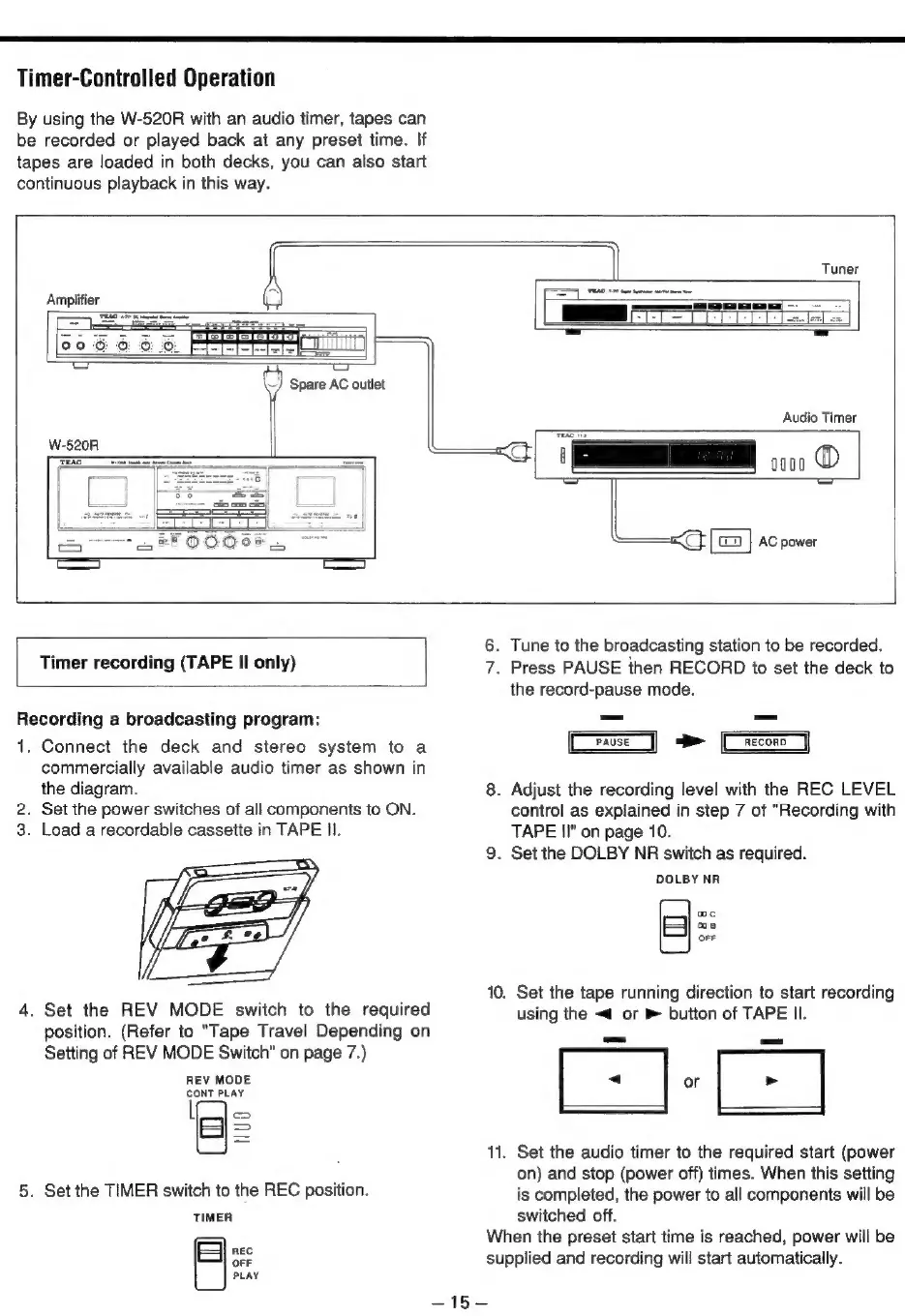
Connect
the
deck
and
stereo
system
to
a
commercially
available
audio
timer
as
shown
in
the
diagram.
Set
the
power
switches
of
all
components
to
ON.
Load
a
recordable
cassette
in
TAPE
II.
.
Set
the
REV
MODE
switch
to
the
required
position.
(Refer
to
"Tape
Travel
Depending
on
Setting
of
REV
MODE
Switch"
on
page
7.)
REV
MODE
CONT
PLAY
lf]
>
.
Set
the
TIMER
switch
to
the
REC
position.
TIMER
REC
OFF
PLAY
46s
bad
10.
11.
Tune
to
the
broadcasting
station
to
be
recorded.
.
Press
PAUSE
then
RECORD
to
set
the
deck
to
the
record-pause
mode.
RECORD
>
Adjust
the
recording
level
with
the
REC
LEVEL
control
as
explained
in
step
7
of
"Recording
with
TAPE
II"
on
page
10.
Set
the
DOLBY
NR
switch
as
required.
DOLBY
NR
Set
the
tape
running
direction
to
start
recording
using
the
<4
or
B
button
of
TAPE
Il.
[
-
|-
Set
the
audio
timer
to
the
required
start
(power
on)
and
stop
(power
off)
times.
When
this
setting
is
completed,
the
power
to
all
components
will
be
switched
off.
mc
os
OFF
When
the
preset
start
time
is
reached,
power
will
be
supplied
and
recording
will
start
automatically.