EasyManua.ls Logo

Teac W-520R - Page 14

Teac W-520R
17 pages
Print Icon
To Next Page IconTo Next Page
To Previous Page IconTo Previous Page
Loading...
SSS
CD
Synchro
Dubbing
Start
of
CD
synchro
dubbing
By
connecting
the
deck
to
a
TEAC
CD
synchro
The
shaded
portions
(J)
indicate
the
CD
compatible
CD
player
(such
as
the
CD-Z5000
or
CD-
synchro
dubbing
mode
in
the
following.
P4000)
which
has
a
CD/DECK
SYNC
terminal
on
its
rear
panel,
dubbing
(recording)
synchronized
with
Deck’s
CD
SYNC
button
ON
the
CD
player
is
possible.
Deck
operation
Stop
Recording
CD
player
operation
Stop
Playback
»)
1.
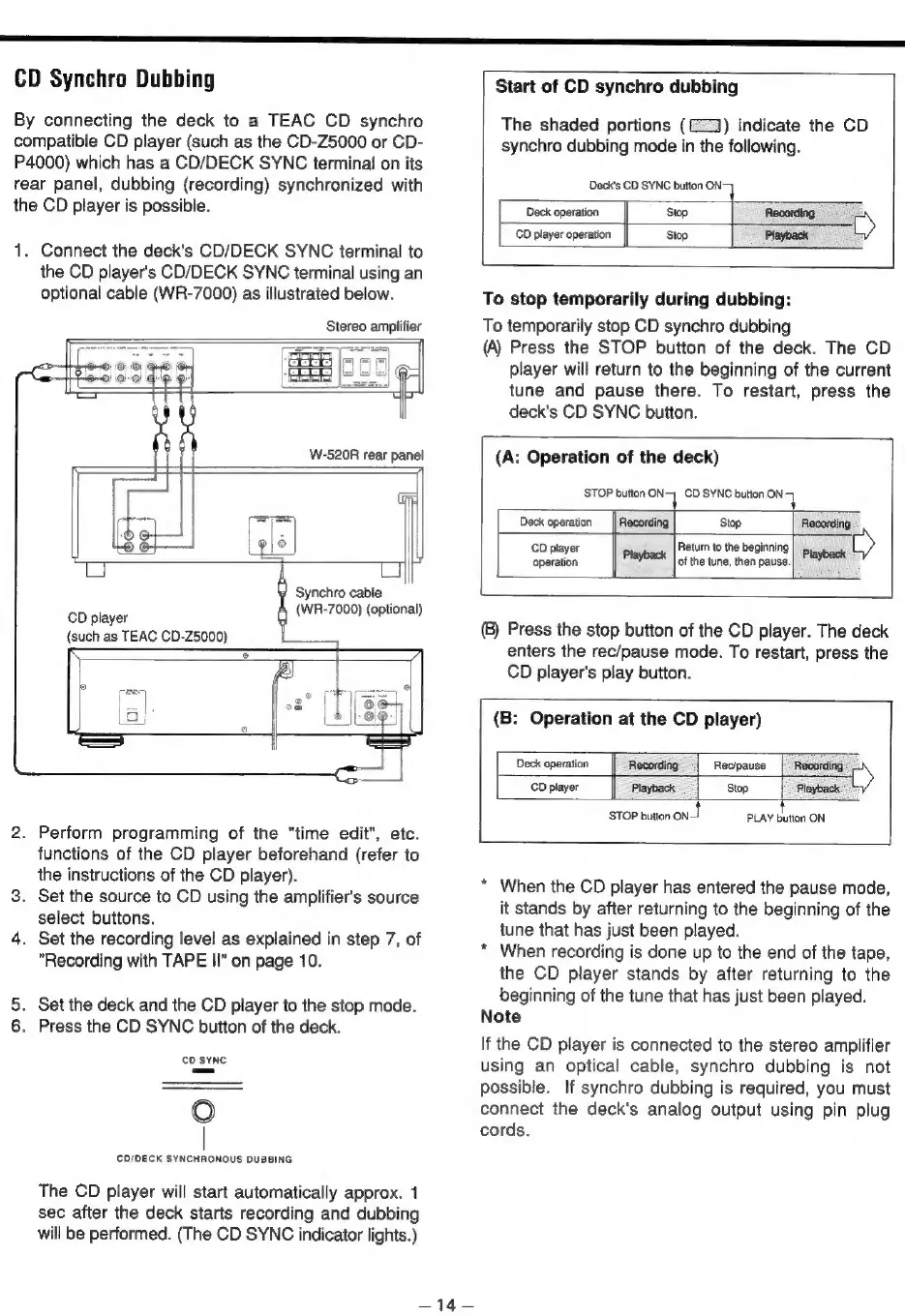
Connect
the
deck's
CD/DECK
SYNC
terminal
to
the
CD
player's
CD/DECK
SYNC
terminal
using
an
optional
cable
(WR-7000)
as
illustrated
below.
To
stop
temporarily
during
dubbing:
Stereo
amplifier
To
temporarily
stop
CD
synchro
dubbing
(A)
Press
the
STOP
button
of
the
deck.
The
CD
player
will
return
to
the
beginning
of
the
current
tune
and
pause
there.
To
restart,
press
the
deck's
CD
SYNC
button.
(A:
Operation
of
the
deck)
STOP
button
ON
CD
SYNC
button
ON
71
[Fel
Deck
operation
Recording
Stop
Recording
g
6
CD
player
Return
to
the
beginning
=
operation
Playback
|
of
the
tune,
then
pause.|
PlaYoack
Synchro
cable
CD
player
(WR-7000)
(optional)
(such
as
TEAC
CD-25000)
®)
Press
the
stop
button
of
the
CD
player.
The
deck
enters
the
rec/pause
mode.
To
restart,
press
the
CD
player's
play
button.
(B:
Operation
at
the
CD
player)
Deck
operation
Recording
Recipause
|
Recording
CD
player
Playback
Stop
Playback
STOP
button
ont
PLAY
button
ON
2.
Perform
programming
of
the
"time
edit",
etc.
functions
of
the
CD
player
beforehand
(refer
to
the
instructions
of
the
CD
player).
+
3.
Set
the
source
to
CD
using
the
amplifier's
source
select
buttons.
4.
Set
the
recording
level
as
explained
in
step
7,
of
‘
"Recording
with
TAPE
II"
on
page
10.
When
the
CD
player
has
entered
the
pause
mode,
it
stands
by
after
returning
to
the
beginning
of
the
tune
that
has
just
been
played.
When
recording
is
done
up
to
the
end
of
the
tape,
the
CD
player
stands
by
after
returning
to
the
5.
Set
the
deck
and
the
CD
player
to
the
stop
mode.
beginning
of
the
tune
that
has
just
been
played.
6.
Press
the
CD
SYNC
button
of
the
deck.
Note
If
the
CD
player
is
connected
to
the
stereo
amplifier
cpeine
using
an
optical
cable,
synchro
dubbing
is
not
possible.
If
synchro
dubbing
is
required,
you
must
Oo
connect
the
deck's
analog
output
using
pin
plug
|
cords.
CD/DECK
SYNCHRONOUS
DUBBING
The
CD
player
will
start
automatically
approx.
1
sec
after
the
deck
starts
recording
and
dubbing
will
be
performed.
(The
CD
SYNC
indicator
lights.)
a
tgs