EasyManua.ls Logo

Teac W-520R - Page 9

Teac W-520R
17 pages
Print Icon
To Next Page IconTo Next Page
To Previous Page IconTo Previous Page
Loading...
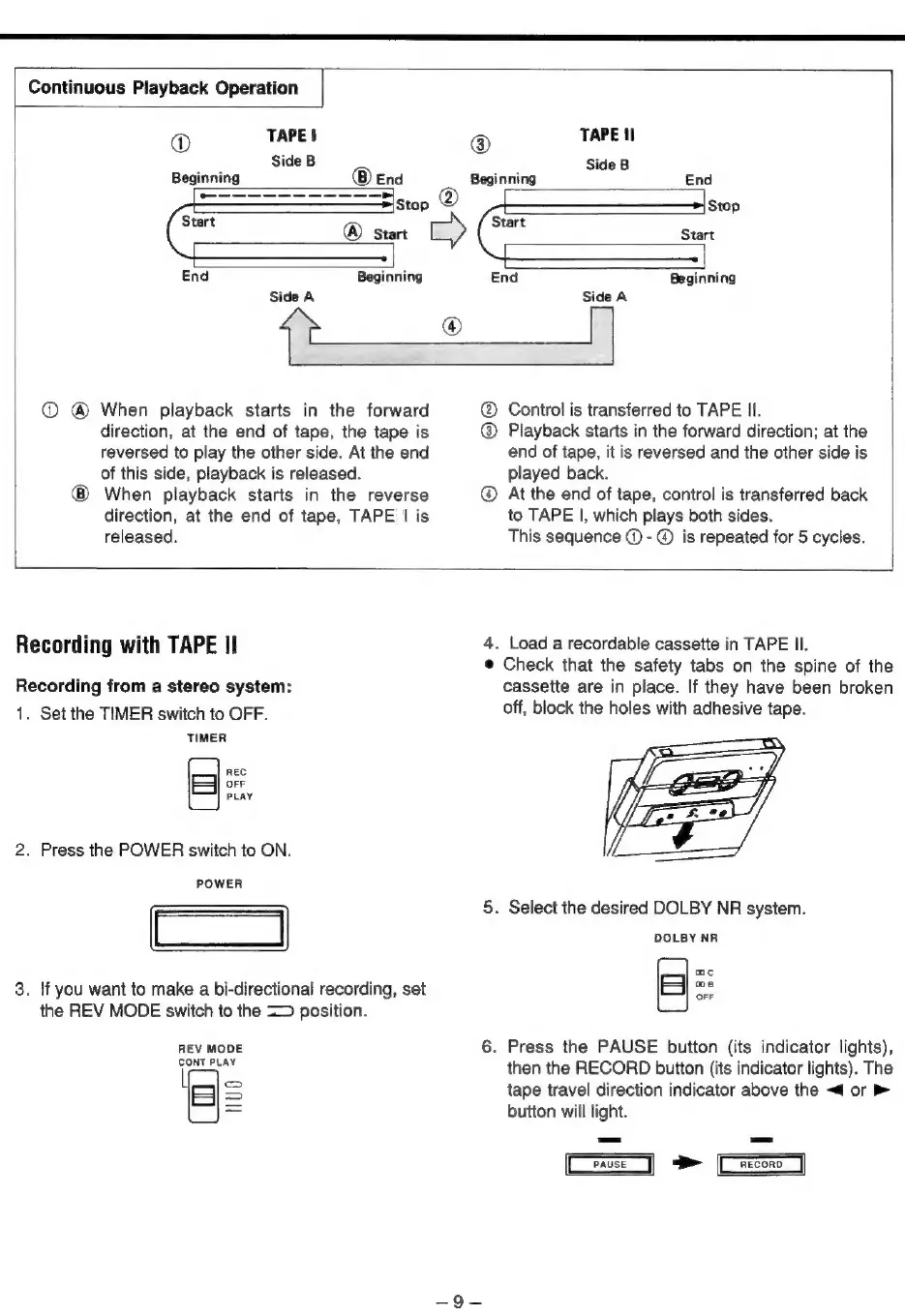
Continuous
Playback
Operation
®@
TAPE
|
®
TAPE
I
Side
B
Side
B
Beginning
End
Beginning
End
a
=\stop
Stop
Start
Start
start
Start
End
Beginning
End
Beginning
Side
A
Side
A
[ee
When
playback
starts
in
the
forward
direction,
at
the
end
of
tape,
the
tape
is
reversed
to
play
the
other
side.
At
the
end
of
this
side,
playback
is
released.
When
playback
starts
in
the
reverse
direction,
at
the
end
of
tape,
TAPE
|
is
released.
Control
is
transferred
to
TAPE
II.
@
Playback
starts
in
the
forward
direction;
at
the
end
of
tape,
it
is
reversed
and
the
other
side
is
played
back.
At
the
end
of
tape,
control
is
transferred
back
to
TAPE
|,
which
plays
both
sides.
This
sequence
@
-
®
is
repeated
for
5
cycles.
Recording
with
TAPE
Il
Recording
from
a
stereo
system:
1.
Set
the
TIMER
switch
to
OFF.
TIMER
2.
Press
the
POWER
switch
to
ON.
POWER
3.
If
you
want
to
make
a
bi-directional
recording,
set
the
REV
MODE
switch
to
the
=>
position.
REC
OFF
PLAY
REV
MODE
CONT
PLAY
(=)
=
4.
Load
a
recordable
cassette
in
TAPE
Il.
©
Check
that
the
safety
tabs
on
the
spine
of
the
cassette
are
in
place.
If
they
have
been
broken
off,
block
the
holes
with
adhesive
tape.
5.
Select
the
desired
DOLBY
NR
system.
DOLBY
NR
6.
Press
the
PAUSE
button
(its
indicator
lights),
then
the
RECORD
button
(its
indicator
lights).
The
tape
travel
direction indicator
above
the
<4
or
button
will
light.
mc
os
OFF
os
=
Ce
>
Ge

Related product manuals