EasyManua.ls Logo

Teac W-520R - Page 10

Teac W-520R
17 pages
Print Icon
To Next Page IconTo Next Page
To Previous Page IconTo Previous Page
Loading...
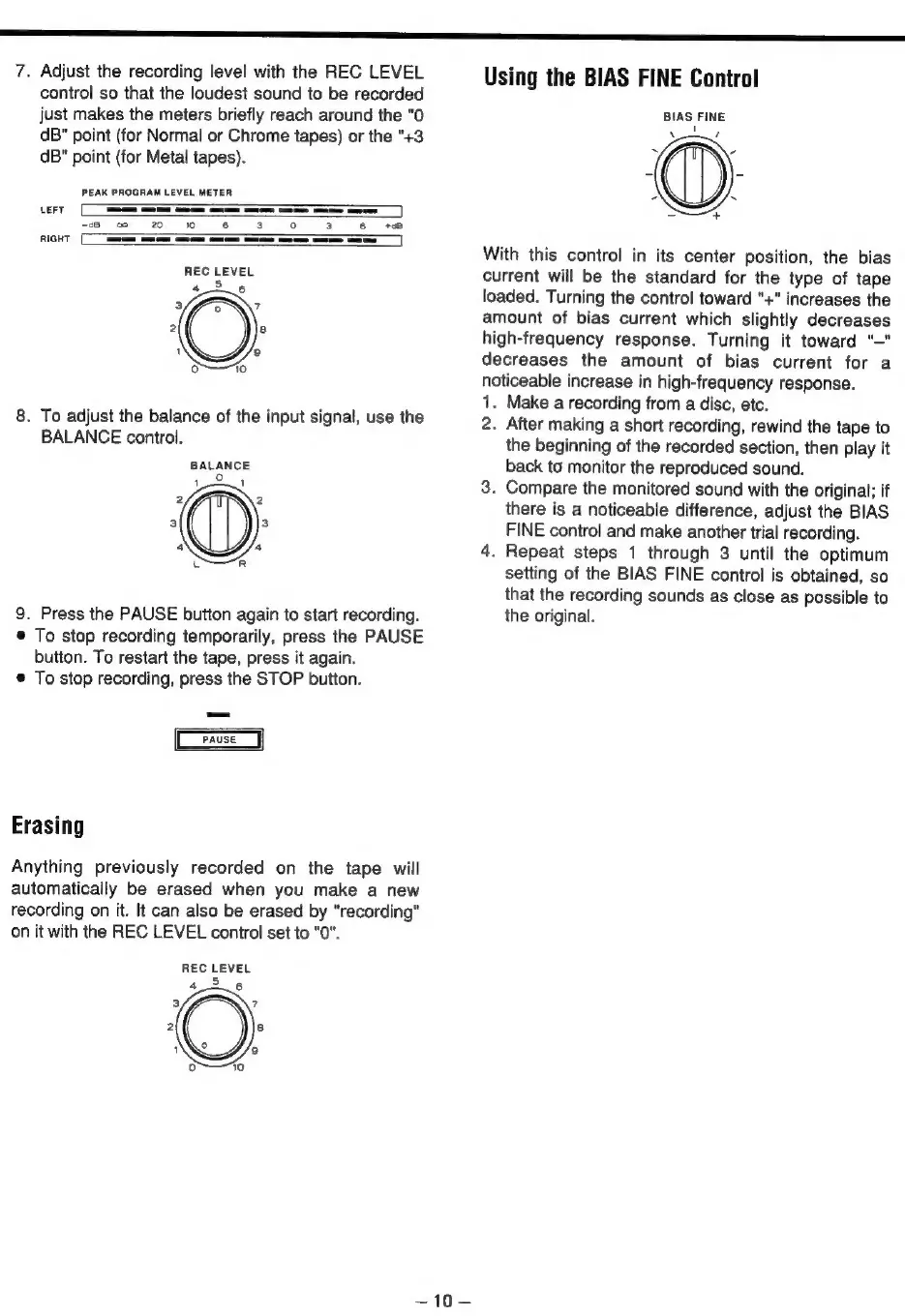
7.
Adjust
the
recording
level
with
the
REC
LEVEL
control
so
that
the
loudest
sound
to
be
recorded
just
makes
the
meters
briefly
reach
around
the
"0
dB"
point
(for
Normal
or
Chrome
tapes)
or
the
"+3
dB"
point
(for
Metal
tapes).
PEAK
PROGRAM
LEVEL
METER
—————
——
co
2
#0
6
———
LEFT
-38
RIGHT
[
REC
LEVEL
45.6
.
To
adjust
the
balance
of
the
input
signal,
use
the
BALANCE
control.
BALANCE
°
1
1
9.
Press
the
PAUSE
button
again
to
start
recording.
©
To
stop
recording
temporarily,
press
the
PAUSE
button.
To
restart
the
tape,
press
it
again.
©
To
stop
recording,
press
the
STOP
button.
Erasing
Anything
previously
recorded
on
the
tape
will
automatically
be
erased
when
you
make
a
new
recording
on
it.
It
can
also
be
erased
by
"recording"
on
it
with
the
REC
LEVEL
control
set
to
"0".
REC
LEVEL
=
{0
Using
the
BIAS
FINE
Control
BIAS
FINE
t
With
this
control
in
its
center
position,
the
bias
current
will
be
the
standard
for
the
type
of
tape
loaded.
Turning
the
control
toward
"+"
increases
the
amount
of
bias
current
which
slightly
decreases
high-frequency
response.
Turning
it
toward
"—"
decreases
the
amount
of
bias
current
for
a
noticeable
increase
in
high-frequency
response.
1.
Make
a
recording
from
a
disc,
etc.
2.
After
making
a
short
recording,
rewind
the
tape
to
the
beginning
of
the
recorded
section,
then
play
it
back
to
monitor
the
reproduced
sound.
.
Compare
the
monitored
sound
with
the
original;
if
there
is
a
noticeable
difference,
adjust
the
BIAS
FINE
control
and
make
another
trial
recording.
.
Repeat
steps
1
through
3
until
the
optimum
setting
of
the
BIAS
FINE
control
is
obtained,
so
that
the
recording
sounds
as
close
as
possible
to
the
original.