EasyManua.ls Logo

Teac W-520R - Page 11

Teac W-520R
17 pages
Print Icon
To Next Page IconTo Next Page
To Previous Page IconTo Previous Page
Loading...
Record
Muting
Operation
(TAPE
II
only)
©
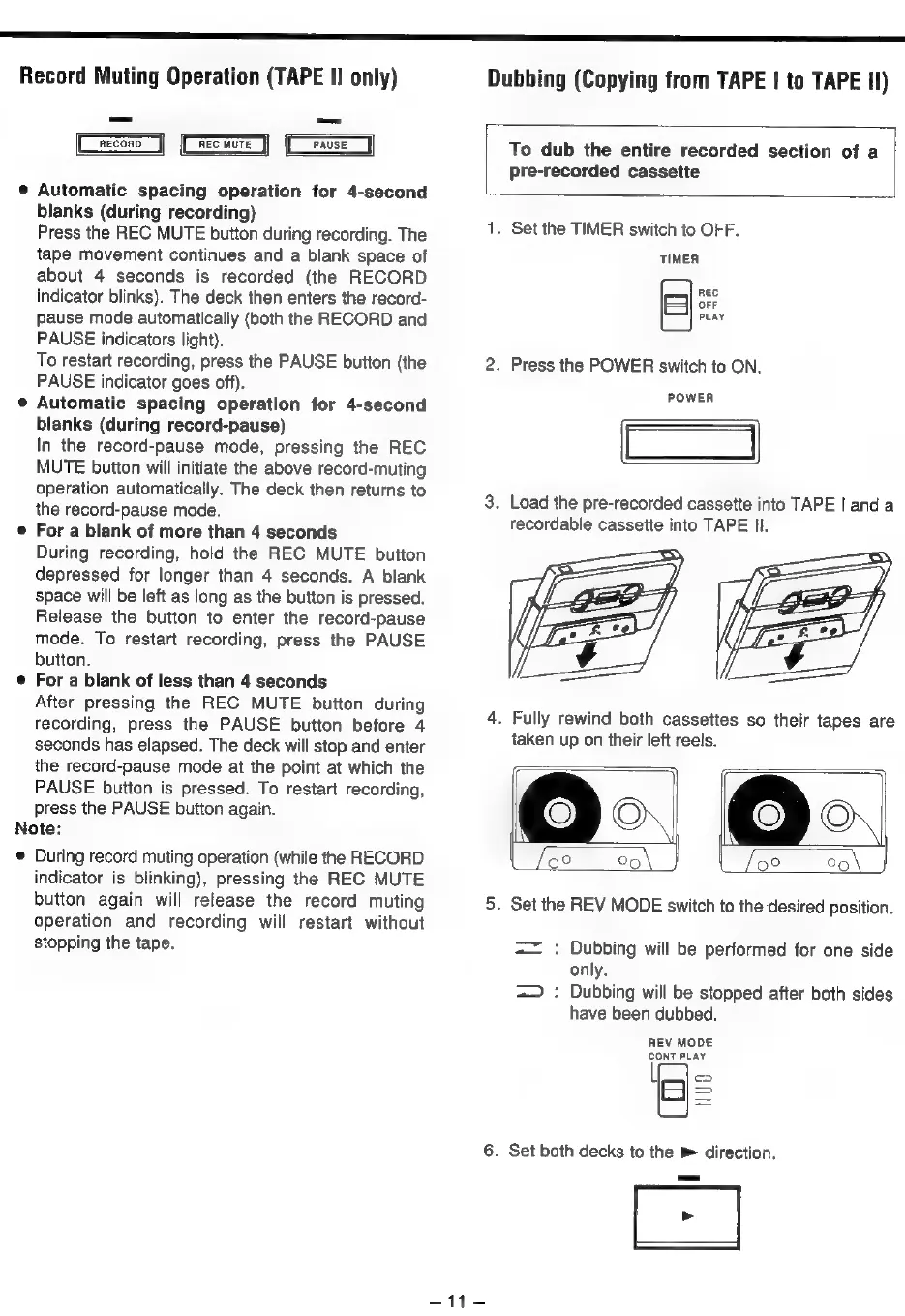
Automatic
spacing
operation
for
4-second
blanks
(during
recording)
Press
the
REC
MUTE
button
during
recording.
The
tape
movement
continues
and
a
blank
space
of
about
4
seconds
is
recorded
(the
RECORD
indicator
blinks).
The
deck
then
enters
the
record-
pause
mode
automatically
(both
the
RECORD
and
PAUSE
indicators
light).
To
restart
recording,
press
the
PAUSE
button
(the
PAUSE
indicator
goes
off).
©
Automatic
spacing
operation
for
4-second
blanks
(during
record-pause)
In
the
record-pause
mode,
pressing
the
REC
MUTE
button
will
initiate
the
above
record-muting
operation
automatically.
The
deck
then
returns
to
the
record-pause
mode.
¢
For
a
blank
of
more
than
4
seconds
During
recording,
hold
the
REC
MUTE
button
depressed
for
longer
than
4
seconds.
A
blank
space
will
be
left
as
long
as
the
button
is
pressed.
Release
the
button
to
enter
the
record-pause
mode.
To
restart
recording,
press
the
PAUSE
button.
©
For
a
blank
of
less
than
4
seconds
After
pressing
the
REC
MUTE
button
during
recording,
press
the
PAUSE
button
before
4
seconds
has
elapsed.
The
deck
will
stop
and
enter
the
record-pause
mode
at
the
point
at
which
the
PAUSE
button
is
pressed.
To
restart
recording,
press
the
PAUSE
button
again.
Note:
@
During
record
muting
operation
(while
the
RECORD
indicator
is
blinking),
pressing
the
REC
MUTE
button
again
will
release
the
record
muting
operation
and
recording
will
restart
without
stopping
the
tape.
Dubbing
(Copying
from
TAPE
|
to
TAPE
II)
To
dub
the
entire
recorded
section
of
a
pre-recorded
cassette
1.
Set
the
TIMER
switch
to
OFF.
TIMER
REC
OFF
PLAY
2.
Press
the
POWER
switch
to
ON.
POWER
3.
Load
the
pre-recorded
cassette
into
TAPE
|
anda
recordable
cassette
into
TAPE
Il.
4.
Fully
rewind
both
cassettes
so
their
tapes
are
taken
up
on
their
left
reels.
5.
Set
the
REV
MODE
switch
to
the
desired
position.
==
:
Dubbing
will
be
performed
for
one
side
only.
=>
:
Dubbing
will
be
stopped
after
both
sides
have
been
dubbed.
REV
MODE
CONT
PLAY
o
>
6.
Set
both
decks
to
the
»
direction.
pe
=
hy