EasyManua.ls Logo

Teac W-700R - Page 8

Teac W-700R
16 pages
Print Icon
To Next Page IconTo Next Page
To Previous Page IconTo Previous Page
Loading...
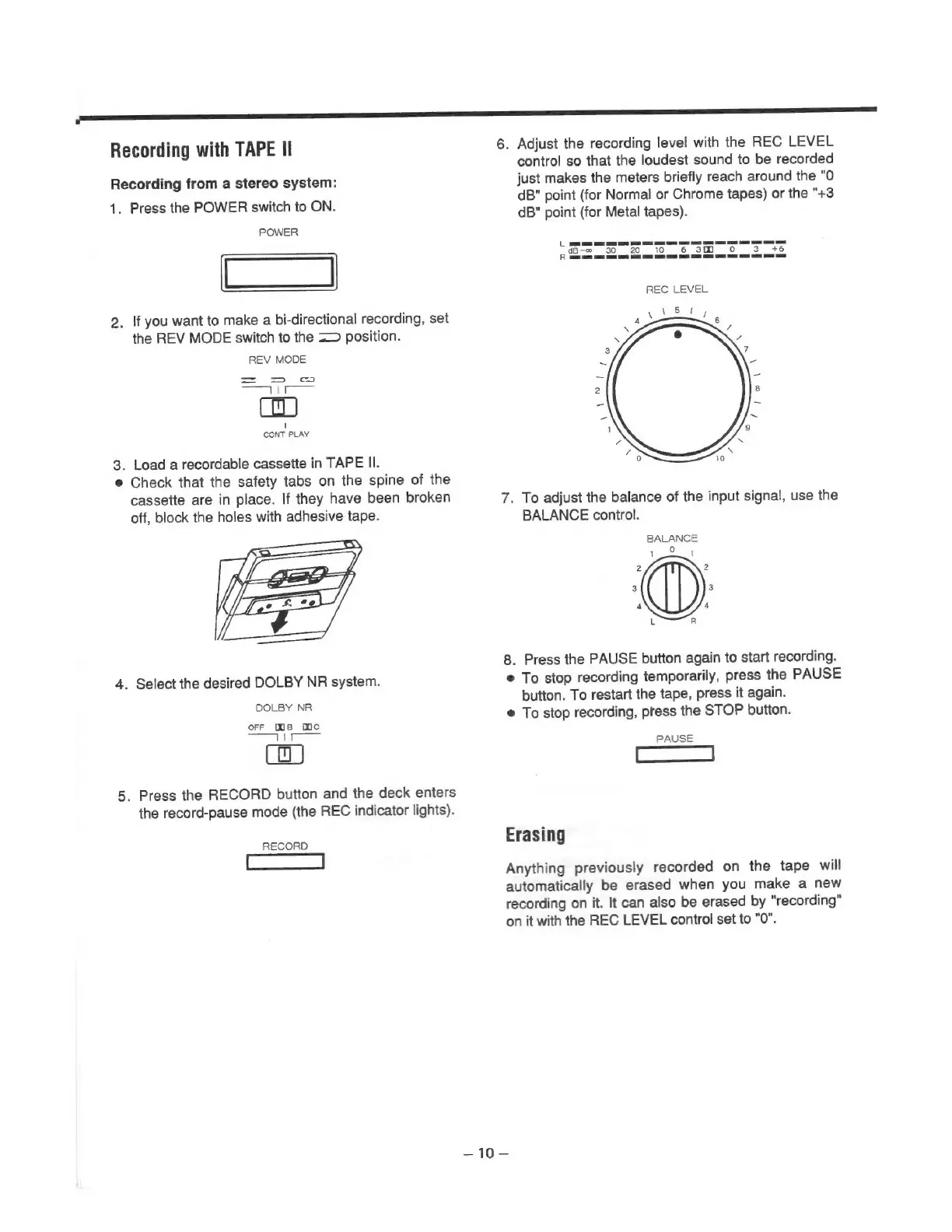
Recording
with
TAPE
Il
Recording
from
a
stereo
system:
1.
Press
the
POWER
switch
to
ON.
POWER
Cd
2.
If
you
want
to
make
a
bi-directional
recording,
set
the
REV
MODE
switch
to
the
=>
position.
REV
MODE
=
=>
cc
Se
dices
1
CONT
PLAY
3.
Load
a
recordable
cassette
in
TAPE
Il.
e
Check
that
the
safety
tabs
on
the
spine
of
the
cassette
are
in
place.
If
they
have
been
broken
off,
block
the
holes
with
adhesive
tape.
4.
Select
the
desired
DOLBY
NR
system.
DOLBY
NR
orF
Ms
mc
an
A!
_
5.
Press
the
RECORD
button
and
the
deck
enters
the
record-pause
mode
(the
REC
indicator
lights).
RECORD
6.
Adjust
the
recording
level
with
the
REC
LEVEL
control
so
that
the
loudest
sound
to
be
recorded
just
makes
the
meters
briefly
reach
around
the
"0
dB"
point
(for
Normal
or
Chrome
tapes)
or
the
"+3
dB"
point
(for
Metal
tapes).
=—_—
=
as
et
ee
==
dB-~-
30
20.
10
6
30
oO
3.
+6
a
a
a
SC
REC
LEVEL
ee
ee
7.
To
adjust
the
balance
of
the
input
signal,
use
the
BALANCE
control.
BALANCE
8.
Press
the
PAUSE
button
again
to
start
recording.
©
To
stop
recording
temporarily,
press
the
PAUSE
button.
To
restart
the
tape,
press
it
again.
e
To
stop
recording,
press
the
STOP
button.
PAUSE
Erasing
Anything
previously
recorded
on
the
tape
will
automatically
be
erased
when
you
make
a
new
recording
on
it.
It
can
also
be
erased
by
"recording"
on
it
with
the
REC
LEVEL
control
set
to
"0".
—10
=

Related product manuals