7
Time interval of Timer
Channel (Comfort) feature
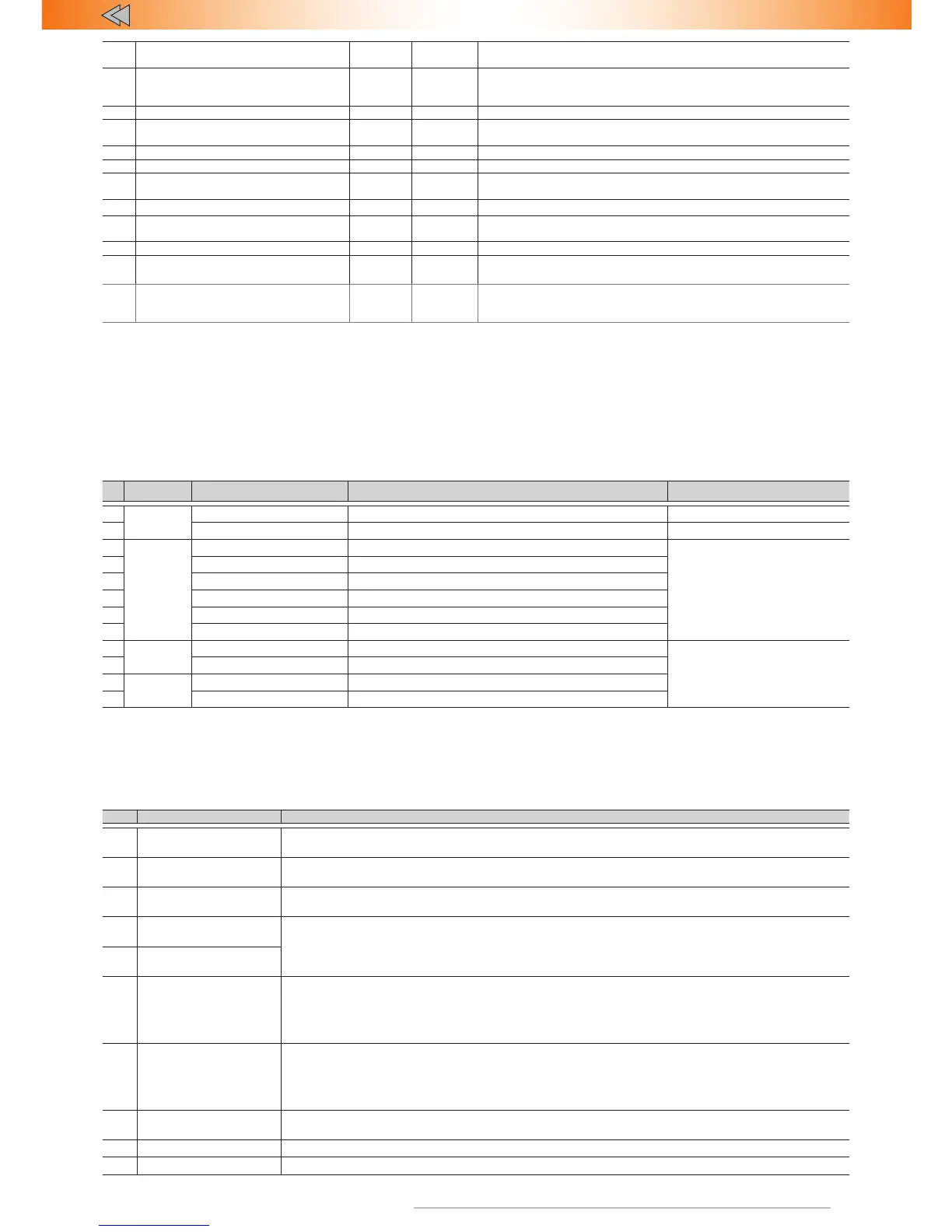
1-6 3 1 – 10 с; ... 3 – 30 с; ... 6 – 60 с
8 Optional sensors multiplex mode 1-2 1
1 – multiplex operating mode of external sensors
2 – standard (sensor has 2 outputs for warning and trigger ) operating
mode of external sensors
9 – – – –
10
Connection check between main
unit and relay (only for TEC-720)
– – Required to perform after installation of the Alarm and relay
11 – – – –
12 – – – –
13 Parking system activation algorithm 1-3 1
1 – not in use; 2 – RFID check when disarming; 3 – stock
remote lock; 4 – stock remote lock in high risk locations
14 Parking system button – – Any avaliable button can be used (CAN, digital or analogue)
15 Speed control (except TEC-700) 1-2 1
1 – enabled; 2 – disabled. Engine lock algorithm
for PINTODrive® and AntiHiJack
16 – – – –
17 Alert delay if perimeter was breached 1-5 1 1 – disabled; 2 - 0.5s; 3 – 1.0-s; 4 – 2.0s; 5 – 3.0s;
18 Engine lock via CAN 1-2 2
1 – enabled; 2 – disabled. If feature is enabled and supported by the
vehicle(check Integrator) - engine can be locked via CAN bus (without
additional connections)
Option #13.
"Parking system operation algorithm":
• "Activation by reverse gear". Front and rear parking sensors are
switched on when gearbox is in R position or by using a control
button. They are switched off when the speed exceeds 15 km/h
or by using the parking system control button
• "Activation by speed". Front parking sensors are switched on if
the vehicle speed is under 15 km/h. Rear parking sensors are
switched on if the vehicle moves backwards with a speed under 15
km/h. In this mode all parking sensors can be disabled by using a
control button until the next ignition sequence or command from
a control button
• "Activation by reverse gear with a shutdown override". Here
algorithm is similar to "Activation by reverse gear". However, when
parking sensors are disabled by using a control button, they will
not be activated when gearbox is in R position up to the next
ignition or command from a control button..
Menu 1.2. Programmable Inputs/Outputs configuration
#
Connector Option
Factory default
Range
1
16-pin
Output #11 (+/-) Turn signals alternate control 1-27
2 Output #11 polarity Negative polarity(LED off) –
3
8-pin
Output #3 (-) 24 – Starter and diagnostic bus lock
1-27
(Functions of programmable
outputs)
4 Output #4 (-) 23 – Timer channel («Comfort»)
5 Output #5 (-)
17 – Front parking sensors control
6 Output #6 (-) 18 – Rear parking sensors control
7 Output #7 (-) 25 – Impulse to close hood lock
8 Output #8 (-)
4 – Impulse after authentication
9
16-pin
Input #5 (+) 1 – Stop signal control
1-10
(Functions of
programmable inputs)
10 Input #13 (-) 2 – Hood position state
11
8-pin
Input #1 (-) 7 – Alert delay if trunk was opened
12 Input #2 (+) 7 – Alert delay if trunk was opened
Options ##1, 3-8.
Used to make a custom output configuration by
assigning one of the 27 functions to any output.
Option #2.
Polarity can be set only of this input has one of the 27
functions assigned.
Options #9-12.
Used to make a custom input configuration by assigning
one of the 10 functions to any input.
Table 4. Programmable inputs options
# Name Note
1 Brake lights state
This function is used only if the vehicle CAN bus does not contain brake pedal position data. In this case brake
light control input is to be connected with brake pedal end switch output.
2 Hood position state
This function is used if the vehicle CAN bus does not contain hood position data. In this case hood control is
to be connected with hood end switch.
3 Door state
This function is used in exceptional cases, when CAN bus does not contain door position data (please,
check Integrator).
4
Central Lock is
closed (status)
This function is used in exceptional cases, when CAN bus does not contain Central Lock status (please
see the Integrator files).
5
Central Lock is
open (status)
6 Ignition
The function is used only in cases when the correct data from CAN bus is not available. This situation may
occur when some circuits of the vehicle are blocked. In this case the Ignition control input has to be connected
to the vehicles wire that has a constant level signal when the ignition is on. Connecting this input wil not cancel
ignition analysis via CAN bus. The ignition is assumed to be on when data is received by any channel(CAN
bus or analog input).
7 Trunk state control
The function is used in case an alarm is triggered when the trunk is opened via original remote control and/
or keyless access system. In this case Trunk opening control input is to be connected to trunk opening feed
control wire. Input control is available only in Security mode. When a command to open the trunk is detected,
the Alarm ignores external sensor inputs and trunk terminal switch for 5 seconds until the actual opening of
the trunk. In 5 seconds after the trunk lid has been closed, sensor inputs and the trunk will be secured
8 Parking system button
The function controls parking sensors by using accessory button (this may be required if there are no buttons
in the vehicle detected by CAN bus)
9 Wake CAN bus This function is used in exceptional cases (please check Integrator).
10 – –



 To Next Page