4. DIP SWITCH FUNCTION
EO18-13004
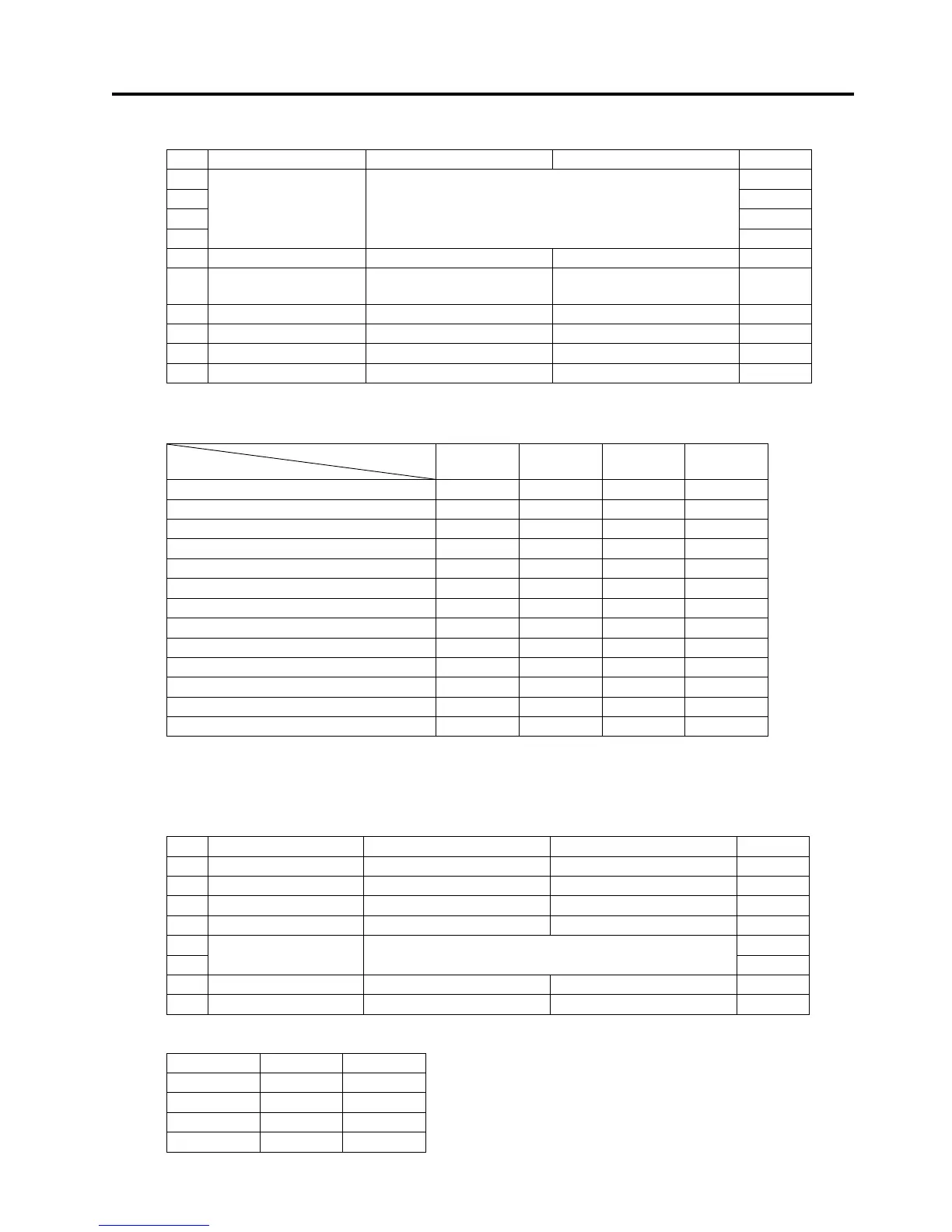
4.1 DIP Switch
4- 2
4.1.2 DIP Switch 2
No. Function ON OFF Default
2-1 OFF
2-2 OFF
2-3 OFF
2-4
International
characters
See table below.
OFF
2-5 JIS/Shift JIS
(NOTE)
Shift JIS JIS OFF
2-6
Handshake
(condition for BUSY)
Receive buffer full
Off-line
Receive buffer full
OFF
2-7 Reserved ---- ---- OFF
2-8 Reserved ---- ---- OFF
2-9 Reserved ---- ---- OFF
2-10 Data receive error Ignored “?” is printed. OFF
NOTE:
Available for the Japan model.
International character selection
No.
Character
2-1 2-2 2-3 2-4
Code 437 (USA, Standard Europe) OFF OFF OFF OFF
Katakana ON OFF OFF OFF
Code850 (Multilingual) OFF ON OFF OFF
Code860 (Portuguese) ON ON OFF OFF
Code863 (Canadian-French) OFF OFF ON OFF
Code865 (Nordic) ON OFF ON OFF
Code852 (Slavic) OFF ON ON OFF
Code866 (Russia) ON ON ON OFF
Code857 (Turkey) OFF OFF OFF ON
Windows code ON OFF OFF ON
Undefined --- --- --- ---
Undefined --- --- --- ---
Blank page ON ON ON ON
NOTE:
The blank page is the area for users’ use. The default for the blank page is blank
(space). When selecting “Katakana”, the character set becomes Japanese. Other
selections become U.S.A.
4.1.3 DIP Switch 3 (Serial Interface only)
No. Function ON OFF Default
3-1 Bit length 7 bit 8 bit OFF
3-2 Parity check Enable Disable OFF
3-3 Select parity Even Odd OFF
3-4 Handshake XON/XOFF DTR/DSR OFF
3-5 ON
3-6
Baud rate See table below.
OFF
3-7 DSR Reset DSR OFF
3-8 INIT Reset ---- OFF
Baud rate selection
Baud rate 3-5 3-6
4800 OFF OFF
9600 ON OFF
19200 OFF ON
38400 ON ON


 To Next Page