UK
20
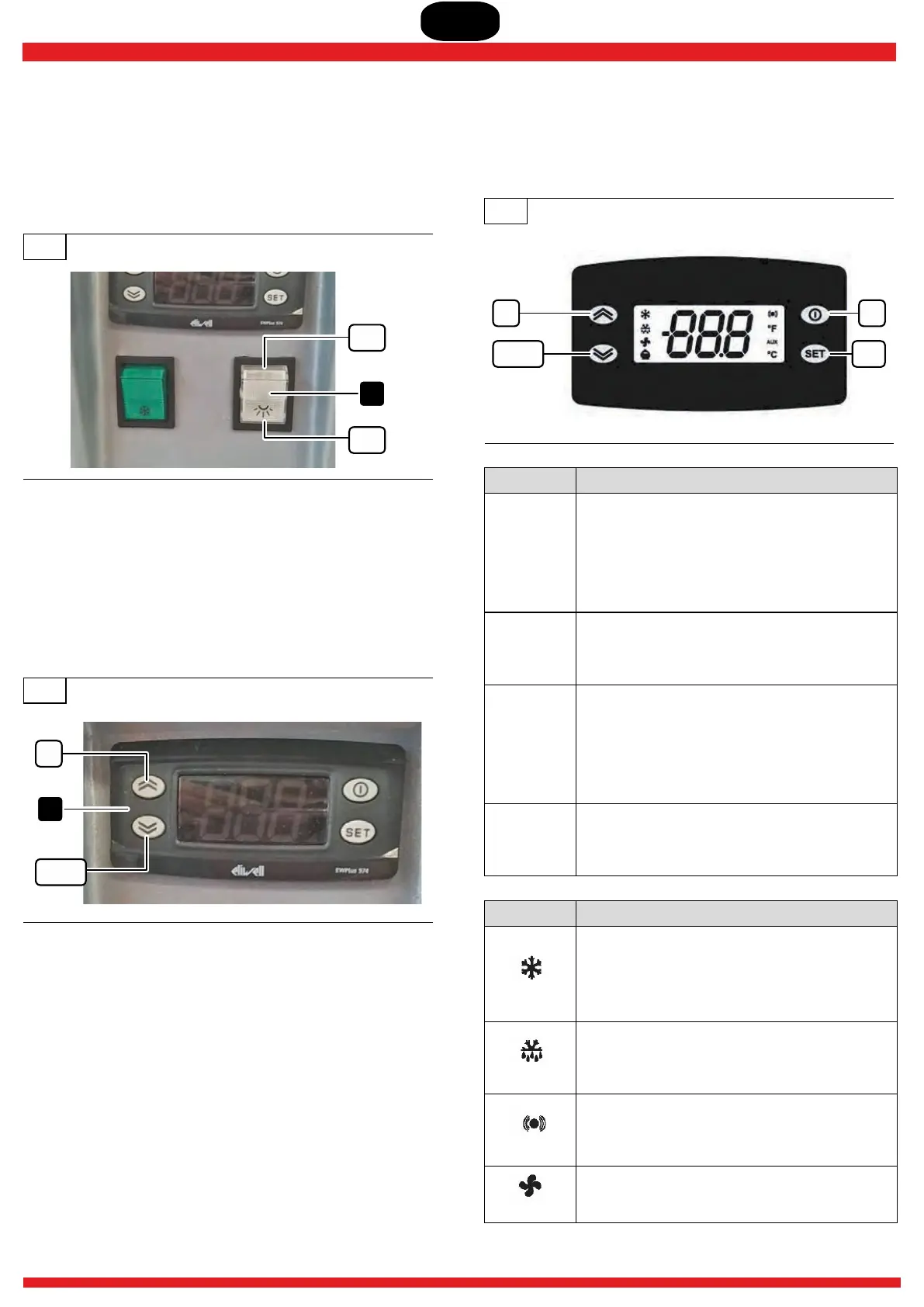
6.4.2 Switching the display compartment
light on and off
▶ Set switch 7.3 to ON and it will turn white. The light inside
the display compartment lights up.
▶ To turn off the light, set the same switch to OFF.
29
7.3
ON
OFF
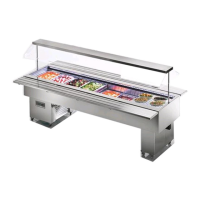
6.4.3 Using the switchboard
The control switchboard 7.1 is supplied with a standard setting
established by the manufacturer. However, the operator can
intervene on the switchboard to vary the temperature inside the
display section and to perform additional defrosting.
30
UP
DOWN
7.1
1) SETTING OF THE EXERCISE TEMPERATURE
▶ Press the SET button: the writing “SET” appears.
▶ To visualise the value of the SETPOINT press the SET
button again. The value of the SETPOINT appears on the
display.
▶ To vary the value of the SETPOINT, operate within 15
seconds, on the “ ” and “ ” buttons.UP DOWN
2) MANUAL ACTIVATION FOR DEFROSTING
The manual activation of the defrosting cycle is obtained by
pressing the “ UP ” button for 5 seconds. lf there are not the
correct conditions for defrosting, (for example the temperature
of the evaporator probe is higher than the temperature at the
end of defrosting), the display will flash 3 times, to signal that
the operation will not be carried out.
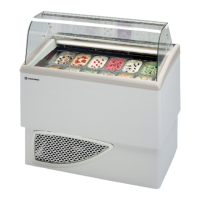
Quick guide for the control unit
31
UP fnc
SETDOWN
BUTTON ACTION
UP
Press and release:
▶ Runs through the menu
▶ Increases the values
Press for at least 5 sec:
▶ Activates manual defrosting
DOWN
Press and release:
▶ Runs through the menu
▶ Decreases the values
fnc
Press and release:
▶ Returns to the previous menu level
▶ Confirms parameter value
Press for at least 5 sec:
▶ Activates the Standby function
SET
Press and release:
▶ Visualises the alarms
▶ Visualises the Setpoint
LED ACTION
Compressor
Permanently on: compressor active.
Flashing: a delay, a protection or a locked
start-up.
Off: otherwise.
Defrost
Permanently on: defrost active.
Flashing: manual or D.I. activation.
Off: otherwise.
Alarm
Permanently on: alarm active.
Flashing: alarm acknowledged.
Off: otherwise.
Fans
Permanently on: fans active.
Off: otherwise.


 To Next Page