75
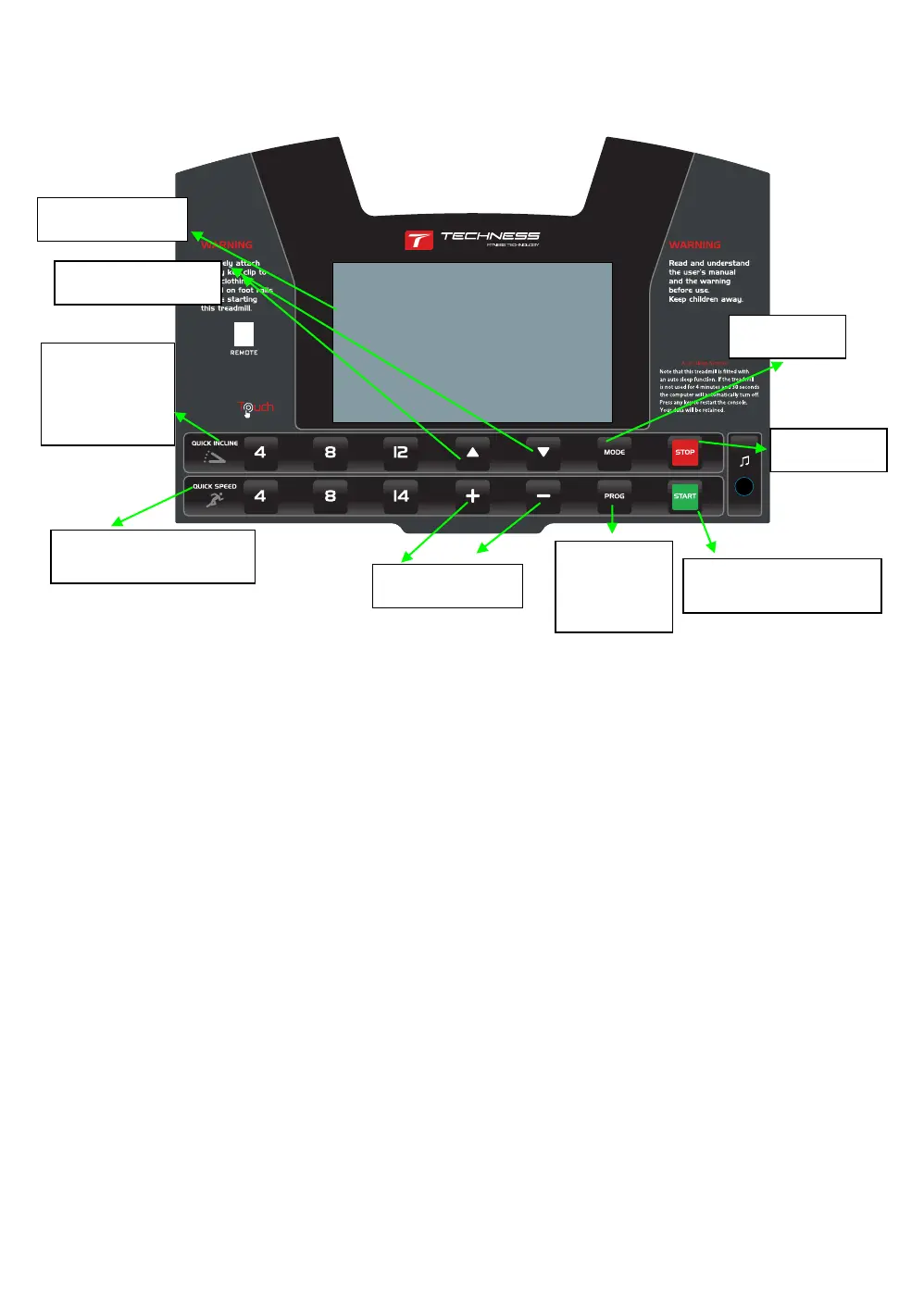
Key Definition
(Ⅰ):Computer function Instruction:
1.1: P0: USER training program; P1-P26 the preset auto programs.
1.2: LCD
display window and 14 keys
1.3: Speed Range: 1.0-16.0km/h
1.4: Incline
Range: 0-12%
1.5: Prevent over loading, over voltage, explosion proof,
anti speed
and electromagnetic
interference
1.6:
Self check
and warning sound function.
1.7: Infrared remote control
function.
1.8: Touch screen with 6 keys
(Ⅱ): LCD
window instruction:
2.1: “SPEED”
window:
When the treadmill
powers up, the time display window will show
“5-4-3-2-1” countdown. Then it will
display the
speed
numerical value and the value F1-F5
when under the body fat test program. Or the ERR message when treadmill is faulty.
2.2:
“TIME”
window: Displays the time numerical value
Program
key
Start key
Start key
QUICK
INCLINE KEY
SPEED”+””-“
QUICK
SPEED KEY
LCD Window
INCLINE”+””-“
Mode key
2.3: “DISTANCE” window: Displays the version no. “U1.0” when power on. And then displays
the distance numerical value.
2.4: “CALORIES” window: Displays the calories numerical value, the value when under the


 To Next Page