EasyManua.ls Logo

Technics SC-CH700 - CCRT Recording Function Details

Technics SC-CH700
80 pages
Print Icon
To Next Page IconTo Next Page
To Previous Page IconTo Previous Page
Loading...
Making
a
Recording
(continued)
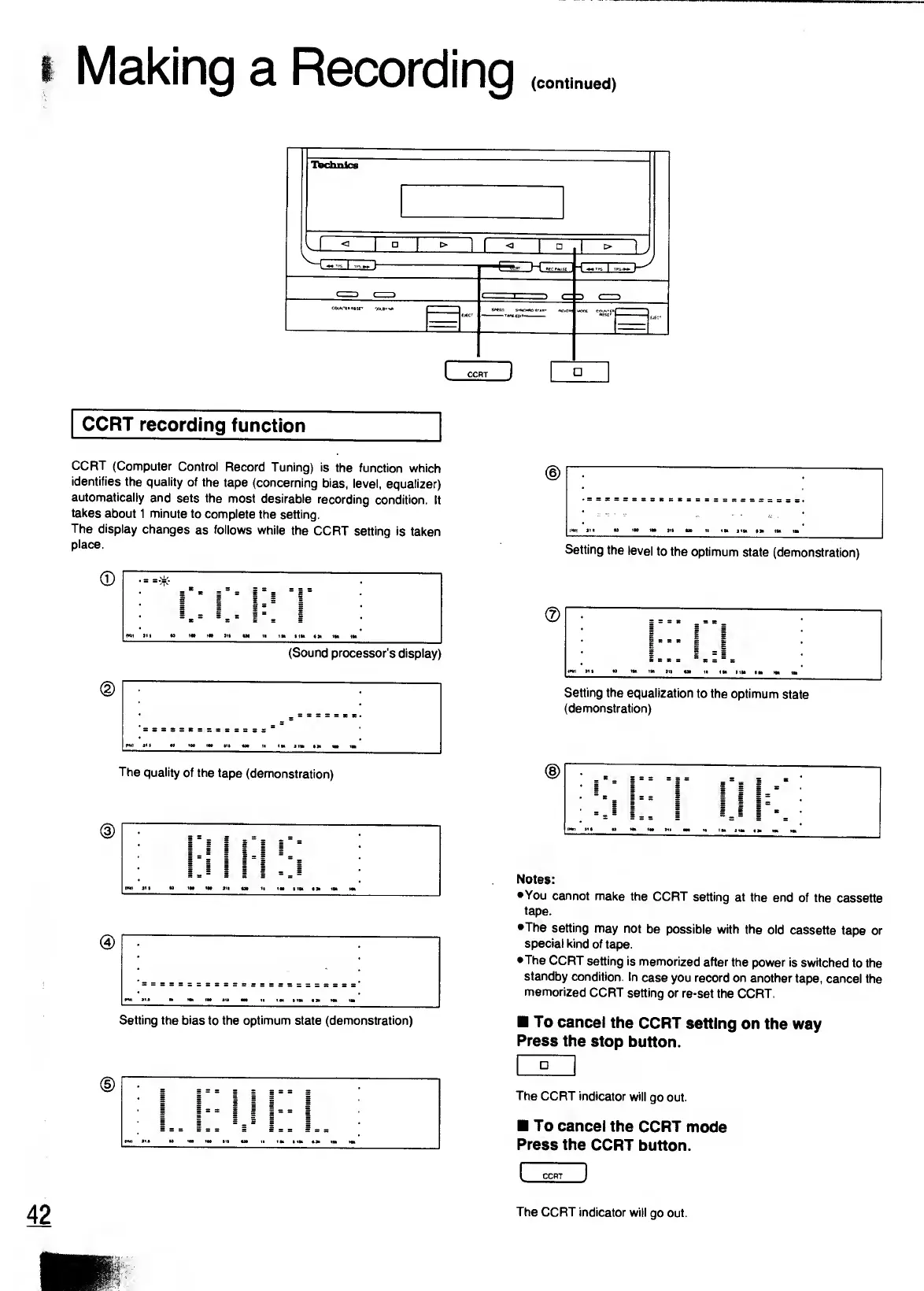
CCRT
recording
function
_
CCRT
(Computer
Control
Record
Tuning)
is
the
function
which
identifies
the
quality
of
the
tape
(concerning
bias,
level,
equalizer)
automatically
and
sets
the
most
desirable
recording
condition.
It
takes
about
1
minute
to
complete
the
setting.
The
display
changes
as
follows
while
the
CCRT
setting
is
taken
place.
(D
The
quality
of
the
tape
(demonstration)
@
Setting
the
bias
to
the
optimum
state
(demonstration)
(D
(D
Setting
the
level
to
the
optimum
state
(demonstration)
Setting
the
equalization
to
the
optimum
state
(demonstration)
Notes:
•You
cannot
make
the
CCRT
setting
at
the
end
of
the
cassette
tape.
•The
setting
may
not
be
possible
with
the
old
cassette
tape
or
special
kind
of
tape.
•The
CCRT
setting
is
memorized
after
the
power
is
switched
to
the
standby
condition.
In
case
you
record
on
another
tape,
cancel
the
memorized
CCRT
setting
or
re-set
the
CCRT.
To
cancel
the
CCRT
setting
on
the
way
Press
the
stop
button.
The
CCRT
indicator
will
go
out.
To
cancel
the
CCRT
mode
Press
the
CCRT
button.
The
CCRT
indicator
will
go
out.

Related product manuals