21
RQT5744
Recording operations
Recording CDs
This function makes it easier for you to record from a disc.
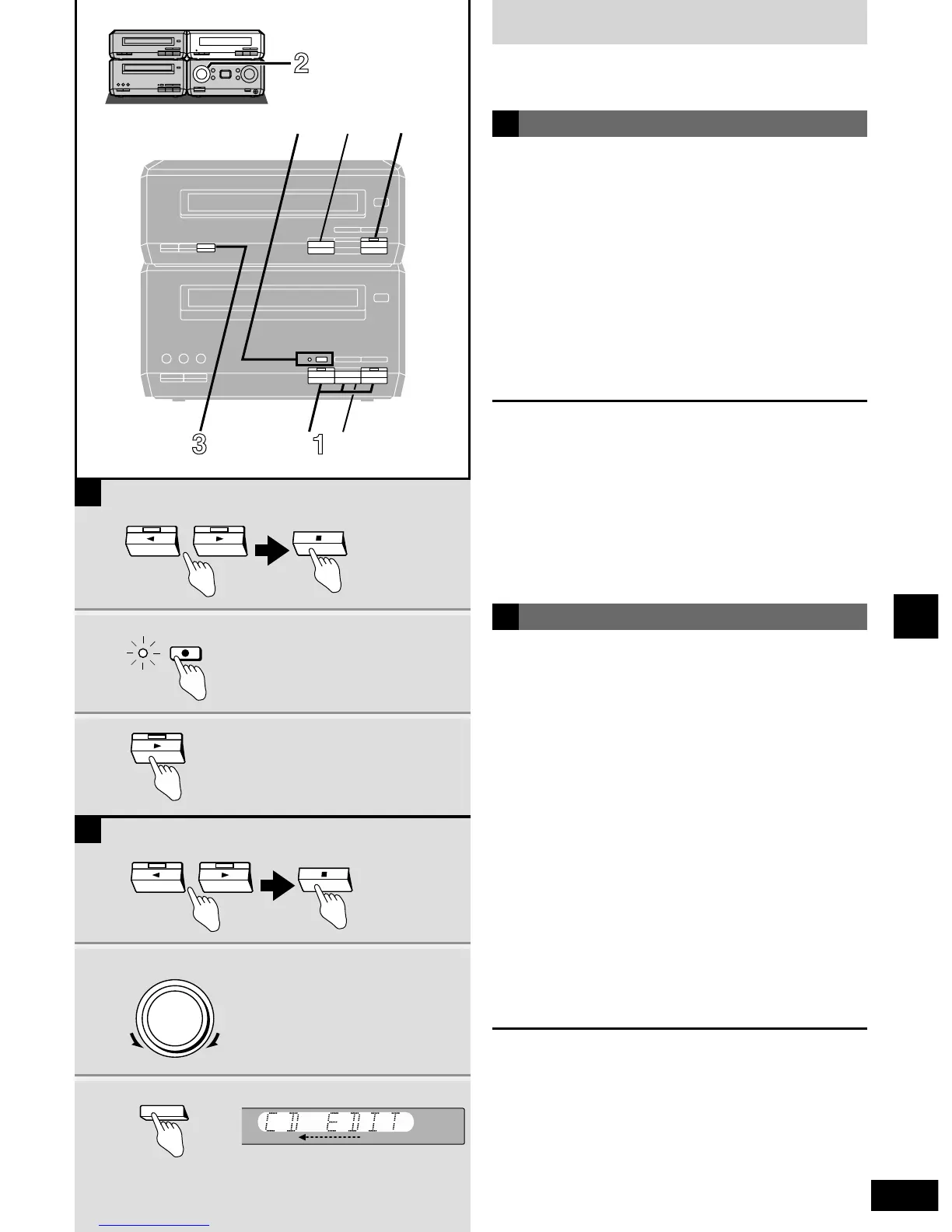
11 Press [w ] or [ q] and then [ g ] to set
the tape direction.
q : to record on the forward side
w : to record on the reverse side
When you select “q”, set the reverse mode to “/”. Now, if a
track is cut off at the end of the forward side, it is re-recorded
on the reverse side.
¡At the end of the reverse side, recording stops and the
current track will be interrupted.
22 Turn [INPUT SELECTOR] to select CD
mode.
33 Press [EDIT].
Recording starts and “CD EDIT” scrolls across the display.
After edit-recording has finished
The cassette deck automatically stops.
To stop editing
Press [ g ] on the deck or the CD player.
“EDIT OUT” is displayed and both sections stop.
Editing programmed tracks
Program the tracks (
a
steps 1 and 2, page 18) before step 3.
CD editing
1
1 Press [w ] or [ q] then [ g ] to set the
tape direction.
q : to record on the forward side
w : to record on the reverse side
2 Press [* REC PAUSE].
The deck goes into the recording standby mode, [* REC
PAUSE] indicator lights and the play indicator starts flashing.
3 Press [ q] on the CD player.
Recording starts automatically.
Four seconds after the CD finishes, the deck goes into the
recording standby mode.
To stop recording
EITHER
Press [ g ] on the CD player.
The deck goes into the recording standby mode four seconds later.
OR
Press [ g ] on the deck.
Recording stops immediately but the CD continues to play.
To record programmed tracks
Program tracks before step 2 (
a
steps 1 and 2, page 18).
Preparation: Do the preparatory steps (
a
page 19).
Insert a CD (
a
page 16).
Normal recording
A
B



 To Next Page