EasyManua.ls Logo

Technics SE-A1010 - Page 7

Technics SE-A1010
20 pages
To Next Page IconTo Next Page
To Previous Page IconTo Previous Page
Loading...
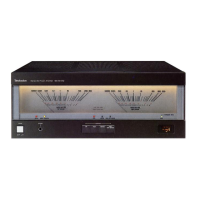
Names
of
parts
NU
SS
\
\
it
i
VULA
NZ
NN
\
ili
|
i
MME
No.
Name
(D
Unit
on/off
poon
(POWER)
and
remote
standby
indicator
(CD)
Use
this
button
to
turn
the
unit
on
and
off.
(off):
The
unit
is
in
standby
mode.
=
(on):
The
unit
is
on.
The
unit
can
be
turned
on
and
off
from
the
Technics
control
amplifier
SU-C1010
{sold
separately).
When
the
unit
is
turned
off
from
SU-C1010,
it
is
in
remote
standby
and
the
indicator
lights.
The
unit
is
still
using
a
small
amount
of
power
in
the
standby
and
remote
standby
conditions.
Standby
uses
less
power.
@
Operation
indicator
(OPERATION)
This
indicator
illuminates
when
the
power
amplifier
is
in
the
normal
operating
condition.
If
the
(+)
and
{-)
wires
of
the
speaker
cables
are
shorted,
or
if
a
circuit
abnormality
such
as
DC
voltage
in
the
power
output
to
the
speakers
is
detected,
the
protection
circuit
will
operate
and
the
“OPERATION?”
indicator
will
turn
off.
@
Headphone
jack
(PHONES)
No.
Name
@
Power
meters
Indicate
the
output
(watts)
of
this
unit.
When
speakers
having
an
impedance
of
8
9
are
connected,
the
output
level
will
be
as
indicated.
However,
if
the
speaker
impedance
is
4
Q,
the
output
level
will
be
double
the
indicated
value.
Actual
_
meter
8
(Q)
p
impedance
of
the
speakers
(Q)
output
indication
©)
Power
meter
light
button
(METER
LIGHT)
©
Speaker
select
buttons/indicators
(SPEAKERS)
®©
Cooling
fan
The
cooling
fan
operates
at
high
power
output
levels
only.
Before
use
U
RQT5006

Other manuals for Technics SE-A1010

Related product manuals